Changing Line Schedules
Line Utilization Maintenance (33.15.9) helps you balance the operations plan against available line capacity. You can view and change scheduled production in either hours or quantities. As you make changes, the screen recalculates coverage, capacity, and utilization.
The program includes three screens:
• In the selection screen, you specify the production line and first item and planning week to review.
• In the summary screen, you can review and adjust production schedules for multiple items.
• In the detail screen, you can view additional global plan information on the selected item, as well as adjust production.
Selection Screen
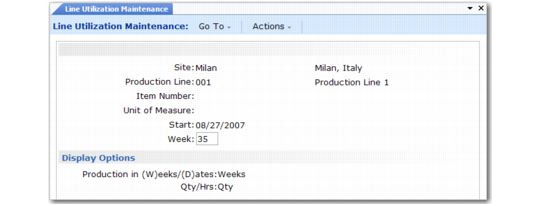
Line Utilization Maintenance (33.15.9), Selection Screen
Site
Enter the supply site code.
Production Line
Enter the code of the production line with production quantities you want to view or update.
Item Number
Enter the end-item number, or leave this field blank to choose all items on the line.
UM
Enter the unit of measure for viewing and changing item quantities. The default unit of measure is the one from the item master record.
Start
Enter the start date for the first calendar week or financial period. The default start date is the system date. If the date you enter is not the Monday of the week or the first day of the period, the system changes it.
Week
Enter the number of the planning week.
Production in Weeks/Dates
Enter W to view production by weeks. Enter D to view production by the Monday date of the week. This option determines the headings in the item summary and item detail screens.
Production in Qty/Hrs
Enter Q to update production quantities. Enter H to update production hours. You can change this option in the item summary and item detail screens.
To move to the summary screen, click Next once. To move to the detail screen, click Next twice.
Item Summary Screen
Navigating in the Item Summary Screen
Action | Navigation Commands |
Switch between production quantities and production hours | Change Qty/Hrs field |
Move between item numbers | Page Up or Page Down |
Access scheduled line production fields | Enter from Qty/Hrs field |
Choose a group of weeks to display | Next, Previous, or Tab |
Save and return to Item Number field | Go or Enter from last displayed line production field |
Move between line production fields without saving | Next or Previous |
Display columns for next four weeks | Tab |
Move to item detail screen | Click Next twice from Item Number field |
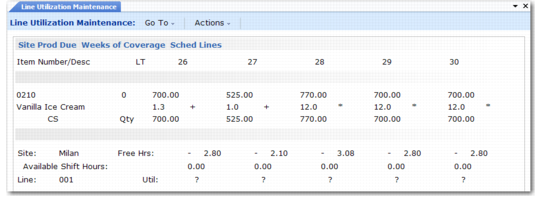
Line Utilization Maintenance, Item Summary Screen
Item Number
Enter the end-item number.
Qty/Hrs
Enter Q to update production quantities. Enter H to update production hours. Afterward, press Enter to access the production schedule fields. Or, click Next to move on to the item detail screen.
LT
The screen displays the item-site’s lead time (safety, inspection, purchasing, and manufacturing), which the initial plan calculation used to set production release dates.
Site Production Due
The screen displays the item’s production due quantity for the supply site. The system calculates production due as:
[(Sales Forecast + Target Inventory) – Previous Week’s Projected QOH]
For the first week, the previous projected QOH equals the opening QOH. When you change site production due, the system recalculates projected quantity on hand, weeks of coverage, free/available shift hours, and utilization.
Weeks of Coverage
The screen initially displays the item’s average weeks-of-coverage factor. When you change production due, the system recalculates this, using the item’s minimum and maximum coverage factors to project inventory shortages (–) and surpluses (+) relative to the average weeks of coverage. An asterisk (*) indicates that projected coverage satisfies the maximum coverage requirement specified in Operations Plan Control (33.1.24).
Sched Line Production
The screen displays production hours or production quantities for the item and line, depending on how you set the Qty/Hrs field. When you change scheduled line production, the screen recalculates free hours, available shift hours, and line utilization.
Site
The screen displays the site code for the production line and item.
Free Hrs
The screen displays the number of shift hours not yet allocated to production. The system calculates free hours as:
(Available Shift Hours – Projected Production Hours)
Available Shift Hours
The screen displays the number of weekly shift hours available for production. The system calculates shift hours based on holidays from Holiday Maintenance (36.2.1) and the shift calendar from Shift Maintenance (18.1.22) or shop calendar from Calendar Maintenance (36.2.5).
Line
The screen displays the production line code.
Util
The screen displays the total line utilization percentage or projected consumption of available production line capacity. The line utilization percentage is:
Line Production Due Qty ÷ Weekly Line Capacity
Line capacity is:
Available Shift Hours * Line Production Rate
From the Site Production Due field, click Next or press Enter to save your changes and return to the Item Number field.
Item Detail Screen
Navigation in this screen is much the same as in the item summary screen.
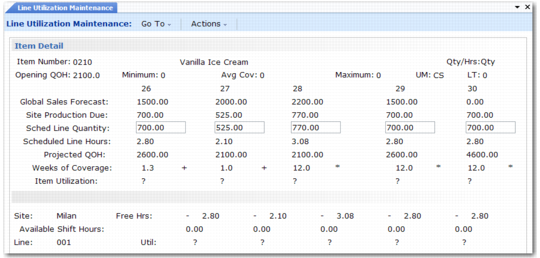
Line Utilization Maintenance, Item Detail Screen
Item Number
Enter the end-item number.
Qty/Hrs
Enter Q to update production quantities. Enter H to update production hours. Afterward, press Enter to access the production schedule fields. Or, click Next to move on to the item detail screen.
Opening QOH
The item’s opening on-hand inventory balance.
Min Wks
The item’s minimum weeks-of-coverage factor from Coverage by Date Maintenance (33.5.5), if any, or from Weeks of Coverage Maintenance (33.5.1). The system uses this factor to calculate projected inventory shortages.
Avg Wks
The item’s average weeks-of-coverage factor from Coverage by Date Maintenance (33.5.5), if any, or from Weeks of Coverage Maintenance (33.5.1).
Max Wks
The item’s maximum weeks-of-coverage factor from Coverage by Date Maintenance (33.5.5), if any, or from Weeks of Coverage Maintenance (33.5.1). The system uses this factor to calculate projected inventory surpluses.
UM
The inventory unit of measure from the item master record.
LT
The item-site’s lead time (safety, inspection, purchasing, and manufacturing), which the initial plan calculation used to set production release dates.
Global Sales Forecast
The item’s consolidated demand from all marketing sites. These global sales forecasts can originate from either end-item sales forecasts or dependent end-item demand calculated by Family Plan Explosion (33.7.14).
Site Production Due
The item’s production due quantity for the supply site. The system calculates production due as:
(Sales Forecast + Target Inventory) – Previous Week’s Projected QOH
For the first week, the previous projected QOH equals the opening QOH. When you change site production due, the system recalculates projected quantity on hand, weeks of coverage, free/available shift hours, and utilization.
Sched Line Quantity
The item quantity scheduled for the production line for the week or Monday date. The system calculates the line production due using the percentages defined in Line Allocation Maintenance (33.5.17). To update this field, set Qty/Hrs to Qty. When you change the quantity, the system recalculates the global projected quantity on hand, weeks of coverage, item and line utilization, available shift hours and free hours.
Scheduled Line Hours
The number of production hours scheduled for the production line for the week or Monday date. The system calculates projected production hours as:
Line Production Due Quantity ÷ Hourly Line Production Rate
Hourly line production rates are defined in Production Line Maintenance (18.1.1). To update this field, set Qty/Hrs to Hrs. When you change the hours, the system recalculates the global projected quantity on hand, weeks of coverage, item and line utilization, available shift hours and free hours.
Projected QOH
The item’s global projected on-hand inventory quantity. The system calculates projected quantity on hand as:
(Previous Week’s Projected QOH + Production Due) – Sales Forecast
For the first week, the projected QOH is the opening QOH.
Weeks of Coverage
The screen initially displays the item’s average weeks-of-coverage factor. When you change production due, the system recalculates this, using the item’s minimum and maximum coverage factors to project inventory shortages (–) and surpluses (+) relative to the average weeks of coverage. An asterisk (*) indicates that projected coverage satisfies the maximum coverage requirement specified in Operations Plan Control (33.1.24).
Item Utilization
The percentage of total available line capacity currently utilized by this item. The system recalculates this if you change Sched Line Qty or Sched Line Hrs.
Site
The site code for the production line and item.
Free Hrs
The number of shift hours not yet allocated to production. The system calculates free hours as:
Available Shift Hours – Projected Production Hours
Available Shift Hours
The number of weekly shift hours available for production. The system calculates shift hours based on holidays from Holiday Maintenance (36.2.1) and the shift calendar from Shift Maintenance (18.1.22) or shop calendar from Calendar Maintenance (36.2.5).
Line
The production line code.
Util
The total line utilization percentage or projected consumption of available production line capacity. The line utilization percentage is:
Line Production Due Qty ÷ Weekly Line Capacity
Line capacity is:
Available Shift Hours * Line Production Rate
From any scheduled line field, click Next or Enter to save your changes and return to the item summary screen.