Creating Distribution Orders
Use Distribution Order Maintenance (12.17.14) to reference one or more intersite requests in preparation for picking and shipping items to another site.
A distribution order is typically a response to demand generated at the receiving site. However, you can also create an intersite request (representing demand) as part of Distribution Order Maintenance.
Note: In a multiple-database environment, the shipping site must be actively connected to the receiving site database to enter a distribution order.
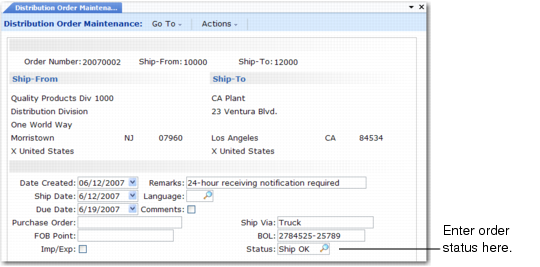
Distribution Order Maintenance (12.17.14) illustrates the header of Distribution Order Maintenance.
Distribution Order Maintenance (12.17.14)
The DO header includes the supply site, the ship-to site, and other general order information. You can enter a user-defined status for the order in the Order Status field. This field is for reference only and does not affect order processing.
Order status displays on selected reports including Distribution Order Print (12.17.18), Distribution Order Picklist Print (12.17.19), and DO Shipment Reconciliation (12.17.17).
Any comments you add at the time you create the distribution order print on Distribution Order Report (12.17.16), Distribution Order Print (12.17.18), and Distribution Order Picklist Print (12.17.19).
If the sites involved in DRP are located in different countries that belong to the European Union, you can generate Intrastat data by setting the Import/Export field to Yes. See User Guide: QAD Intrastat for details.
Note: If you are using the Logistics Accounting module, a frame for input of freight data displays. Based on the freight terms you specify, another frame may display for input of the code identifying the associated logistics supplier.