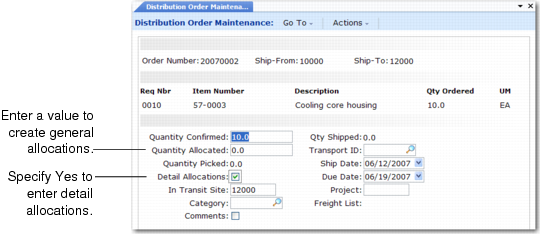
Creating General Allocations
You can create general or detail allocations in Distribution Order Maintenance for items on associated intersite requests. You can also specify a quantity picked.
• General allocations reserve inventory quantity on hand.
• Detail allocations reserve items identified by site, location, lot/serial number, and lot reference number. Allocation details print on picklists, and display as the default on shipment transactions.
• Specifying a quantity picked prevents a picklist from being printed for the detail allocation.
Distribution Order Maintenance, Intersite Request Frame
Quantity Allocated
If you are creating a new intersite request, specify the quantity that the system should allocate for it. Specifying a quantity in this field creates general allocations. To create detail allocations, set Detail Allocations to Yes.
The sum of quantity shipped, quantity picked, and quantity allocated cannot be greater than quantity confirmed. Access to this field can be restricted through security.
You can print picklists based on the quantity allocated.
Detail Allocations
Enter Yes to display an additional pop-up for specifying allocation details. This field defaults to No, unless detail allocation records already exist. In this case, the default is Yes.
If there is an unallocated confirmed quantity for this intersite request, the system automatically detail allocates from the available and unallocated quantity on hand.