Distribution Order Workbench
Distribution Order Workbench (12.17.13) lets the shipping site group intersite requests and issue distribution orders based on the group. Use this when attaching an intersite demand to a distribution order is impractical. The workbench is a combination of the intersite demand and intersite order programs.
The workbench process has three steps:
• You define selection criteria to group outstanding intersite requests.
• The system creates a distribution order to satisfy these requests.
• The system determines which of the requests will be filled on the generated order.
Grouping Intersite Requests
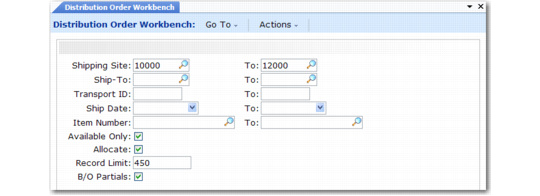
In the first step, specify selection criteria for listing requests, based on shipping site, ship-to site, transportation mode, ship date, and item number.
Distribution Order Workbench (12.17.13)
The ship date limits the display to requests with ship dates before the specified date. If Available Only is Yes, selection stops when inventory is exhausted. If Allocate is Yes, the workbench makes detail allocations when unallocated inventory exists and the intersite request is not fully allocated.
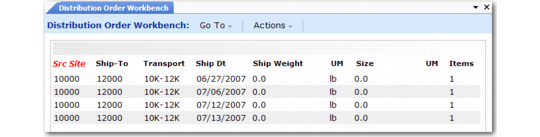
The next frame displays intersite requests matching the selection criteria. Requests are sorted first by ship-to site, then by transport mode, and finally by ship date.
Distribution Order Workbench (12.17.13)
The system selects all requests that share the same shipping site, ship-to site, and transportation mode. To select different requests, change the selection criteria or edit the selections after they are made.