Using Distribution Order Processing
Use Distribution Order Processing (12.17.21) to access the features and frames of Distribution Order Maintenance and Distribution Order Shipments sequentially from one menu item. Distribution Order Processing supports creating and shipping orders through background processes such as CIM files or QXtend application program interfaces (APIs).
For details about these processes, see:
• The chapter on the CIM Interface in User Guide: QAD System Administration
• Technical Reference: QAD QXtend
You can also use Distribution Order Processing when creating and shipping distribution orders interactively to streamline these activities.
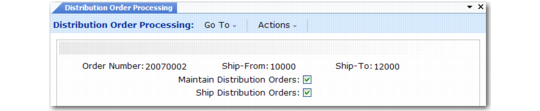
Distribution Order Processing (12.17.21) illustrates the header frame of Distribution Order Processing. The other frames that display in this program are exactly the same as those in the two related programs.
Distribution Order Processing (12.17.21)
Enter a number identifying a new or existing distribution order. To specify a new number, Maintain Distribution Orders must be Yes. Specify the ship-from and ship-to sites and then indicate processing options:
Note: One or both of these options must be set to Yes.
• When Maintain Distribution Orders is Yes, all of the frames that display in Distribution Order Maintenance display. This must be Yes when you specify a new order number.
• When Ship Distribution Orders is Yes, all of the frames that display in Distribution Order Shipments display. If Maintain Distribution Orders is also Yes, shipment frames follow the maintenance frames.