Receiving Distribution Orders
At the demand site, receive distribution order shipments with Distributed Order Receipt (12.15.20). This program:
• Records the receipt of items from distribution orders
• Transfers received items from an in-transit site and location to the site and location you specify
• Generates the appropriate transaction history and GL transaction records for each receipt
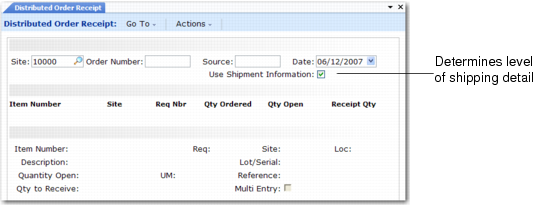
The Use Shipment Information field in Distributed Order Receipt controls the shipment detail the system uses during receipt. If Yes, the system uses full shipment detail for the default quantities and item detail being received. If No, it uses only the items and total quantities during receipt. This may be appropriate if you are entering data through CIM load.
See User Guide: QAD System Administration for information on CIM load.
Distributed Order Receipt (12.15.20)
When Use Shipment Information is Yes, all issue data for the order is loaded. The quantity to receive is set equal to the open quantity, and any item detail such as lot/serial numbers, reference numbers, or locations is preserved and appears in the multi-entry window. You can alter the receipt items, quantities, or item detail if necessary, or accept the entire shipment as the default receipt.
When detailed shipment data is no longer available, set Use Shipment Information to No. This is appropriate if a stocking software is used to receive the shipment and modified data is then CIM loaded. The Qty Ordered displays the shipped quantities, but quantity to receive is set to zero.
Using CIM load for Distributed Order Receipt, you can receive a number of items for any quantity in a single transaction as long as those items do not have lot/serial, location, or reference detail. When CIM loading multi-lot/serial, location, or reference items, you can only receive a single lot/serial, location, or reference item per receipt transaction. If you attempt to receive the same item number again with unique detail, it overwrites the first receipt record.
When you receive the items, received item quantities and detail are checked against the shipment detail and, where a match exists, in-transit quantities are reduced. For any items that do not match—if you receive less, or use a different lot or serial number—the shipment detail is not decremented. You can see any remaining shipment detail for an order by reentering Distributed Order Receipt and setting Use Shipment Information to Yes. You should resolve these discrepancies and correct any errors using negative quantities.