DO Container Maintenance
Use DO Container Maintenance (12.19.7) to create containers and add items to containers. The site code and container number uniquely identify containers and their contents. You can manually assign container numbers or have the system automatically assign them.
You can grant or deny access to users when using a specific inventory movement code at a particular site. This is done through Inventory Movement Code Security (36.3.13.13). As a result, you can only edit a container associated with a shipment if a security record does not exist that denies access to the inventory movement code and ship-from site of the shipment.
See the shipping chapter of User Guide: QAD Sales.
DO Container Maintenance Key Frame
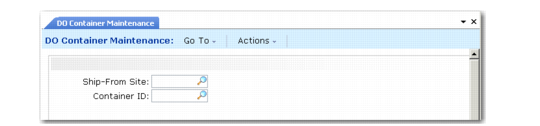
DO Container Maintenance (12.19.7), Site/Container Selection
Ship-From Site
Enter the site code from which this container is shipped.
Container ID
Enter a number identifying this container. Leave blank to create a new container.
Container Information Frame
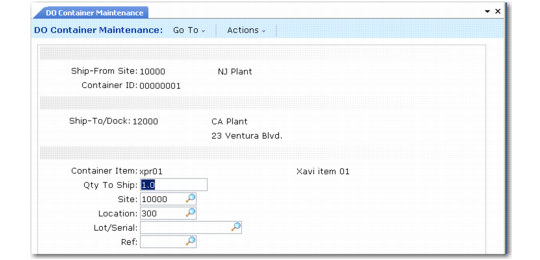
To create a container in DO Container Maintenance (12.19.7), first define its qualities such as quantity, site, and location (
DO Container Maintenance, Container Data).
DO Container Maintenance, Container Data
Container Item
Specify the item number of the container, defined in Item Master Maintenance (1.4.1); for example, the item number assigned to the pallet or shipping carton, packing material, and labels.
Quantity to Ship
Enter the quantity of the container item that this record represents; typically, the quantity is 1. If you are using many containers of the same item number, creating individual container records might be prohibitive. If so, Qty to Ship can be the quantity of all the containers, and contents registered with this record apply to the number of containers entered here.
Site
Specify the site code for this container item. When you specify a site that differs from the header ship-from site, auto-transfer from the inventory to the shipping site must be allowed. Otherwise, an error displays.
Location
Specify the location code for this container item.
Lot/Serial
Specify the lot/serial number for this container item.
Ref
Specify the reference number for this container item.
Container Frame
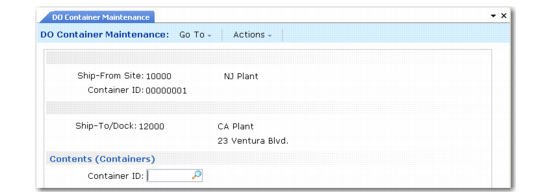
After you specify quantity, site, and location, and click Next, the system prompts you to enter a new or existing container item.
DO Container Maintenance, Container Frame
You can add or remove containers in this frame. To add a container:
1 In the Container ID field, enter an existing container number for the same ship-from and ship-to sites.
2 Press the insert/add command appropriate to your interface to add the container.
To remove a container:
1 In the Container ID field, enter the container number you want to delete or use the up and down arrows to navigate to the container number you want to remove.
2 Press the remove/delete command appropriate to your interface to remove the container.
3 You are prompted to confirm the deletion. Enter Yes to continue deleting, or No to cancel.
To delete an item from the container, specify a quantity of zero in the Item Information frame.
Item Information Frame
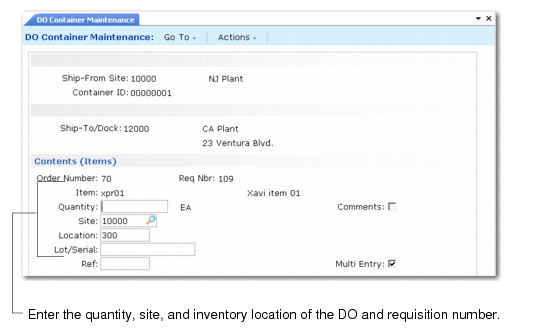
You enter information about the items within the container in the Item Information frame, shown in
DO Container Maintenance, Contents (Items) Frame.
DO Container Maintenance, Contents (Items) Frame
Order Number
Enter a number identifying a distribution order. The DO number, ship-from site, and ship-to site uniquely identify a specific order and its associated requisition number. Use the number to select specific information.
Req Number
Enter the ID of an existing requisition number linked to the DO number entered in the Order Number field. When you specify the distribution order and requisition number, the system fills in the item number.
Item
This field is display only. It shows the item number of the commodity, part, or product for the specified distribution order and requisition number.
Quantity
Specify the number of items to be added to the container.
Site
Specify the site code for this item number.
Location
Specify the location code to be assigned to the items you are adding to this container. Location defaults from Item-Site Inventory Data Maintenance (1.4.16) for the item and site; if a site-specific record does not exist, location defaults from Item Master Maintenance (1.4.1).
Lot/Serial
Specify the lot/serial number for this item number.
Reference
Specify the reference number for this item number.
Multi Entry
Enter Yes to enter different sites, locations, lot/serial numbers, and reference numbers for each item you are adding to this container, or No to assign the same values. If you are adding several items that include a lot or serial number to a container, enter Yes in the Multi Entry field.
Comments
This field specifies if comments can be associated with this line item on this container. Specify Yes to enter or edit transaction comments. The system prompts you for your comments. Enter No if you do not want to add or edit transaction comments.
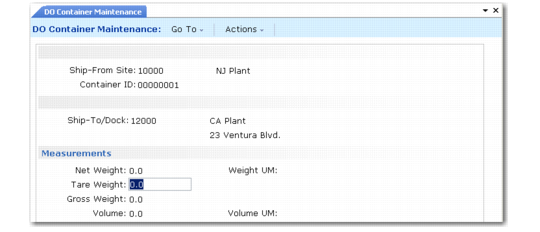
Measurements Frame
The Measurements frame shows you the container and item information you have entered.
DO Container Maintenance, Measurements shows the Measurements frame.
DO Container Maintenance, Measurements
Net Weight
The net weight of the container item before packing or loading defaults from the item master record.
Weight UM
The net weight unit of measure defined in the item master record of this container item number.
Tare Weight
Enter the weight that is the difference between the product item ship weight and net weight. The system may modify this value because some container item weights may vary. If you pack this container in another container, any change in weight due to change in container contents or manual modification is made to the weight of the parent container.
Gross Weight
Specify the sum of the net weight of the container item number plus the net weight of the item numbers added to the container. For product items, it is the net weight of the product item.
Volume
The volume of the container item before packing or loading defaults from the item master record.
Volume UM
The volume unit of measure defined in the item master record of this container item.