Overview
A pre-shipper is a document used to select containers and product inventory for shipment. When you select products and containers on pre-shippers, the inventory for those items can be picked, if it has not been already. Pre-shippers are similar to distribution order picklists and can be printed in DO Pre-Shipper/Shipper Print (12.19.11).
A shipper is a document accompanying the shipment as a record of what is included. You can send a shipper electronically as an advance ship notice (ASN) when the shipment leaves your dock or send it with the shipment as a packing list.
The system makes a distinction between pre-shippers and shippers and numbers them separately. This distinction accommodates businesses that must number their shipments consecutively. When you print pre-shippers, you can automatically turn them into shippers. If you do not assign a shipper number to a pre-shipper when you print it, the shipper number is assigned (based on an internal or external sequence) when the pre-shipper is confirmed in DO Pre-Shipper/Shipper Confirm (12.19.13).
Note: If you are required to maintain consecutive shipper numbering based on the order in which products leave the dock, always create pre‑shippers. You can turn them into shippers when they are ready to be sent, ensuring that consecutive shipper numbers are assigned.
Intersite requests drive pre-shipper creation and, therefore, detail allocation of product inventory. Requirements from distribution orders and intersite requests become the pre-shipper, and the pre-shipper becomes the shipper. The data from each document carries forward with each step in the shipping cycle. Once created, pre-shippers can be merged into other pre-shippers or shippers using DO Pre-Shipper/Shipper Maint (12.19.3).
Workflow
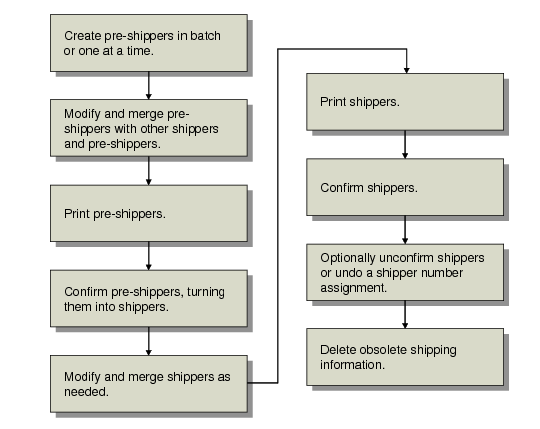
The workflow in
DO Container/Shipper Workflow provides an overview of the activities involved in shipping with shippers. DO Pre-Shipper/Shipper Maint (12.19.3) combines most shipment functions in one program; optionally you can use separate processing programs for each step.
DO Container/Shipper Workflow
1 Use DO Picklist/Pre-Shipper–Auto (12.19.1) to create pre-shippers in batches. Use DO Pre-Shipper/Shipper Maint (12.19.3) to create pre‑shipper and shipper documents one at a time and perform other processing functions.
Note: You can also create pre-shippers by using EDI eCommerce import functions. See
Importing Shippers.
2 Once created, you can merge pre-shippers into other pre-shippers or shippers with the workbench.
3 If you do not print the pre-shipper from the maintenance program, use DO Pre-Shipper/Shipper Print (12.19.11) to print pre-shippers and optionally confirm them, creating shippers.
4 If you do not confirm during printing of pre-shippers, Use DO Pre-Shipper/Shipper Confirm (12.19.13) to transform a pre-shipper into a shipper.
5 After creating shippers, modify them, merge them, and add containers in DO Pre-Shipper/Shipper Maint.
6 If you do not print shippers from the maintenance program, use DO Pre-Shipper/Shipper Print to print the shipper.
7 If you do not confirm during printing of shippers, Use DO Pre-Shipper/Shipper Confirm (12.19.13) to confirm a shipper.
8 Use Undo DO Shipper Nbr Assignment (12.19.20) to unassign a shipper number and turn a shipper back to a pre-shipper.
9 Optionally remove DO shipper information when online records are no longer needed with DO Shipper Delete/Archive (12.19.23).
Shipment Processing Programs
Programs on the Distribution Orders Shipping Menu are listed in
Shipment Processing Menu (12.19).
Shipment Processing Menu (12.19)
Menu | Menu Label | Program Name |
12.19 | Distribution Orders Shipping Menu ... | |
12.19.1 | DO Picklist/Pre-Shipper–Auto | dodssl.p |
12.19.3 | DO Pre-Shipper/Shipper Maint | dodsshmt.p |
12.19.4 | DO Pre-Shipper/Shipper Inquiry | dodsshiq.p |
12.19.5 | DO Pre-Shipper/Shipper Report | dodsshrp.p |
12.19.7 | DO Container Maintenance | dodsctmt.p |
12.19.8 | DO Container Inquiry | dodsctiq.p |
12.19.7 | DO Pre-Shipper/Shipper Auto Confirm | rcauis.p |
12.19.8 | DO Sales Order Shipper Maintenance | rcshmt.p |
12.19.9 | DO Container by Item Inquiry | dodsitiq.p |
12.19.11 | DO Pre-Shipper/Shipper Maint | dodsshpr.p |
12.19.13 | DO Pre-Shipper/Shipper Confirm | dodsois.p |
12.19.15 | DO Backlog/Missed Shipment Rpt | dodsblrp.p |
12.19.17 | DO Shipping Label Print | dodsrp10.p |
12.19.20 | Undo DO Shipper Nbr Assignment | dodsslrb.p |
12.19.22 | DO Container Delete/Archive | dodsctup.p |
12.19.23 | DO Shipper Delete/Archive | dodsshup.p |
12.19.24 | DO Container/Shipper Control | dodspm.p |
12.19.32 | DO Container Report | * |
12.19.33 | DO Container by Item Report | * |
* Enhanced .NET UI report |