Approaches to Master Scheduling
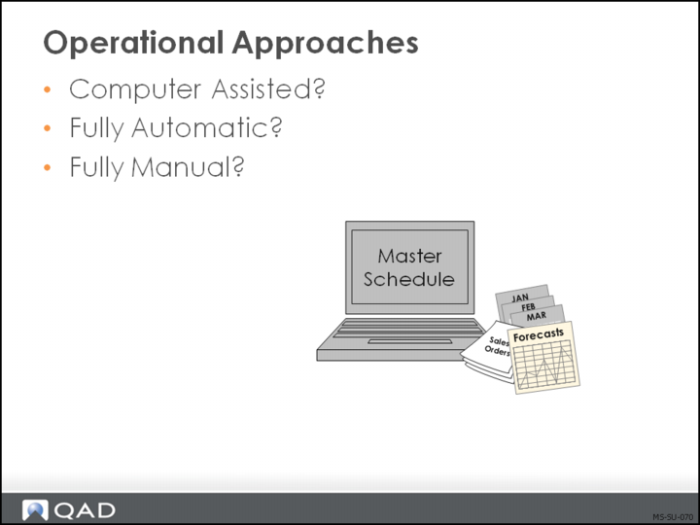
There are three approaches to master scheduling in QAD Enterprise Applications:
1 Computer assisted (recommended)
2 Fully automatic
3 Fully manual
Carefully consider these options when setting planning parameters for your items at each site. Each item can be set up in any of these approaches. The next few pages will discuss the options in some detail.
Computer Assisted Approach (Recommended)
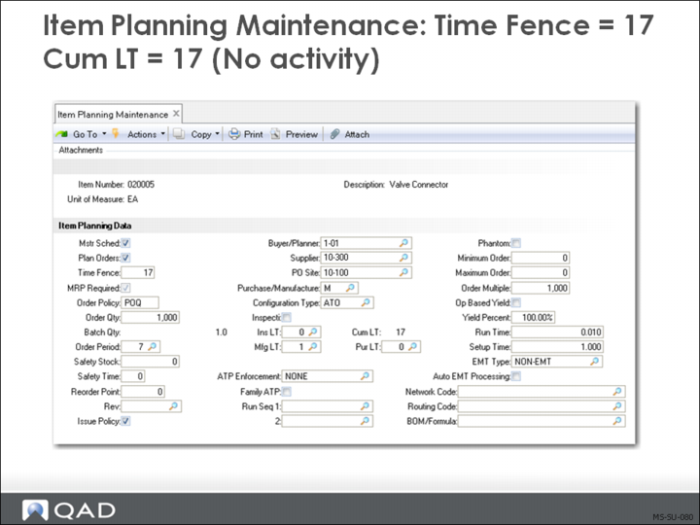
To use the computer-assisted approach for master scheduling, set the following values for each master scheduled item:
• Master Schedule is Yes
• Plan Orders is Yes
• Time Fence is cumulative lead time
• Order Policy is any option but blank
Time Fence
Defining time fences for master scheduled items allows MRP to control orders outside of a specified time period and allows the master scheduler to control orders within that time period.
Specify a planning horizon, in calendar days, for each master scheduled item. When MRP plans orders for these items, it will not schedule order due dates within this time fence.
MRP will plan orders to:
• Cover future requirements
• Provide action messages over the near-term horizon
• In the near term, the master scheduler maintains the master schedule
Note: The time fence is where manual control is exerted in computer-assisted planning. The longer the time fence the more manual involvement the master scheduler will have.
Selective Materials Plan
Selective Materials Plan (23.3) allows planning for master scheduled items separately from MRP items. If you use the computer-assisted approach to master scheduling, you may want to:
• Run Selective Materials Plan for master schedule items only
• Adjust the master schedule and rerun Selective Materials Plan as needed
• Run Selective Materials Plan for MRP-scheduled items only
Note: Selective MRP plans requirements only for the items selected. At some point you will need to run Net Change MRP to plan lower level requirements.
Fully Automatic Approach
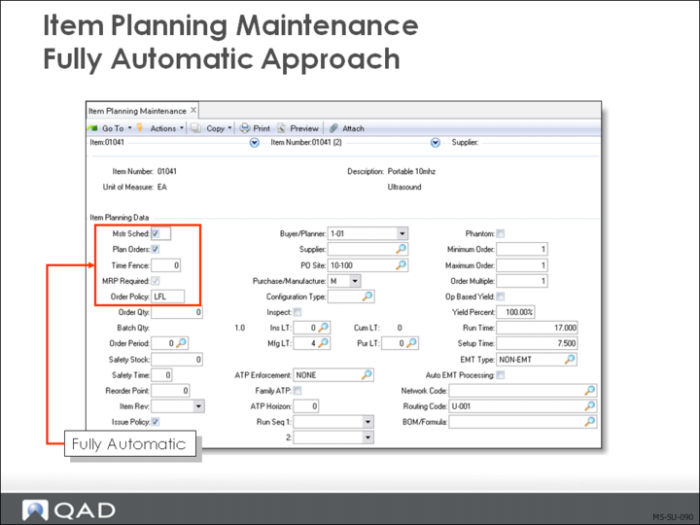
The master schedule can be generated entirely by MRP. This means that the system has complete control over master scheduled items with no distinction between master scheduled and MRP items. When this approach is used, material plans may change dramatically each time MRP is run. A master schedule order may be expedited one day and canceled the next for example.
To use the fully automatic approach to master scheduled items, set the following values:
• Master Schedule is Yes
• Plan Orders is Yes
• Time Fence is 0
• Order Policy is any option but blank
Fully Manual Approach
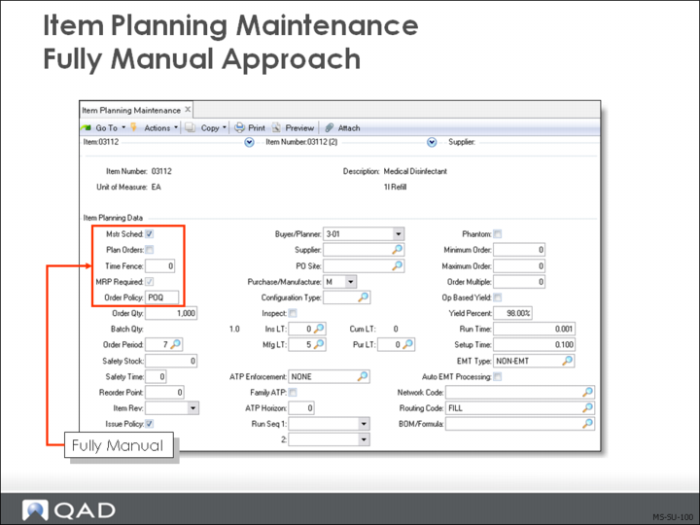
Fully Manual Scheduling
• Master Schedule is Yes
• Plan Orders is No
• Order Policy is Any option other than blank
Enter all master scheduled orders manually. MRP will not generate any planned orders, but will issue action messages suggesting that orders be created if none exist.
Note: In a make-to-stock environment it seems unlikely that all master scheduled items would be planned manually. However in a make to order environment it is more likely and in a job shop situation very likely.
There are situations where the master scheduler wants to know the requirement for an item but does not want the system to plan an order that will never be released. One example of this is water used in some food processing. The planner may want to know how much water this months schedule requires, but will never issue a purchase order to buy the water as it is cover by plant overhead as a utility. The action message will specify the amount of water needed. In contrast some processes used specially processed bottled water that is purchased with a purchase order.
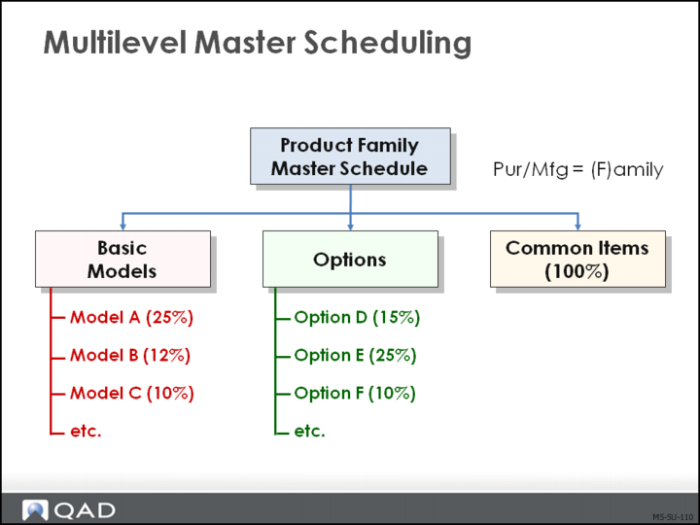
Multilevel Master Scheduling
• Plan family-level items using either the fully automatic or computer-assisted technique
• Use MRP to plan orders to generate production forecasts for the components of family items
Sometimes, demand for an item is dependent on demand for another item. This is a common occurrence when the master schedules for several sets of items are related through planning bills or product structures.
• Typical in assemble-to-order environments such as automotive or computer manufacturers
• Unrealistic to stock all of the possible combinations of end items
• Impossible to accurately forecast all possible combinations of end items for master scheduling
For master scheduling purposes, it is not possible to accurately forecast the detailed combinations of potential products that can be manufactured and sold.
Forecasting at the family-item level or the option-item level is more accurate and can be used to drive the master schedule process.
Typically, the top-level item of a multilevel master scheduled product structure represents the family of buildable products that can be configured from a set of available models and options. It represents an item that is itself never manufactured or stocked.
In QAD Enterprise Applications, such an item is assigned the Pur/Mfg code of F (family).
Planning Bills
Having identified a family item for multilevel master scheduling, the next step is to identify the component items. In such a product structure the components are the actual:
• Manufactured model
• Manufactured configured product
• Item groups representing common parts or selected options
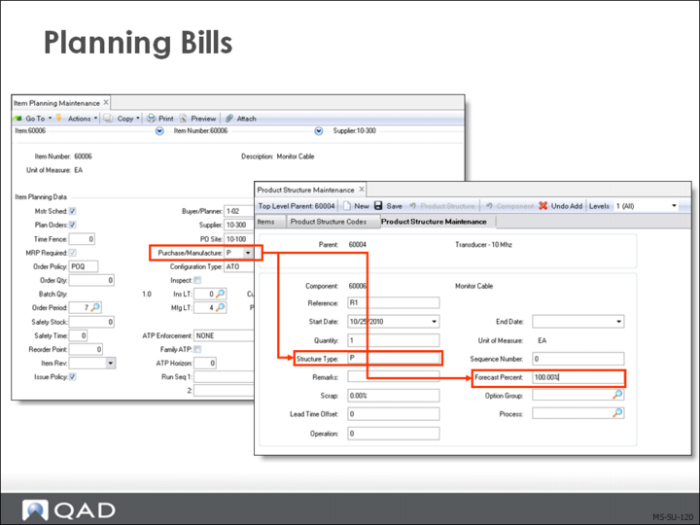
Using Product Structure Maintenance in QAD Enterprise Applications, items within the family product structure are assigned a:
• Structure code of P (planning) or O (option)
• Forecast percentage
The Structure Code settings of P or O dictate how QAD Enterprise Applications will handle the dependent demand forecast driven off of the parent item.
Production Forecasts
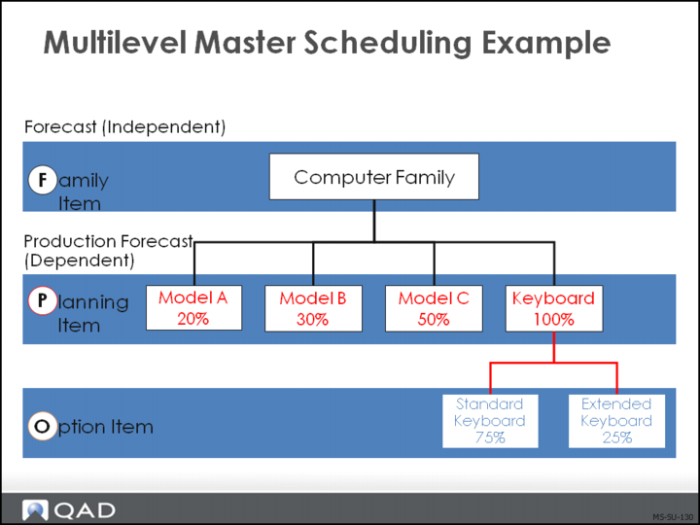
As a result of establishing a family planning structure and then forecasting and master scheduling at the family level, QAD Enterprise Applications will calculate the demand for the component items. This derived demand resulting from the family or upper-level independent demand is a Production Forecast.
• The production forecast derives from the:
• Master production schedule, and
• Forecast percentage specified in the planning bill
• Production forecast amounts:
• Display in master schedule reports and inquiries
• Contribute to the total demand that MRP regards as input
When planning bills, forecasts and master schedules are established at the family-item level,
QAD Enterprise Applications automatically calculates the derived demand for components of the family or upper-level item.
These calculations are based on the available-to-promise quantities for the family-level item and the quantity per and forecast percentage for the components of that family item.
As forecast for the family-level item is consumed, the available net forecast for that item changes, resulting in revised calculations for the production forecast the next time MRP is run.
Top-Level Items
Usually, the top-level item of a multilevel master scheduled product structure or planning bill represents the entire family of products that can be configured from a set of available models and options.
• Define family items with a Pur/Mfg code of Family (F) in Item Planning Maintenance (1.4.7) or Item-Site Planning Maintenance (1.4.17)
• Components of the family item in the planning bill can be either:
• The actual manufactured items or configured products, or
• Item groups representing common components or selected options
Family-Level Item Values
Set Master Schedule to Yes and Plan Orders to Yes for family-level items.
• MRP calculates net requirements and creates or adjusts planned orders accordingly
• Manually control the schedule for a period of time by setting the time fence appropriately
Time Fence (Optional)
MRP adds the time fence to the system date
• MRP does not create any planned orders within that time period
• MRP will delete any planned order if there is no demand generated for the item
• If change is needed on firm orders, MRP creates an action message
Order Policy
Any option other than blank
Example
The multilevel schedule consists of forecasts that are exploded by MRP.
Note: Discussed in Training Guide: Product Structures and Formulas.