Deleting GLRW Budgets
You can maintain an unlimited number of GLRW budgets in the system simultaneously, such as budgets for different years or different versions of the same budget. Eventually, you may want to delete some unused GLRW budget data to free up disk space.
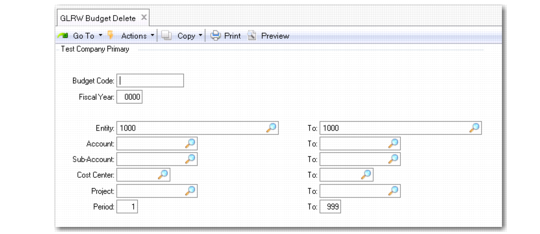
Use GLRW Budget Delete (25.17.4.23) to delete budget data for GLRW reports. Once deleted, records cannot be recovered. You may want to back up your database prior to running GLRW Budget Delete, just in case you need to recover data.
It is recommended that you restrict access to GLRW Budget Delete.
If budget codes are deleted in GLRW Budget Delete and later reused with different budget details, you must run Synchronize GL Data to update the information used by the GL Report Writer.
GLRW Budget Delete (25.17.4.23)
Calculating GLRW Budgets
GLRW budgets can be expressed as a percentage of the actual amount in another account; for example, Cost of Sales can be budgeted as a percentage of Sales. GLRW Budget Calculation (25.17.4.7) reads the actual amount and calculates the budget.
GLRW Budget Calculation is needed only if you express budgets as a percentage of actuals.
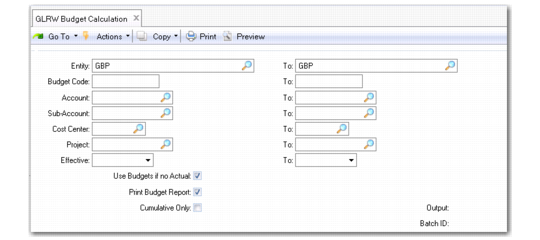
GLRW Budget Calculation (25.17.4.7)
Use Budgets if No Actual
Select this field to calculate the GLRW budget based on the budget for the base account when no actuals are available.
Clear this field to set the budget to zero when there are no actuals.
Print Budget Report
Select this field to print a budget report when the calculation is complete.
This report lists the calculated budget amounts for the effective date range of this calculation. Both the percentages and the calculated budget amounts are listed.
Cumulative Only
Select this field to print only the cumulative budget amount for the GL calendar year.
Clear this field to print a detailed report of each budget amount by fiscal period within the effective date range of the calculation.