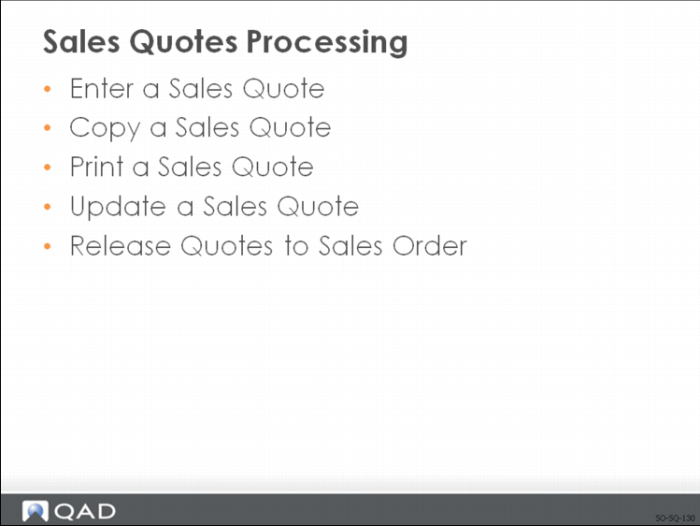
Sales Quote Processing
You create sales quotes using Sales Quote Maintenance
• System assigns each sales quote a unique number
• Information used to create a sales quote is similar to a sales order
• Need to identify:
• To whom you are selling items
• The location to ship-to
• Payment and credit terms, if applicable
• What is being sold
• The effective date for the sales quote
Note: If the customer does not accept the sales quote before this date, renegotiate the terms of the sales quote or extend the Expiration Date. However, you do not need to specify a Due Date.
Enter a Sales Quote
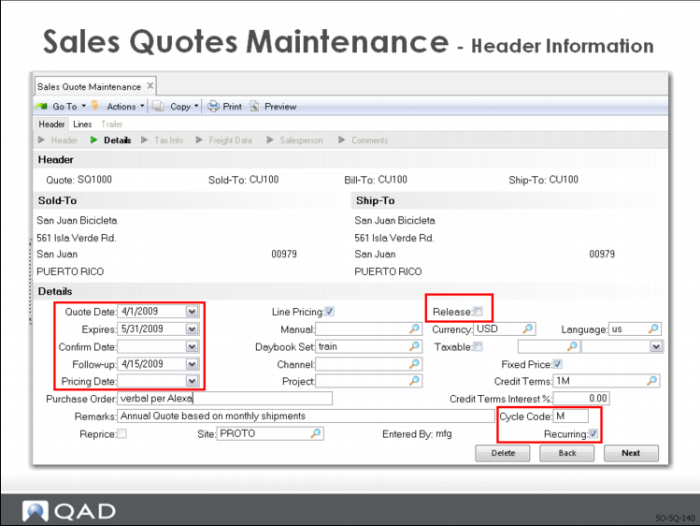
Sales Quote Maintenance: Header
Much of the information in the Sales Quotes Header defaults from the customer record, but you can change this information on the quotation.
The following key fields in Sales Quote Maintenance differ from sales orders:
Expires
Specifies the normal length of time quoted prices are good for. After this time, a quote expires and prices must be renegotiated.
The number of Days Until Expire specified in the Sales Quote Control is added to the quote date to determine the quote expiration date. This date displays and may be changed.
Quote reports can be selected for ranges of expiration dates, allowing you to review and act on quotes which are going to be expired.
Quotes past their expiration date can be purged using the delete/archive function.
Follow-up
The follow-up date for this sales quote. Follow-up date is for your use only. It can be set to the date of the last follow-up contact for this quote, or the date of the next planned follow-up contact for this quote. Several reports let you select quotes by follow-up date.
Line Pricing
Determines whether the system prices each line item as it is entered, or waits until the end of the order entry before calculating prices that can be affected by quantity breaks
• Affects newly created quotes only; when you are maintaining an existing quote, this setting has no effect
• Defaults from the setting of Price QO by Line in Pricing Control
This field is similar to the one is sales order described in
Line Pricing.
Release
Indicates whether allow the system to generate a sales order should from this quote.
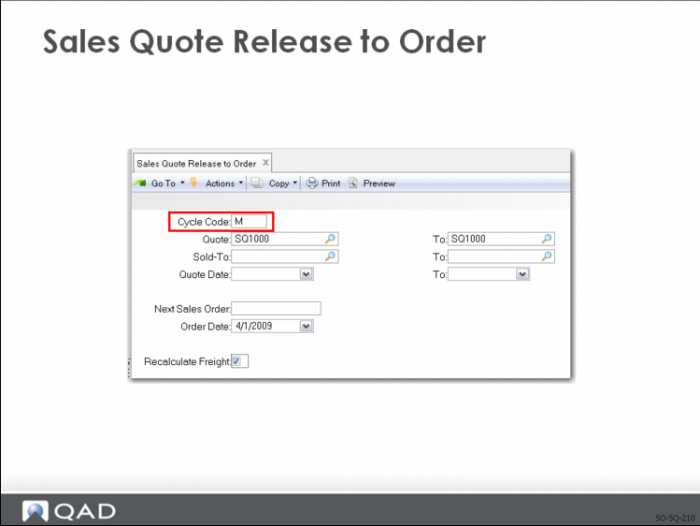
When a customer places an order against an outstanding quotation, the system can automatically generate the sales order from the quote. Sales Quote Release to Order creates orders based on the quote Release, Cycle Code, and line item Quantity to Release values. It only considers quotes marked with Release set to Yes and the specified Cycle Code, if any.
Cycle Code
Used with recurring sales quotes t o specifies the frequency with which sales orders are released from this quote. Validated against predefined values entered in Generalized Codes Maintenance, if any.
Recurring
Indicates whether there are to be recurring releases against this sales quote. After a quote has been released, the Release field is reset to No unless Recurring is Set to Yes. In this case, multiple sales orders can be generated from the quote.
Example: A quote records monthly fees for maintenance charges. An entire year is quoted, but a sales order and invoice are generated on a monthly basis. This type of quote is entered with Release set to Yes, Recurring set to Yes, Cycle Code set to MO, and Quantity to Release as 1. The quote quantity would be 12, for all 12 months.
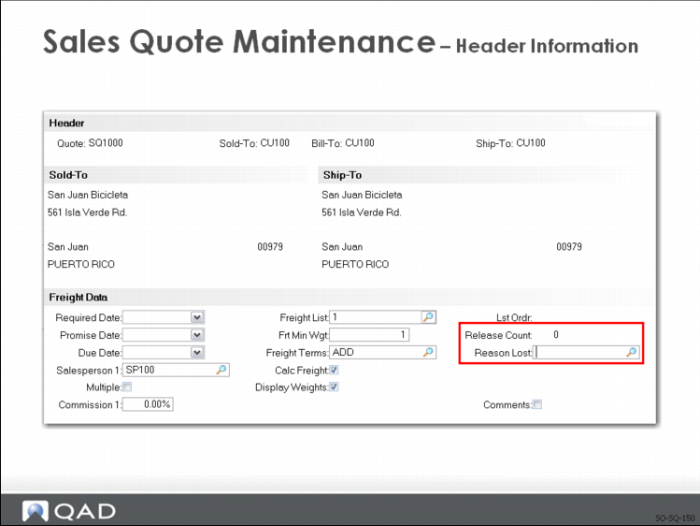
Sales Quote Maintenance: Header
You do not need to enter key dates (Required, Promise, and Due Dates) until you are ready to release the quote to a sales order.
Release Count
A system maintained field recording the total number of orders released from this quote. This field is updated automatically by Sales Quote Release to Order and is for reference only.
Reason Lost
Indicates the reason why the customer did not place an order against this quote.
• Displays as the default reason lost on each of the sales quote line items; can be changed on each, as needed
• The Sales Quote Reason Lost Report allows you to evaluate why you did not get the business. By recording the reason lost on each lost quote, you can establish trends or identify problem areas
• Can be used to categorize lost sales due to price, delivery, quality, or any other common reasons
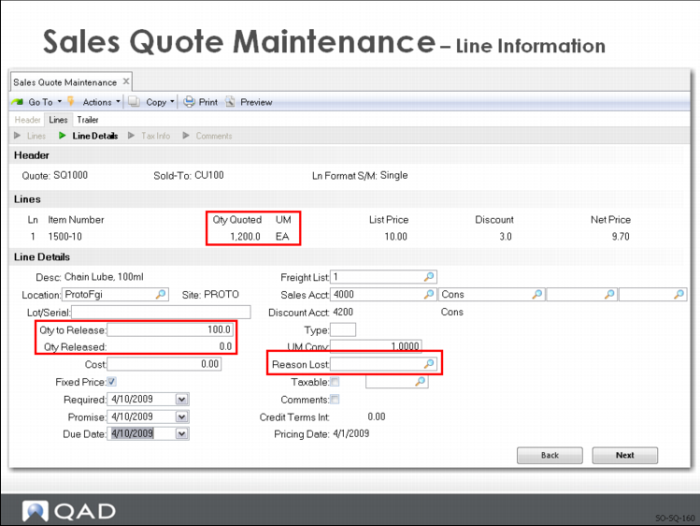
Sales Quote Maintenance: Line Items
Quantity Quoted
The order quantity for this line item.
Qty to Release
The quantity to release can be greater than the original quote quantity. This field specifies the quantity to be ordered on the sales order released from this line item.
Qty Released
A system maintained field recording the total order quantity released from this quote. This field is updated automatically by Sales Quote Release to Order. The quantity released can be greater than the quantity quoted.
Sales Quote Maintenance: Trailer
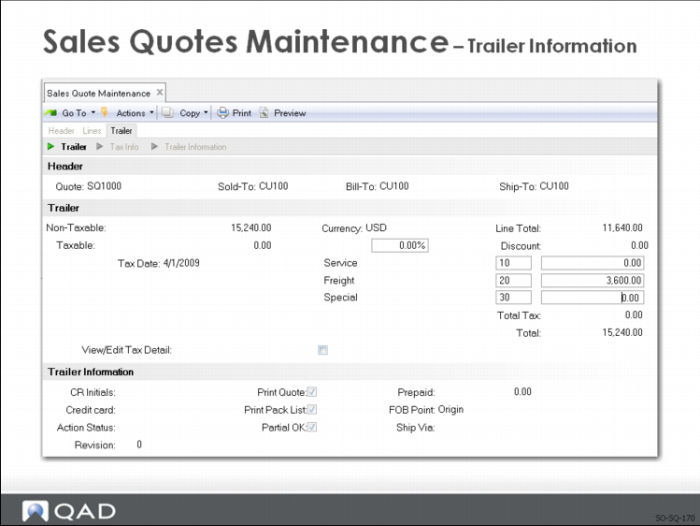
When all line items are entered, the trailer frame is displayed:
• Totaled line items
• Calculated taxes
• Optional order discounts
• Freight charges: calculated automatically on a bulk or unit basis
• Optional miscellaneous charges
Action Status
If the customer is on credit hold, the field defaults to HD (Hold). Quotes on credit hold cannot be released to a sales order until it is approved or the customer is no longer on credit hold
Sales Quote Copy from Order
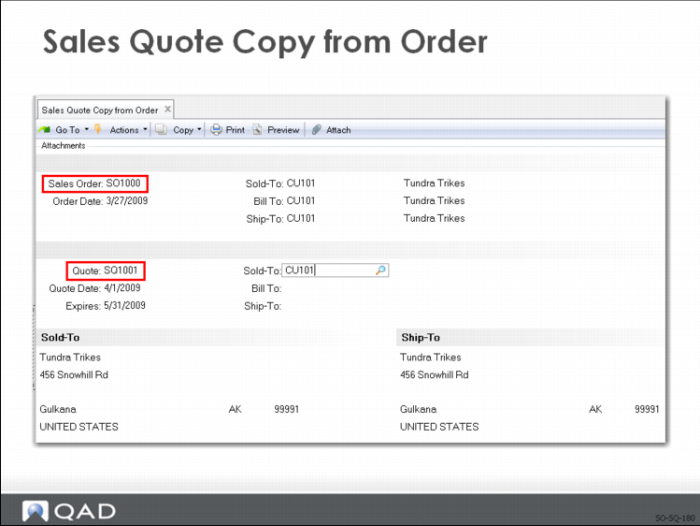
Use Sales Quote Copy from Order to quickly create a quote using a similar, existing sales order.
• Specify the sales order to copy. The Sold-To, Bill-To, and Ship-To display but cannot be changed
• Enter the quote number (or leave it blank to accept the default)
• You can accept the Sold-To, Bill-To, and Ship-To defaults or enter new numbers
• When you press Go after making your changes, the quote is created
Note: After a copy, you can modify the resulting quote using Sales Quote Maintenance before printing or releasing it.
The new quote is identical to the order you copied. If you change the Sold-To, Bill-To, or Ship-To default, you probably need to change certain data such as taxes or credit terms that are not appropriate for the new quote.
Sales Quote Copy from Quote
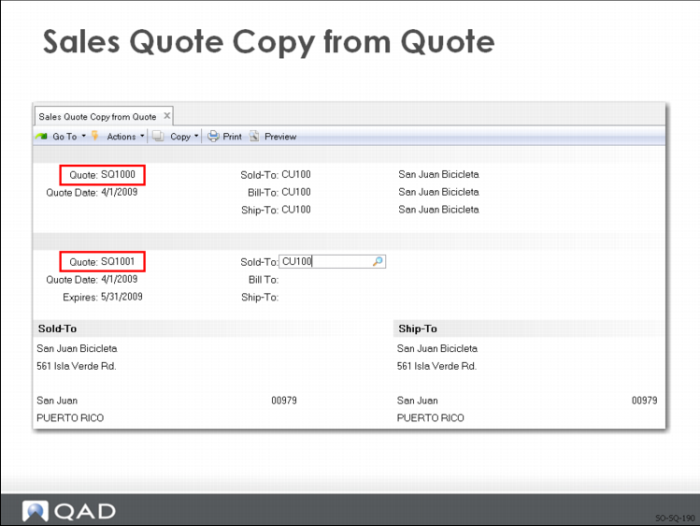
Use Sales Quote Copy from Quote to quickly create a quote using a similar, existing quote.
• Specify the sales quote to copy. the Sold-To, Bill-To, and Ship-To display but cannot be changed
• Enter the quote number (or leave it blank to accept the default)
• You can accept the Sold-To, Bill-To, and Ship-To defaults or enter new numbers
• When you press Go after making your changes, the quote is created
Note: After a copy, you can modify the resulting quote using Sales Quote Maintenance before printing or releasing it.
The new quote is identical to the one you copied. If you change the Sold-To, Bill-To, or Ship-To default, you probably need to change certain data such as taxes or credit terms that are not appropriate for the new quote.
Sales Quote Repricing
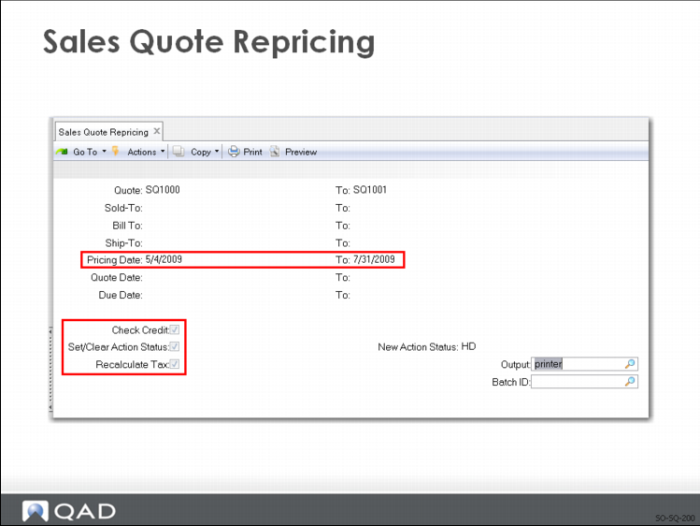
Sales Quote Repricing updates the list and net price to the latest corresponding price list price.
• You can reprice sales quotes so that ordered quantities are added, across orders, to calculate quantity breaks
• Sales Quote Repricing combines quotes by matching price lists and the following:
• Sold-to customer numbers
• Bill-to customer numbers
• Ship-to customer numbers
• Purchase order numbers
• Any combination of these four factors
Check Credit
If Yes, checks customer credit limits and past-due invoices, and generates an audit report. If No, bypasses credit check and generates the audit report only
Running Sales Order Repricing probably change sales order values. Some orders can exceed credit limits and orders currently on hold perhaps now be within credit limits. Using Check Credit cannot trigger update.
Set/Clear Action Status
Use when repricing sales quotes to set or clear the value in the Action Status field in Sales Quote Maintenance
If Credit Check is Yes, set Set/Clear Action Status to Yes to update credit status before release. The value entered in New Action Status will be assigned to any quotes exceeding credit limits.
Sales Quote Release to Order
When the customer requests delivery, use Sales Quote Maintenance to:
• Enter the Qty to Release and Due Date for each line
• Set Release to Yes
Use Sales Quote Release to Order to generate sales orders for open sales quotes that are ready for release (Release is Yes).
• Only those quotes that do not contain items having a restricted transaction of ADD_SO or ORD_SO are released
• The release of a quote results in a confirmed sales order
Note: Shipments can be processed only against a sales order, not a quote.
The number of releases and the total quantity released is maintained on the quote, along with the last sales order number released. Total quantity to release can exceed the original quote quantity
After the release, Qty to Release is reset to zero and Release to No if the quote is not recurring.
Note: If you release an item by mistake, use Sales Order Maintenance to change, cancel, or delete the line. Release Count and Qty Released in the quote do not reflect these changes, however.