Setting Up Periodic Costing
The following items need to be set up to use Periodic Costing:
• Inventory Accounting Control
• Periodic Costing Sub-Ledger
• Period Costing Daybooks
• Template Periodic Costing Cost Set
• Periodic Costing Control File
• Periodic Costing Cost Sets
• Grouped Sites
After these items are set up, you initialize Periodic Costing before using it for the first time.
Inventory Accounting Control
Use Inventory Accounting Control (36.9.2) to set the Periodic Costing mode.
Set the Create GL Transactions field based on whether you want to use periodic costing in Complete or Adjustment mode. When using complete PC mode, set Create GL Transactions to No.
Periodic Costing Sub-Ledger
Setting Up Periodic Costing Periods
Use PC Periods Maintenance (30.5.1.1) to define start and end dates for the cost periods for each GL accounting period. The system uses these periods to determine the time periods (buckets) for cost calculations. The system maintains a cost set for every cost calculating period.
Note: Unlimited periods per GL period only applies to FIFO calculations with a minimum period length of one per day and a maximum length of one per GL Calendar Period.
If you attempt to enter periods with overlapping dates, the system displays an error message. If a gap exists between the end date of one period and the start date of the next period, the system automatically creates an additional period to fill the gap.
Important: Periods should cover the entire GL period. If you do not create a period that includes the period start and end dates, errors will occur during cost calculations.
You can redefine periods during the calendar year as required, as long as no periodic costing transactions exist and the GL period is open.
PC Periods Maintenance (30.5.1.1)
Calendar Year
Specify the GL calendar year for the cost period. This should be a valid year defined in GL Calendar Create.
Calendar Period
Specify the GL calendar period for the cost period. This should be a valid GL period defined in GL Calendar Create.
Cost Calc Per Start
Specify the first date in this periodic costing period.
When you set up a new record, the default for the first period is the first day of the GL period. Subsequent periods default to the day following the previous Period End value.
The first period should start with the first day of the GL period. Otherwise, errors will occur during cost calculations.
Cost Calc Per End
Specify the last date in this periodic costing period.
When you set up a new record, the default for the first period is the last day of the GL period.
The last period should end with the last day of the GL period. Otherwise, errors will occur during cost calculations.
Defining Work Center Rates
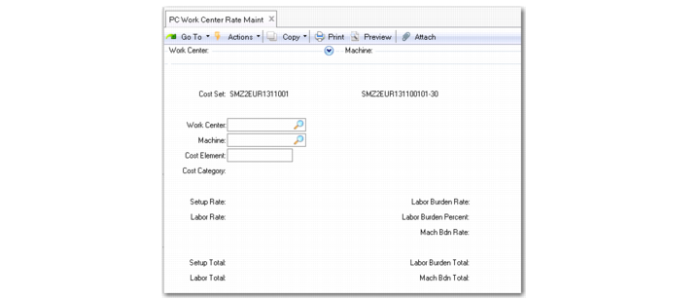
Use PC Work Center Rate Maint (30.5.3.1) to define setup and labor rates, as well as labor burden and machine burden rates, used in periodic costing calculations for a specified cost set.
You can maintain the following rates or totals by specified work center, machine, and element:
• Labor burden %
• Labor burden rate/total
• Labor rate/total
• Machine burden rate/total
• Set up rate/total
If you leave the machine field blank, all operations with a blank machine field will receive the rate.
When you provide work center rates as totals, the formulas to calculate production costs rates are as follows:
Total run time = accumulated total run time for the department/work center/machine
Total setup time = accumulated total set-up time for the department/work center/machine
Labor Rate = (total labor cost / total run time)
Setup Rate = (total setup cost / total setup time)
Burden Rate = (total labor burden cost / (total run time + total setup time))
Machine Burden Rate = (total machine burden cost / (total run time + total setup time))
PC Work Center Rate Maintenance (30.5.3.1)
Cost Set
Enter the cost set for which you want to maintain work center rate costs.
Note: If using FIFO with multiple PC periods (buckets) for the same GL period, the rates/total should be provided per PC period (bucket) and not for the entire GL period, as each period is a separate cost set. The system can maintain work center rate amounts in base currency or statutory currency. When statutory currency is enabled for the domain, the system calculates for cost adjustment transactions that are created based on the effective date provided.
Once you set up PC work center rates, you can use these additional programs to manipulate the data:
• PC Work Center Rate Inquiry (30.5.3.2)
• PC Work Center Rate Report (30.5.3.3)
• PC Work Center Rate Copy (30.5.3.5)
• PC Work Center Rate Update (30.5.3.13)
Periodic Costing Daybooks
You should select the periodic costing daybook type in Daybook Create (25.8.1.1). You create two daybooks:
• PC calculation daybook (transient layer)
• PC final daybook (official or management layer)
The system captures the periodic costing GL transactions in the transient layer (the PC calculation daybook). At the end of the period when the system completes all validations, it posts the periodic costing GL transactions to the PC final daybook by a mass layer transfer of GL transactions. The GL transactions in the transient layer are summarized when posting them to the PC final daybook.
Depending on whether you use adjustment mode or complete mode, you need to define the PC final daybook in either official or management layer, respectively.
For journal entries of periodic costing in a transient layer:
• You cannot delete or change transient postings coming from periodic costing using the normal Journal Entry (JE) form.
• You cannot create transient postings in a daybook that point to periodic costing using the normal JE form.
The system ensures that no postings on a PC daybook are created in a period that is closed for periodic costing before it posts to the PC daybook.
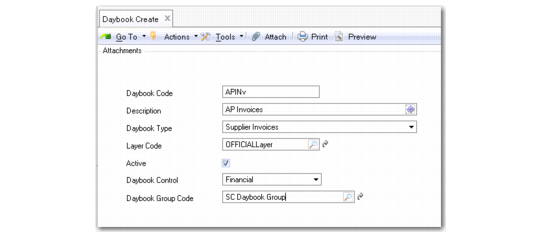
Daybook Create
Daybook Code
Enter a daybook code (maximum eight characters).
Note: You enter the daybook code that you set up for PC here in Periodic Costing Control File (30.5.24) when you set up periodic costing.
Description
Enter a brief description (maximum 24 characters) of the daybook.
Daybook Type
Select the PC daybook type from the drop-down list.
Layer Code
Select an accounting layer: official, management, or transient.
Active
Indicate if this is an active daybook.
Daybook Control
Choose the type of daybook control from the drop-down list:
• Financial: Contains postings originating in the financial modules.
• Operational: Contains postings from operational functions.
• External: Contains postings originating from external, third-party systems; for example, payroll applications.
Daybook control types are used to clearly separate postings based on their source.
The transient layer daybook should be operational; other layers should be financial.
Template Periodic Costing Cost Set
Begin the creation process in Cost Set Maintenance (30.1).
Set the Cost Set Type to PC (periodic costing) indicating its purpose. When PC is the cost set type, the system displays an additional frame to indicate whether to use the PC cost set template.
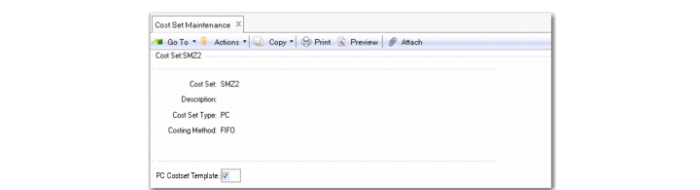
Cost Set Maintenance (30.1)
PC Costset Template
Indicate Yes or No to define this cost set as the periodic costing cost set template when you use periodic costing to calculate inventory. The default is No. This field is editable only when you enable the periodic costing module. The field displays only when you set Costing Type to PC (periodic costing).
When the cost set is the first PC Cost Set Type and the cost set is the template, the system sets this field to Yes.
Periodic Costing Control File
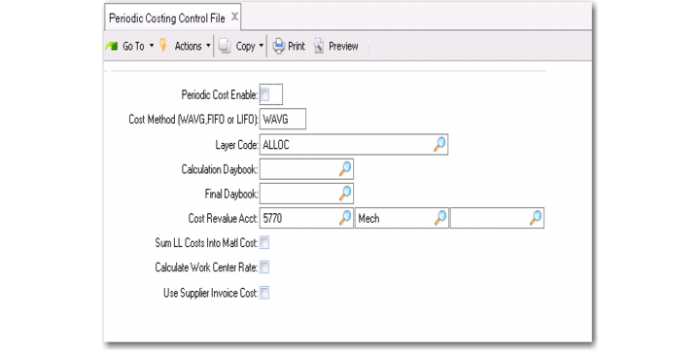
Use Periodic Costing Control File (30.5.24) to enable periodic costing functionality and define several values used in processing.
Periodic Costing Control File (30.5.24)
Periodic Cost Enable
Select this option to enable periodic costing cost methods for this domain. Periodic costing method lets you calculate cost averages during a user-specified period using formulas that are based on FIFO or weighted average, specified in the Cost Method field. The system uses the period you define in PC Periods Maintenance (30.5.1.1).
This setting applies to the entire domain; you cannot use periodic costing for individual entities. Each domain can have its own data setup, calculation formula, adjustment settings, and GL entries. (Only one cost calculation method can be defined by domain.)
Cost Method (WAVG, FIFO)
Specify how periodic costing calculations are done in this domain:
WAVG: Considers the previous period cost and the average of the cost incurred this period.
FIFO: Considers the receipt date of items for the existing inventory. This method assumes that the oldest (first) item in stock is issued first.
Note: Once periodic transactions exist in the official or management layer, this field is read-only; you cannot update it any longer.
Layer Code
Specify which accounting layer (management or official) is used for GL postings of periodic costs in this domain. The valid value depends on the setting of Create GL Trans in Inventory Accounting Control; that is, adjustment mode versus complete mode.
Management: This option is required when Create GL Trans is Yes and periodic costing is in adjustment mode.
Official: This option is required with Create GL Trans is No and periodic costing is in the Complete mode.
Calculation Daybook
Specify the daybook used for posting periodic costs during preliminary or test postings to the transient accounting layer. Amounts are posted to this daybook until final posting to the management/official layer. At that time they are moved to the Final Daybook.
Final Daybook
Specify the daybook used for posting final periodic costs to the management or official accounting layer.
Cost Revalue Acct
Specify the account, sub-account, and cost center used to record offset amounts to ensure that inventory accounts are properly balanced when the unit cost for the item in a site is changed. The GL type should be Standard.
Sum LL Costs Into Matl Cost
Specify how lower-level costs are posted to Cost of Goods Sold when periodic costing is in use.
Note: This setting applies only to periodic costing. When you use another cost method, this function is controlled by the same field in Inventory Accounting Control.
No: Add lower-level costs to this-level costs for each cost component and post the total to Cost of Goods Sold.
For example, the total material cost (this-level plus lower-level) is posted to Cost of Goods - Material, the total labor cost is posted to Cost of Goods - Labor, and so on, for Cost of Goods - Burden, Overhead, and Subcontract.
Yes: Summarize all lower-level costs into Cost of Goods - Material. Only this-level costs are posted to Cost of Goods - Labor, Burden, Overhead, and Subcontract.
This field does not affect the way costs are calculated or stored in cost sets.
Usually this field is set to No. Cost of goods sold amounts are maintained separately for each cost component. However, in some companies, the material cost for an end item is considered to include all costs associated with purchasing or manufacturing components, as well as any direct material costs. Then this field is set to Yes.
Calculate Work Center Rate
Specify the method the system uses for calculating labor costs (including setup) and burden costs for the period:
Yes: The system bases the costs on work center labor and burden rates. The cost accountant provides total cost per labor/burden that is prorated across items produced in that work center.
For work centers, the labor rate is the standard hourly labor rate for personnel who run operations at this work center. The system uses this rate when calculating both labor and labor burden.
Burden costs apply to both setup and run time. Labor burden is calculated as a rate per labor hour and/or a percentage of total labor. Labor burden percent is most commonly used in a labor-intensive environment. Labor burden rates are commonly used in a high-volume production environment. Both types of burden can be applied—as a rate per hour and/or as a percentage of labor cost.
Labor Burden Rate = [(Setup Hrs / Order Quantity + Run Hrs) * WC Labor Burden Rate] / Item Yield%
Labor Burden Percent = [(Setup Hrs / Order Quantity * WC Setup Rate) + (Run Hrs * WC Labor Rate) * WC Labor Burden%] / Item Yield%
The labor burden rate or percentage per hour is applicable to both setup and run time at the work center.
No: The cost accountant provides the labor/burden cost rate that is applied directly to the hours reported in that work center. The work center rates/total should be provided per period.
The total labor cost is the combined cost of setting up the operation and running it. Since setup time applies to the whole operation rather than per unit, setup time is divided by the item order quantity, then multiplied by the setup rate.
Labor Cost = (Setup Hrs / Order Quantity * WC Setup Rate) + (Run Hrs per Unit * WC Labor Rate) / Item Yield%
Use Supplier Invoice Cost
Select this option when you want to use the cost set up in the Supplier Invoice.
Periodic Costing Cost Sets
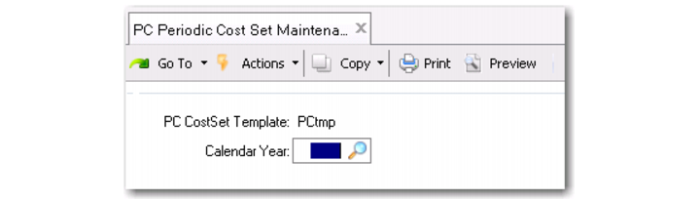
You can use PC Periodic Cost Set Maintenance (30.5.1.4) to specify a detailed (child) cost set for a template cost set. You specify a template cost set in Cost Set Maintenance. In Cost Set Maintenance, the system displays the detailed cost set as the code of the template cost set plus three characters of currency, two characters of the fiscal year period, and three characters of a continuous number.
If you create a detailed cost sets for a template cost set, you cannot delete the template until you delete the detailed costs sets first.
When you run PC Periodic Cost Set Maintenance, the default template cost set displays. Enter a year, then select Yes when the system prompts you to create the detailed cost set; see
PC Periodic Cost Set Maintenance (30.5.1.4). If you have enabled statutory currencies, detailed cost sets are created for both the base and statutory currencies.
Before running periodic cost calculations, you must verify that a detailed periodic cost set has been created for the respective periods. Also, you can check periodic costing cost sets by using Cost Set Browse (30.1.2).
PC Periodic Cost Set Maintenance (30.5.1.4)
Creating Cost Set Elements
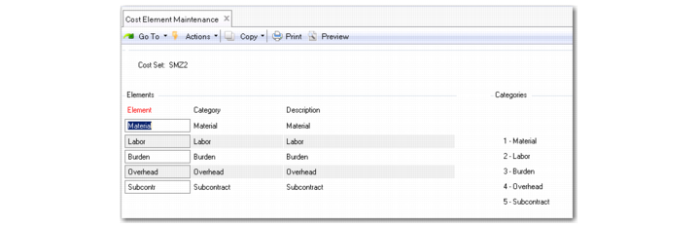
You can use Cost Element Maintenance (30.17.1) to set up separate cost elements for logistics charges in the GL cost sets assigned to sites that receive purchased items. The cost elements should be in the Material or Overhead cost category.
You create a cost element for each logistics charge you want to accrue. For example, you could create separate cost elements for domestic freight and overseas freight, or create only one cost element for freight.
For field descriptions and other information on Cost Element Maintenance, see
Cost Management.
You create a template periodic costing cost set so that these extra settings are defined in the template for all periodic costing cost sets. The system automatically creates these elements.
Note: You can use PC Item Cost Delete/Archive (30.5.22) to archive and delete PC category cost and element cost data as required, based on specified ranges of item, site, and period; see
here.
Grouped Sites
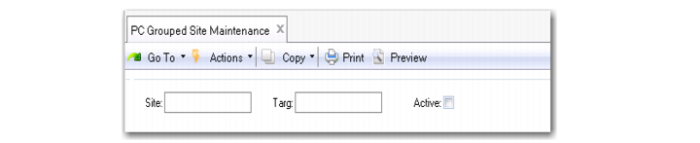
Use PC Grouped Site Maintenance (30.5.1.13) to set up grouped-site costing.
All transactions are calculated according to process logic flow; however, to avoid conflicts with the standard QAD EE linked site costing, you enter the periodic costing grouped sites using PC Grouped Site Maintenance only. This is necessary for item attributes.
When the cost accountant changes rules for the site, a new site should be created and inventory transferred from the old site to the new site; grouped site rules do not apply.
When new sites are included in the already existing grouped rules, a new periodic calculation for the current period is mandatory before closing the period.
The same site cannot be part of multiple grouped rules, and all sites that are part of the grouped rules should be in the same domain.
You can activate/deactivate grouped-site rules. When an existing grouped-site rule is deactivated, a new recalculation for the current period is mandatory.
Note: For some countries, such as Brazil, legislation dictates that you can apply the same cost to separate sites only when all sites have the same federal tax identification; otherwise, the sites can be considered different companies and costing cannot be consolidated.
Enter the source site in the Site field and the linked site in the Target field; then set the Active field to Yes.
PC Grouped Site Maintenance (30.5.1.13)
Initializing Periodic Costing
To initialize Periodic Costing prior to first use, you must run the Period Costing Initialize option to begin calculating the period costs for a specific GL period.
Note: Periodic Costing Initialization only needs to be run once before using PC for the first time. Subsequent uses do not require initialization.
When initializing Periodic Costing, you must specify:
• Effective Date -The last date of the GL period not using Periodic Costing
• Cost Set - Reference cost set of item unit costs to be copied for the initial cost valuation.
When entering a cost set, you may enter a current cost set, a standard cost set, or a simulation cost set. The item price should be defined for each item in the cost set.
For advanced repetitive, the system copies the WIP transferred from the old cumulative WO to the new cumulative WO to PC-related WO tables during the PC initialize process.

 Cost Element Maintenance (30.17.1)