Browse Collections
You can use the following Periodic Costing .NET UI browse collections as one-stop programs to view and modify data. You can select a record in the top-level browse and drill down into the browse collection’s supporting browses that display additional information about the record you selected. Periodic Costing browse collections include the following:
The following topics provide more information.
Transaction PC Cost Browse Collection
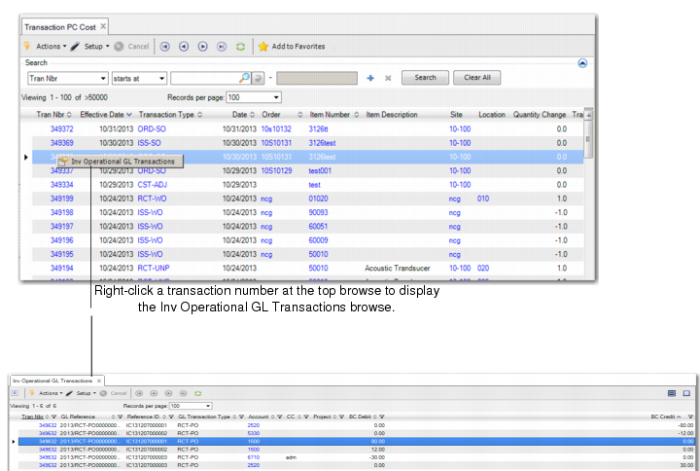
This browse collection contains a list of inventory transactions by number and type, effective date, item number and description, order number, site and location, and quantity changed. It also shows the transaction price, standard amount, PC unit cost and amount for each transaction as well as the entity, address, shipper number, ID, and operation.
To access supporting browses, you right-click the blue data in the top-level browse. When you do, a button displays. Click the button and the supporting browse of the same name displays below the top-level browse; see
Transaction PC Cost.
The top-level browse lets you right-click the following to display a supporting browse:
Transactions PC Cost Supporting Browses
|
Field to Click
|
Button that Displays
|
Browse that Displays
|
|
Tran Nbr
|
|
Inv Operational GL Transactions
|
|
Transaction Type
|
|
Code Master
|
|
Order
|
|
Transaction Numbers
|
|
Item Number
|
|
Item Master
|
|
Site
|
|
Sites
|
|
Location
|
|
Location Master
|
When you right-click a transaction number, the system displays the supporting Inv Operational GL Transactions browse with GL reference data and GL transaction data. The Inv Operational GL Transaction browse displays additional data for the transaction you clicked in the header list. For this supporting browse, you can view additional data that shows the debit account for the GL transaction and the amount and the credit account and the amount.
Transaction PC Cost
You can follow the same pattern of right-clicking blue data in fields in the supporting browses. When you do, buttons display and the supporting browses display below the browse in which you clicked. For example, in the Inv Operational GL Transactions browse, you can right-click the transaction number or the account to display supporting browses.
Inv Operational GL Transactions Browse Collection
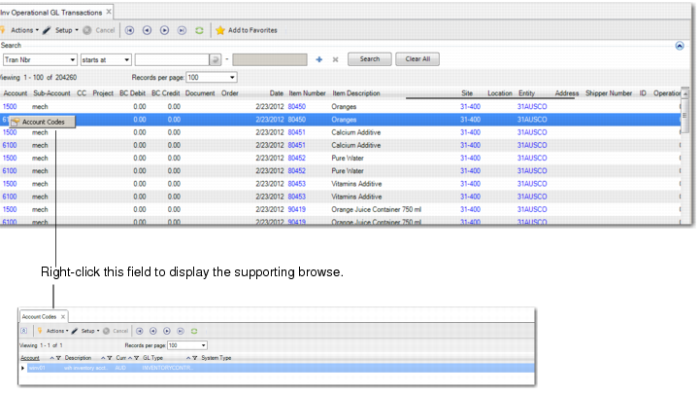
This browse collection lists all operational GL transactions for the inventory transactions. The top-level browse lists the transaction number, GL reference and reference ID, GL transaction type, account, sub-account, cost center (CC), project, BC debit and BC credit, document, order, date, item number and description.
To access supporting browses, you right-click the blue data in the top-level browse. When you do, a button displays. Click the button and the supporting browse of the same name displays below the top-level browse. For example, right-click the transaction number in the top-level browse and the system displays the supporting Transaction PC Cost browse, or right-click the account code and the system displays another supporting browse that shows the account codes; see
Inv Operational GL Transactions.
Inv Operational GL Transactions Supporting Browses
Field to Click | Button that Displays | Browse that Displays |
Tran Nbr | | Transaction PC Cost |
Account | | Account Codes |
Item Number | | Item Master |
Sites | | Sites |
Entity | | Entity Codes |
By selecting a single record in the top-level browse, then drilling down, you can easily see which accounts are debited and credited for every inventory operational GL transaction.
Inv Operational GL Transactions
Operation History Browse Collection
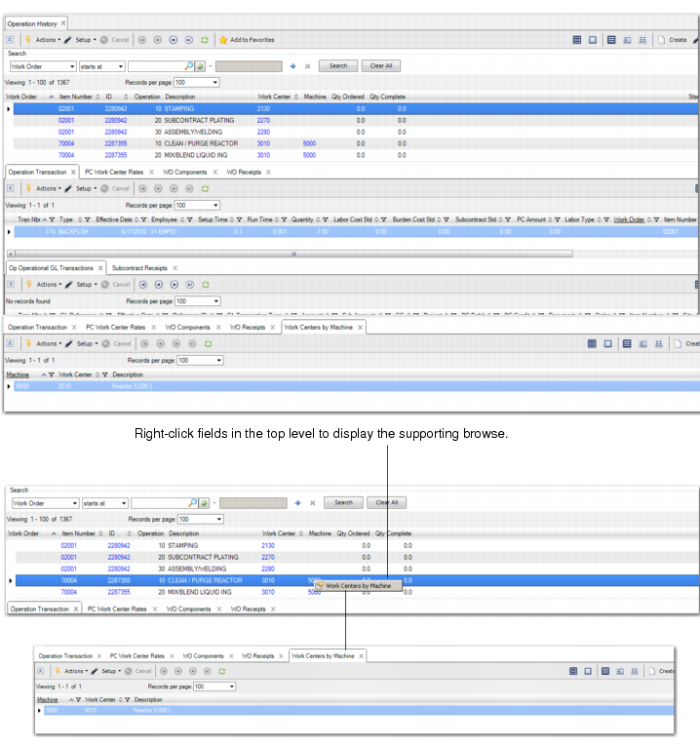
This browse collection provides a consolidated view of all transaction information for a work order. The top-level browse lists items by item number, ID, operation and description, the work center, the machine, quantity ordered and completed.
Supporting browses include the Operation Transaction, PC Work Center Rates, WO Components (which also shows the cost adjustments transactions), WO Receipts (and shows the WO reject and accounting close), OP Operational GL Transactions, and Subcontract Receipts (and shows the inventory transactions for the receipts); see
Operational History Browse Collection.
To access even more supporting browses, right-click the blue data in the top-level browse. When you do, a button displays. Click the button and the supporting browse of the same name displays below the top-level browse.
Operation History Supporting Browses
Field to Click | Button that Displays | Browse that Displays |
Item Number | | Item Master |
ID | | Work Order Routings and Work Order Routings Maintenance |
Work Center | | Work Centers |
Machine | | Work Centers by Machine |
Operational History Browse Collection