Implementing GTM > Setting Up Tax Classes and Usages
  
Setting Up Tax Classes and Usages
Depending on your tax system, set up tax class and/or tax usage codes to accommodate differences in taxation within a tax zone. These codes apply to all domains in the database.
Tax Classes vs. Tax Usages lists some typical situations and describes how to implement them.

Tax Classes vs. Tax Usages
 
Situation
Implementation
Customers and/or suppliers in a tax zone are subject to different tax types or tax exemption types.
Set up tax classes for these customers and/or suppliers.
Product lines and/or items are subject to different tax types or tax exemption types.
Items are always subject to the tax types in the line item tax environment. There is no way to override this. You can set up tax classes for product lines and items. However, they are only used to select tax rates.
On sales transactions, trailer charges are subject to different tax types or tax exemption types.
Trailer charges are always subject to the tax types in the transaction tax environment. There is no way to override this. You can set up tax classes for trailer charges; however, they are only used to select tax rates.
Customers and/or suppliers are subject to different tax rates for a tax type.
Set up tax usages for these customers and suppliers.
Items are subject to different tax rates for a tax type.
If items have the same rates on all transactions, set up tax classes. However, if rates can differ by transaction, based on the intended usage of the item, set up the tax usage codes to reference during transaction entry.
Trailer charges are subject to different tax rates for a tax type.
Set up tax classes for these trailer charges.
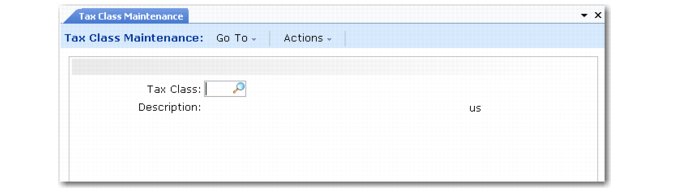
Set up tax class codes in Tax Class Maintenance (29.1.5). To verify data setup, use Tax Class Browse (29.1.6) and Report (29.1.7).

Tax Class Maintenance (29.1.5)
Tax Class
Enter a code (maximum 3 characters) that identifies a group of customers, suppliers, product lines, items, service categories, or trailer charges subject to special taxation.
For customers and suppliers, the tax class helps determine the tax environment.
For product lines, the tax class determines the tax rate for new items.
For items, service categories, and trailer charges, the tax class helps determine the tax rate for tax types in the tax environment.
For more detailed tax exemption reporting, remember to set up tax classes for exemptions.
Description
Enter a brief (maximum 24 characters) description of the tax class. This field is required.
Multiple language descriptions are supported. See Multiple Language Descriptions for details.
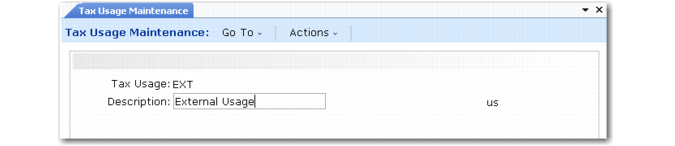
Set up tax usage codes in Tax Usage Maintenance (29.1.9). To verify data setup, use Tax Usage Browse (29.1.10) and Report (29.1.11).

Tax Usage Maintenance (29.1.9)
Tax Usage
Enter a code (maximum eight characters) that identifies a group of customers, suppliers, or items subject to special taxation on a specific transaction.
Description
Enter a brief (maximum 24 characters) description of the tax usage code. This field is required.
Multiple language descriptions are supported. See Multiple Language Descriptions for details.
Note: Tax Usage Maintenance contains an additional Legal Information window used to record Brazilian legal requirements. The Legal Information window is described in the Legal Documents chapter of User Guide: QAD Sales.