Work Centers
A work center is a group of people and/or machines. Work centers also link departments with routing operations.
Work centers are the basic unit for operation scheduling and CRP. Depending on how you plan and schedule work, you can set up work centers for an individual machine or for groups of similar machines. If, for example, there are separate machines for polishing plastic lenses and polishing glass lenses, they would be set up as separate work centers. The system uses work centers for scheduling, planning, and determining costs for GL transactions.
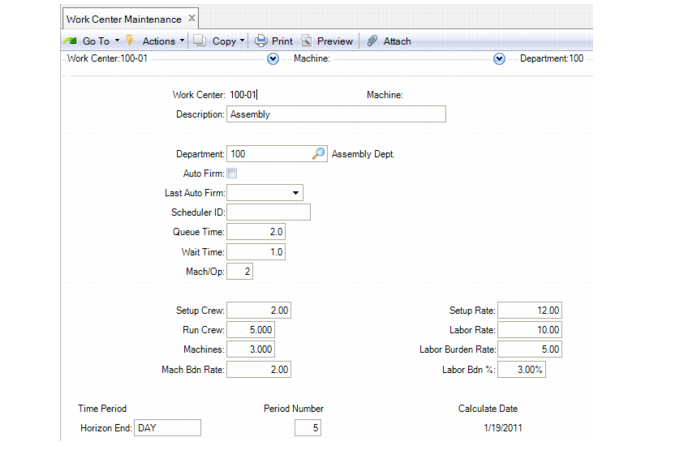
Use Work Center Maintenance (14.5) to set up work centers.
Work Center Maintenance (14.5)
Work Center and Machine
Uniquely identify a work center by a work center code along with an optional machine code. Leave Machine blank if only one type of machine is in the work center. If there are multiple machine types or models, set up a different record for each machine, using the same work center ID.
Department
Enter a department code, set up in Department Maintenance (14.1). You must assign each work center to a department.
Auto-Firm
Specify Yes to have the system automatically firm orders scheduled on this production line using Auto Firm Planned Orders (22.20.1). Auto Firm Planned Orders firms planned orders for either production lines or work centers for a specific horizon or a range of dates.
If you use the .NET UI-only Planning and Scheduling Workbenches, you must set this field to Yes if you schedule for work centers and intend to firm planned orders in the workbenches. You must set the same-named field to Yes in Production Line Maintenance (18.1.1) if you intend to firm planned orders for production lines using the workbenches. If Auto Firm is set to No, the system does not firm planned orders.
Last Auto Firm
Enter a date of the last auto-firm by selecting a date from the calendars that display when you click the drop-down icon in the .NET UI. You can see the date of the last auto-firm in work center and production line browses in QAD EE.
Queue and Wait Time
Enter the standard time, in decimal hours, a job normally spends waiting at this work center before it is set up and processed and after processing has been completed. These values display as defaults when you reference this work center as part of a standard, routing, or process operation.
Machines/Op
Enter the number of machines at this work center that can work at the same time to process a given operation. CRP uses this number to calculate work center capacity. This value displays as the default when you reference this work center as part of a standard, routing, or process. See
Work Center Capacity.
Setup and Run Crew
Optionally, enter the number of people required to set up and run this work center. These fields are for reference only.
Machines
Enter the number of machines or people in this work center. CRP calculates the total capacity for a work center by multiplying the number of working hours, defined in the shop calendar, by the number of machines.
Setup and Labor Rate
Enter the average labor rates paid per labor hour to set up and run this work center. These values are used by item cost calculations and by labor feedback functions to calculate and post actual costs and variances.
Note: Rates apply to all operations carried out at this work center. You cannot change them for individual operations.
Mach and Labor Burden Rate
Enter the burden rates per hour applicable to machine and labor run time and setup at this work center. These values are used by item cost calculations and by labor feedback functions to calculate and post actual costs and variances.
Labor Burden %
Enter the labor burden percentage applicable to the total labor cost at this work center.
Horizon End
Specify either Day, Week, or Month as the horizon end for this work center. This field is applicable only when Planning and Scheduling Workbenches are enabled in Site Maintenance.
Work centers display as resources within the Planning and Scheduling Workbench, which is a .NET UI only scheduling tool for both master schedules and production schedules. The workbench depicts the scheduling or sequencing horizon, depending on your order type and which schedule (master or production) with which you work in the workbench. You can change the future and history horizon within the workbench; however, the date you set here depicts the increment for the horizon end.
The calculate date is read-only. The system calculates the date from period and period number, so if you set Horizon End to Day and Period to 5, the Calculate Date is 5days starting with today. If you set Horizon End to Week and Period to 4, then the Calculate Date is 4 weeks from now including today.
Period Number
Specify the number of periods to use for the scheduling horizon for this work center. This field is applicable only when Planning and Scheduling Workbenches are enabled in Site Maintenance.
Work centers display as resources within the Planning and Scheduling Workbench, which is a .NET UI only scheduling tool for both master schedules and production schedules. The workbench depicts the scheduling or sequencing horizon, depending on your order type and which schedule (master or production) with which you work in the workbench. You can change the future and history horizon within the workbench; however, the period number you set here depicts the number of periods for the horizon.
Calculate Date
The calculate date is read-only. The system calculates the date from period and period number, so if you set Horizon End to Day and Period to 5, the Calculate Date is 5 days starting with today. If you set Horizon End to Week and Period to 4, then the Calculate Date is 4 weeks from now including today.
Important: Changes to work center labor and burden fields affect how transaction amounts and product costs are calculated. They should be authorized by your cost accounting department.
Work Center Capacity
CRP uses work center capacity when evaluating work center load. It is the total number of hours the work center is available to do work. Capacity varies with the work center calendar or shop calendar and the number of machines or people in the work center.
The formula is:
Work Center Capacity = Calendar Hours Available * Machines
The work center number of machines should be at least as high as the number of machines per operation for this work center and for operations that use this work center.