Standard Operations
Often, routings share one or more operations that are essentially the same. For example, an automated packaging process may be the same regardless of the color of the products packaged. To save work when entering new routing operations, you can create template steps called standard operations.
When you enter a new routing operation, automatically copy the standard data to the routing by referencing the standard operation code. Then edit the standard information as needed. Changes apply only to the new routing—not to the standard operation you copied.
Note: If you change a standard operation after referencing it on a routing, the changes do not automatically apply to the existing routing. Use Routing Update (14.13.7) to apply any changes you made to standard operations and work centers to existing routings.
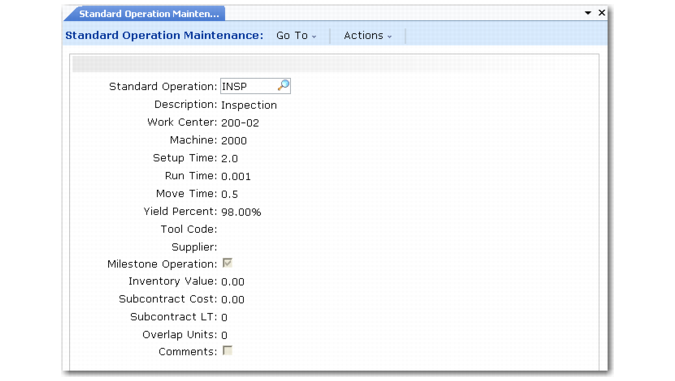
Use Standard Operation Maintenance (14.9) to set up standard operations.
Standard Operation Maintenance (14.9)
Work Center and Machine
Enter codes for the work center and machine that normally perform this operation.
Setup, Run, and Move Time
Enter the normal times, in decimal hours, to process items during this operation. Run time is per unit; setup and move time are independent of order size. See
Lead Times.
Yield %
Enter the order percentage expected to be in usable condition after this operation. See
Yield.
Tool Code
Optionally, enter the code for a tool normally used during this operation. This is for reference only. To standardize tool codes, set them up in Generalized Codes Maintenance (36.2.13) for field ro_tool.
Supplier
If this is a subcontract operation, enter the code of the supplier doing the work.
Milestone Operation
Enter Yes to define this as a repetitive labor reporting operation and to backflush all previous operations since the last milestone operation. The field only affects repetitive manufacturing operations. See
Repetitive.
Inventory Value
Optionally, enter accumulated cost through this operation. Only this value is used by the Repetitive WIP Cost Report (18.4.12).
Subcontract Cost and LT
If this is a subcontract operation, enter the normal average cost per unit charged by the subcontractor and the normal number of calendar days the subcontractor takes to complete the operation.
Overlap Units
Enter the number of units that must be completed before they are moved to the next operation. When there are two consecutive operations, you can sometimes save time by moving partial quantities from one operation to the next before the first operation has been completed.
Operation Capacity
As the number of machines increases, work center capacity and the number of hours a work center is available for work also increases. If there are 8 hours in a work day and an operation has 2 machines per operation, the work center has 16 hours of capacity for that operation.
Operation Capacity = Calendar Hours Available * Machines per Operation
The number of machines per operation is also used for calculating the lead time and machine burden cost for an operation.