Setting Up Structures for Recyclable By-products
A recyclable by-product is reused in a manufacturing process.
Example: In a manufacturing process, dry paint is sprayed onto charged sheet metal. The paint powder adheres to the metal and, after baking in a kiln, becomes a painted surface. Upon application, some of the dry paint falls to the floor, where it is collected by a vacuum funnel and eventually returned to the spraying machine.
Although recyclable materials are technically by-products, the system does not treat them as part of the co-product/by-product structure, but as regular components. Thus, they should be defined as regular components and managed accordingly.
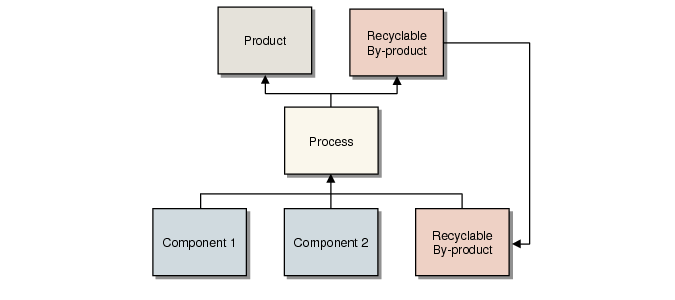
A Recyclable By‑product Process illustrates a recyclable by-product process.
A Recyclable By‑product Process
You set up a structure for a recyclable by-product by:
• Entering an item number for the recyclable item.
• Adding a recyclable item to a product structure/formula. Typically, you enter two product structure/formula records for each recyclable by-product:
• One for the component requirement—a component going into the process—entered as a positive quantity.
• One for a recyclable by-product—a component coming out of the process—entered as a negative quantity.
To set up a structure for a recyclable by-product, complete the following steps:
1 In Item Master Maintenance (1.4.1), enter:
Item Number
Enter an item number for each recyclable by-product. Use a single item number even if the item requires reprocessing after it is received as a by-product and before it is reintroduced as an ingredient of a process.
2 In Product Structure Maintenance (13.5) or Formula Maintenance (15.5), enter:
Component Item
Enter the item number of the recyclable material.
Reference
Enter a code to differentiate between a component requirement and a recyclable by-product. Typically, component requirements have blank reference codes. Recyclable by-product codes are user defined.
Qty Per
Enter a quantity for this product structure or formula. For a recyclable by-product, enter a negative number to indicate the quantity expected to be recovered from the process. For a component requirement, enter a positive number to indicate the full amount required.
LT Offset
Enter the number of days to be added to the work order start date to determine when the by-product is available for supply.
Op
Enter the operation for which the by-product is available or the operation for which the component is required.
Once these steps are complete, you can:
• Print work order picklists with component requirements summarized by operation.
• Roll up costs using the net material requirement for the component (quantity required less the quantity produced).
• Run MRP and have it recognize the demand and supply of the recyclable materials—by-product supply is negative demand.
• Receive by-products using Work Order Component Issue (16.10), Work Order Receipt Backflush (16.12), or Work Order Operation Backflush (16.19) for the operation where a by‑product is expected, by entering a negative quantity to receive.