Defining Control Settings
Use two programs to specify control and default values for work order processing.
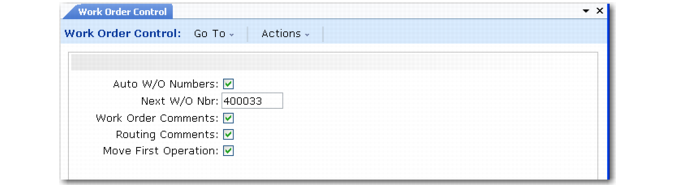
Work Order Control (16.24) includes several settings that mainly affect numbering and comment defaults. An additional field affects the work order release process.
Work Order Control (16.24)
Move First Operation
This field determines whether the work order release function sets the status of the first operation to Queue. If No, the operation status is left blank and must be changed manually.
This field is typically set to Yes. The released order then appears on the dispatch list for the specified work center and the Queue status indicates it is waiting to be started. If a lengthy picking effort is required, the work order may not be ready as soon as it is released. In this case, set this field to No. Use Operation Move to change the status later.
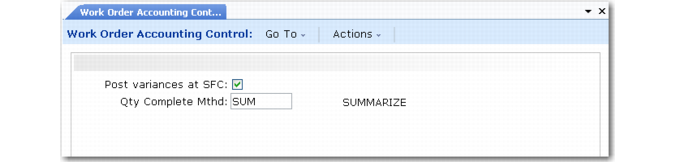
Work Order Accounting Control (36.9.11) includes two settings that impact the general ledger transactions created by work orders.
Work Order Accounting Control (36.9.11)
Post variances at SFC
This field sets the default for the same field in Work Order Maintenance.
Yes: Labor and burden variances are calculated and posted whenever shop floor labor feedback transactions are entered.
No: Variances are suppressed and not calculated or posted until the work order is received.
Setting this field to No reduces the number of variance transactions posted to the general ledger, particularly if there are many shop floor labor transactions processed before material receipts are recorded.
If you have very long run times, set this field to No, suppressing variance calculations until finished product is received. If you have short run times, set this field to Yes.
Quantity Complete Method
The value of this field defaults to Process/Formula Maintenance (15.18) and Co/By-Product Maintenance (15.12.1) and affects the calculation of mixed variances. See
Calculating Mix Variances for Joint Orders.