Manually Controlling Due Dates
When you create an order in Work Order Maintenance, the due date is calculated from the release date. The calculation begins by setting the release date to the current date, then uses the manufacturing lead time and shop calendar to calculate the due date.
To define either the release or due date and have the program calculate the undefined date, enter the defined date and enter a question mark for the date you want calculated. The system calculates the date for the field containing the question mark using the date from the other field and the operation times from the item routing.
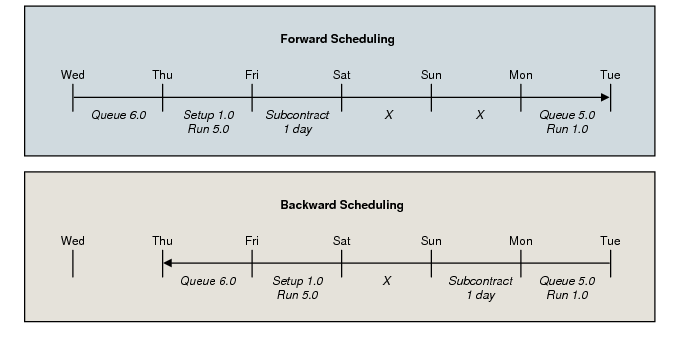
• If you enter a release date and enter a question mark in the Due Date field, the system calculates the due date by starting at the beginning of the release date and forward scheduling starting with queue time for the first operation.
• If you enter a due date and enter a question mark in the Release Date field, the system starts at the end of the due date and backward schedules by starting with the last move time for the last operation.
• If you leave both dates blank, the release date is set to today’s date and forward scheduling is used.
Note: In all cases, the order quantity is used in calculating run time.
Sample Schedule Setup
|
|
Queue
|
Setup
|
Run
|
Subcontract
|
|
Operation 10
|
6
|
1
|
.05
|
|
|
Operation 20
|
|
|
|
1 day
|
|
Operation 30
|
5
|
|
.01
|
|
Operation Times
Different release and due dates are possible using forward versus backward scheduling. This is because some lead time components are scheduled in shop days and some in calendar days. A shop day lead time component may be in effect over a weekend in one direction, whereas in the opposite direction, a calendar day component may be in effect.