Creating Repetitive Schedules
A repetitive schedule is a statement of planned output for a production line for one day. It consists of a list of scheduled quantities and due dates. A repetitive schedule controls the same activities as a work order. However, because it is used for continuous process manufacturing, it issues components from inventory by backflushing. This method deducts the required quantities from inventory when order quantities are reported as complete.
If you used Line Schedule Workbench (18.22.1.10) or Planned Repetitive Sched Approve (23.8) to create a line schedule, use Repetitive Schedule Update (18.22.1.18) to turn the line schedule into a repetitive schedule. Otherwise, create repetitive schedules using Schedule Maintenance (18.22.2.1).
Updating a Repetitive Schedule from a Line Schedule
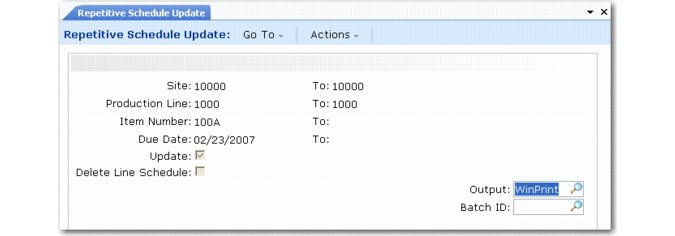
Once you are satisfied with a line schedule in the workbench, use Repetitive Schedule Update (18.22.1.18) to generate the repetitive schedule or update an existing one.
Repetitive Schedule Update (18.22.1.18)
You can delete the line schedule as you update, or retain it. Typically, you retain the line schedule, since you can continuously maintain it by adding new MRP orders. However, you can use this function to delete an unneeded simulation by setting Update Repetitive to No and Delete Line Schedule to Yes.
Example: A four-week repetitive schedule for an item on a production line needs an additional week added every week. Use the workbench to schedule the new week, and Repetitive Schedule Update to update the schedule.
After updating repetitive schedules, run MRP to synchronize planned orders with the schedule changes.
Schedule Maintenance
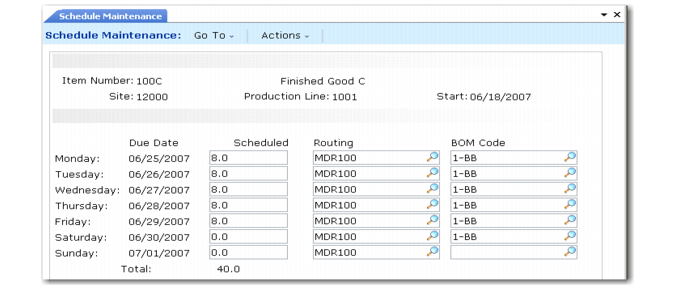
Use Schedule Maintenance (18.22.2.1) to enter or maintain daily schedules for each production line at a site. If the production line has multiple shifts, the schedule represents the total for all shifts. If there are no production lines at the site, you can enter a schedule for the whole site.
Schedule Maintenance (18.22.2.1)
The bill of material (BOM) and routing for an item on a repetitive schedule default from Item Master Maintenance (1.4.1) or Item-Site Planning Maintenance (1.4.17). You can specify valid alternates, but you cannot combine different BOMs and routings on one order.
Reviewing Repetitive Schedules
Use Production Line Schedule Inquiry (18.22.2.13) to review the production schedule for a selected production line and day.
Use Production Line Schedule Report (18.22.2.15) to review the production schedule for a range of production lines and dates.