Checking Component Availability
You can use the following component check browse collections for real-time retrieval of work order component availability, maintenance, manipulation, viewing, and reporting of production details:
• Release Production Orders by Production Line
• Manage Materials for Production Line
• Release Production Orders by Work Center
• Manage Materials for Work Center
• Monitor Material Shortages
• Purchase Direct Materials
The browse collections let you perform material component shortage checks across your selected range of work orders and order statuses. Since most manufacturers experience shortages, the component check programs let you quickly identify and analyze the shortage so that your orders can still be met.
The browse collections let you look at current and future component projected quantity on hand (PQOH) statuses. And the status check is automated in a single display, so there is no need to manually search through various reports, programs, and browses to check for shortages.
You can use the component check browse collections to drill down into component shortage information for selected jobs (work orders) to identify the root cause and possible solutions.
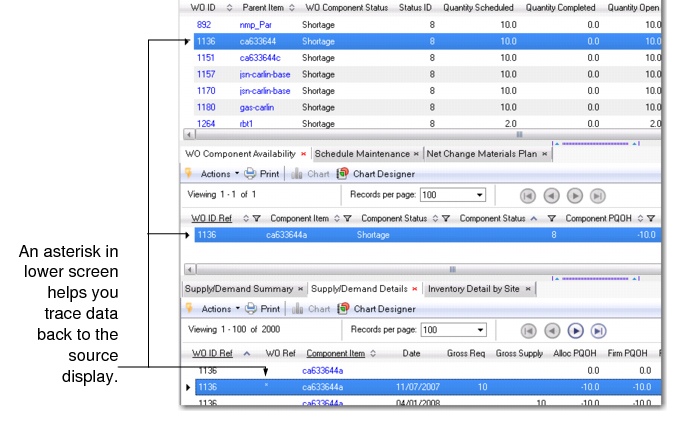
Your selection drives the data that displays in the details programs. An asterisk (*) displays in the row of data within the detail programs that relates to your selection in other browse programs. This helps you trace data back to the record upon which you are calculating component availability; see
Data Trace.
Data Trace