Demand/Supply Summary Browse
There can be hundreds of MRP detail records for the component you select; but how do the records relate to the component of the work order you selected?
For a selected work order and work order component, the system collects and totals all MRP supply and demand records prior to, and including, the work order record you selected. You can see these aggregated records in the Supply/Demand Detail Browse.
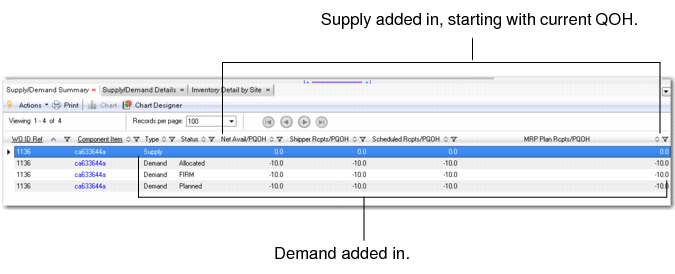
The Supply/Demand Summary Browse lets you view the aggregated records from a matrix point of view:
• The first row in the display is the Supply Row. It lists the current QOH for the work order component item and other sources of cumulative supply up through the work order component’s demand release date.
• The next three rows are Demand Rows. They list the three categories of demand. Each row starts with prior demand requirements and the gross requirements of the selected work order. Then from left to right, it adds in the current QOH, then adds in the cumulative supply to calculate the component PQOH.
This supply and demand matrix format provides you with a global view of component supply/demand.
Supply/Demand Summary
You can anticipate when a material shortage typically occurs in your production cycle to determine if your supply meets future demand. For example, if a material shortage typically occurs two to three days before a standard supplier delivery on the first of every month, you can factor in this anticipated shortage and view incoming supply to determine if the demand can be met.
Since you can view both planned and confirmed orders for short components, you can always take into account the worst-case items; that is, you can factor in orders, receipts, or work centers for items that take the longest time to process.