Using WLT Data Collection Frames
Depending on your particular tracing needs and system configuration, various Repetitive, Advanced Repetitive, Work Orders, Shop Floor Control, and Purchasing programs use WIP Lot Trace frames to collect, record, and update tracing records. The following sections discuss when these frames are activated and how they are used within each program.
Routing and routing operations become WLT controlled when:
• Trace Parents is Yes in WIP Lot Trace Control (3.22.13.24) and a routing registration does not exist for the routing being used. All operations for that routing become WLT controlled.
• A WLT routing registration is active for the routing. WLT control begins at the start operation specified in the registration record.
A component item becomes WLT controlled when it is consumed at a WLT-controlled operation and either of the following is true:
• Trace Components is Yes in WIP Lot Trace Control, or
• Trace Components is Yes in WLT BOM registrations for any BOMs that use the component.
Destination Work Center and Machine
The Destination Work Center and Machine frame appears in Repetitive, Advanced Repetitive, and Work Orders programs. Use it to specify where to move the WIP material produced at the current operation. The information entered in this frame is used to update QOH balances for the affected queues.
Example: In your Advanced Repetitive environment you have three machines in a work center that do the same job for operation 30. To trace WIP material processed by a machine, backflush the WIP material at operation 20 and use this frame to specify the machine where that WIP material will be processed during operation 30.
Destination Work Center and Machine Frame
When using Reject Transaction (18.22.16), this frame appears only when the reject‑from queue is WLT controlled. When using Rework Transaction (18.22.17), this frame appears only when the rework‑from queue is WLT controlled. For all other programs, this frame appears when:
• The current operation output queue is WLT controlled.
• The current operation is not the last operation.
• Move To Next Op is Yes.
Programs Displaying Destination Work Center and Machine Frame lists the material transfer programs that use this WLT frame.
Programs Displaying Destination Work Center and Machine Frame
Menu | Program |
16.19 | Work Order Operation Backflush |
16.20.1 | Labor Feedback by Work Order |
18.14 | Repetitive Labor Transaction |
18.16 | Repetitive Rework Transaction |
18.22.13 | Backflush Transaction |
18.22.16 | Reject Transaction |
18.22.17 | Rework Transaction |
18.22.19 | Move Transaction |
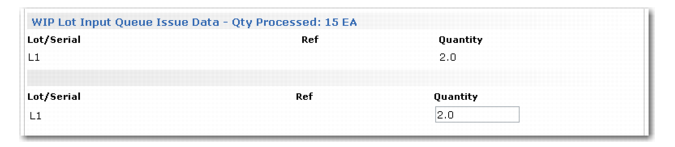
WIP Lot Input Queue Issue Data
Use the WIP Lot Input Queue Issue Data frame to register lot/serials of the WIP material being consumed at the current operation. This frame appears when the previous operation’s output queue and the current operation’s input queue are WLT controlled.
Programs Displaying WIP Lot Input Queue Issue Data Frame lists the programs where this frame appears.
Programs Displaying WIP Lot Input Queue Issue Data Frame
Menu | Program |
5.13.1 | Purchase Order Receipts |
5.13.14 | PO Shipper Maintenance |
5.13.20 | PO Shipper Receipt |
16.10 | Work Order Component Issue |
16.19 | Work Order Operation Backflush |
18.14 | Repetitive Labor Transaction |
18.17 | Repetitive Reject Transaction |
18.22.13 | Backflush Transaction |
If the current operation’s output queue is WLT controlled, these WIP lot/serials default to the WIP Lot Output Queue Receipt Data frame, (
WIP Lot Output Queue Receipt Data). That output frame appears immediately after this input frame.
WIP Lot Input Queue Issue Data
The current operation’s WIP QOH balances are updated to reflect the issue or receipt of this WIP material. The WIP lot/serials entered are recorded in tracing history as being consumed from the input queue of the current operation and produced into the output queue WIP lot/serials entered in the WIP Lot Output Queue Receipt Data frame.
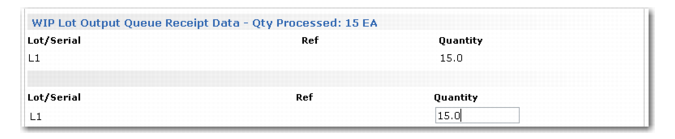
WIP Lot Output Queue Receipt Data
Use the WIP Lot Output Queue Receipt Data frame to report the WIP lot/serial numbers, references, and quantities of the WIP material produced by an operation.
This frame appears in:
• Purchase Order Receipts (5.13.1) when the output queue of the current operation is WLT controlled.
• Repetitive Labor Transaction (18.14) when the output queue of the current operation is WLT controlled and is not the last routing operation.
If the current input queue is WLT controlled, the WIP lot/serial entered in the Input Queue WIP Lot Issue Data frame defaults to this frame. Assign this lot/serial, or assign a new one to the WIP material being produced.
WIP Lot Output Queue Receipt Data
For Advanced Repetitive, the total processed is the number entered in Qty Processed. This total includes the reject and scrap quantities. For Repetitive, the quantity processed is the number entered in Qty Completed. This quantity does not include scrap or reject quantities.
Programs Displaying WIP Lot Output Queue Receipt Data Frame
Menu | Program |
5.13.1 | Purchase Order Receipts |
16.19 | Work Order Operation Backflush |
16.20.1 | Labor Feedback by Work Order |
16.20.2 | Labor Feedback by Employee |
16.20.3 | Labor Feedback by Work Center |
18.14 | Repetitive Labor Transaction |
18.22.13 | Backflush Transaction |
Reporting Reject Data
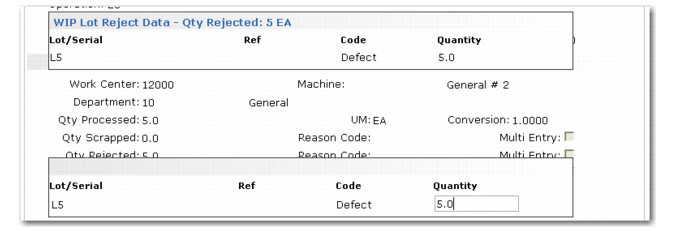
Use the WIP Lot Reject Data frame to report the WIP lot/serial numbers, references, reject codes, and quantities of rejected material. The quantity is moved from the operation’s output queue to the reject queue.
WIP Lot Reject Data
This frame appears in the following programs when the output queue of the operation for which labor is being reported is WLT controlled and a quantity is entered in Qty Reject:
• Backflush Transaction (18.22.13)
• Repetitive Labor Transaction (18.14)
• Reject Transaction (18.22.16)
• Repetitive Reject Transaction (18.17)
Reporting Scrap Data
Four WLT frames are used to record lot/serials, references, scrap codes, and quantities of WLT-controlled material being scrapped from an operation’s input, output, or reject queues:
• WIP Lot Scrap Data
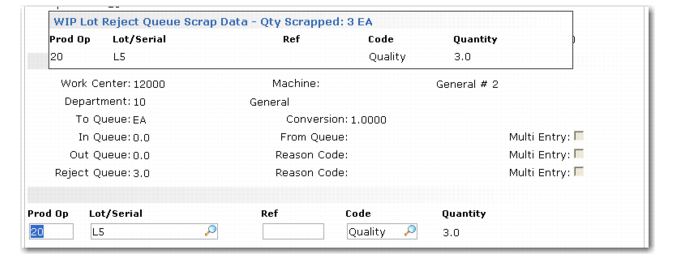
• WIP Lot Reject Queue Scrap Data
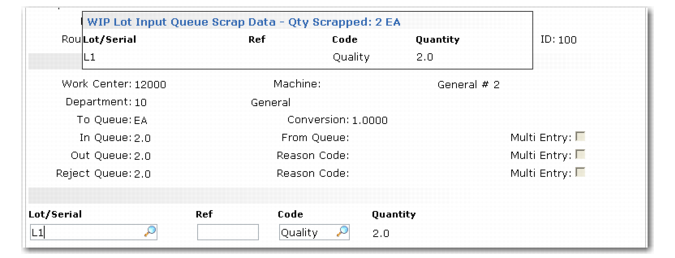
• WIP Lot Input Queue Scrap Data
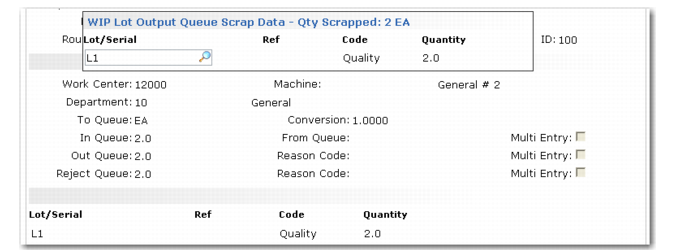
• WIP Lot Output Queue Scrap Data
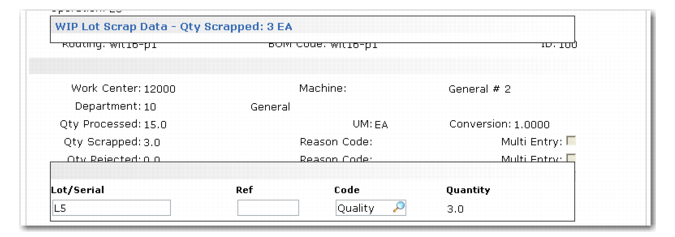
WIP Lot Scrap Data
Backflush Transaction (18.22.13) uses this frame when the output queue of the operation for which labor is being reported is WLT controlled and a quantity is entered in Qty Scrapped.
WIP Lot Scrap Data
The quantity scrapped is deducted from the lot quantity entered in the WIP Lot Output Queue Receipt Data frame. It is added to the cumulative scrapped quantity.
WIP Lot Reject Queue Scrap Data
Use the WIP Lot Reject Queue Scrap Data frame to record WIP material being scrapped from an operation’s reject queue. This frame displays in Scrap Transaction (18.22.18) when a reject quantity is entered in Rjct Queue and the reject queue is WLT controlled. It also displays in Repetitive Scrap Transaction (18.18).
WIP Lot Reject Queue Scrap Data
The quantity scrapped is deducted from the WIP QOH balance for the current operation’s reject queue. It is added to the cumulative scrapped quantity.
WIP Lot Input Queue Scrap Data
Use the WIP Lot Input Queue Scrap Data frame to record the WLT-controlled material being scrapped from an operation’s input queue. It displays in Backflush Transaction (18.22.13).
WIP Lot Input Queue Scrap Data
The quantity scrapped is deducted from the WIP QOH balance for the current operation’s input queue. It is added to the cumulative scrapped quantity.
WIP Lot Output Queue Scrap Data
Use the WIP Lot Output Queue Scrap Data frame to record the WLT-controlled material being scrapped from an operation’s output queue. It displays in Scrap Transaction (18.22.18).
WIP Lot Output Queue Scrap Data
Recording Labor Data
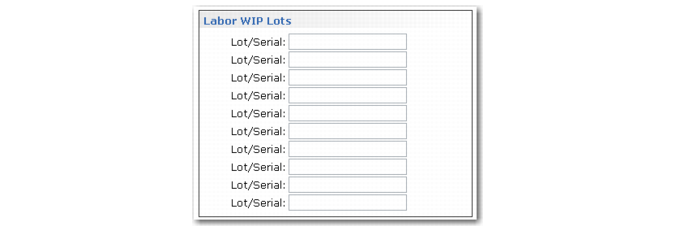
Use the Labor WIP Lots frame to associate run and setup labor time with corresponding lot/serials. This frame appears in the following programs when the output queue of the operation being processed is WLT controlled:
• Repetitive Setup Transaction (18.13)
• Run Labor Transaction (18.22.14)
• Setup Labor Transaction (18.22.15)
Labor WIP Lots
Labor time reporting is not required. Any labor WIP lot/serial numbers entered are not validated. This frame links the labor and employee to the specified WIP lot/serial numbers. Labor time is reported as produced material by WLT reports.
Recording Rework Data
Use the WIP Lot Rework Data frame to specify the WIP lot/serial to rework. Optionally, use this frame to assign new WIP lot/serials to that WIP material.
The WIP Lot Rework Data frame appears in the Repetitive Rework Transaction (18.16) and Rework Transaction (18.22.17) when the reject‑from queue is WLT controlled. This frame appears immediately after the Destination Work Center and Machine frame.
WIP Lot Rework Data
Items reworked can come from a previous operation’s reject queue. Use the lookup on the Lot/Serial field to select the correct value.
Before moving the reworked WIP lot/serial to the destination locations, the system checks the following settings in WIP Lot Trace Control or in the corresponding WLT routing and BOM registrations:
• Split WIP Lots
• Combine WIP Lots
• Max Lot Size
When you move reworked WIP lot/serial quantities to the last operation in a routing, you must enter material receipt information for the reworked WIP lot/serial. Receipt information is entered using the Receipt Data Input data frame. Values for Qty, UM, and Lot/Serial default from the values you previously entered in the transaction; Multi Entry is not editable. Lot/Serial and Ref default from the values you entered in the WIP Lot Rework Data frame.
QOH and Queue Balances
The information you enter in the WLT frames is used to adjust QOH balances and cumulative accounts for the input and output queues of the affected operations. The reject queue from where material was moved is reduced by the quantity reworked. The quantity reworked is added to the cumulative reworked, consumed, and produced quantities for the WIP lot/serial. When you receive reworked material into finished material inventory, that quantity is reduced from the QOH of the output queue of the last operation.
WIP Lot Move Data
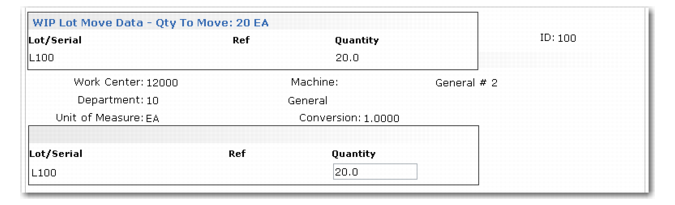
Use the WIP Lot Move Data frame to record the WIP lot/serials, references, and quantities of material being moved. This frame does not appear if you are moving WIP quantities to finished goods inventory. Instead, the Receipt Data Input frame appears for receipt of finished goods into inventory.
You can use a WIP lot/serial number as the finished item lot/serial number. If you are using lot groups (a feature of the Regulatory Attributes module) to create automatic lot numbers, that function creates and assigns the lot/serial number for this finished item. The lot/serial assigned to the finished item is saved to WLT tracing history.
WIP Lot Move Data Frame
The WIP Lot Move Data frame follows the Work Center and Machine frame in Move Transaction (18.22.19). Use the frame to specify quantities to move from the output queue of the indicated operation to the input queue of the next operation.
This frame appears in Sub Shipper Maintenance (18.22.5.5) and Sub Container Maintenance (18.22.5.4) when moving WLT‑controlled WIP material to a subcontract operation. The lot/serial quantities you enter are moved to the subcontract location when you confirm the shipper using Sub Shipper Issue (18.22.5.11).
This frame also appears in Operation Move Transaction (16.20.6) immediately after the Source/Destination Work Center and Machine frame. The WIP lot/serials you specify in the WIP Lot Move Data frame are moved from the source location to the destination location you specify in the Source/Destination Work Center and Machine frame.
Current Work Center and Machine
Use this frame to specify the work center and machine location from which input WIP lot/serials will be consumed by the operation. For example, using Work Order Component Issue (16.10), this frame appears after you indicate the work order number, ID, and operation from where the components or WIP material will be issued.
The Current Work Center and Machine frame appears in Work Order Receipt (16.11) and Work Order Component Issue (16.10) when the operation being processed is WLT controlled.
Current Work Center and Machine Frame