Defining Specifications
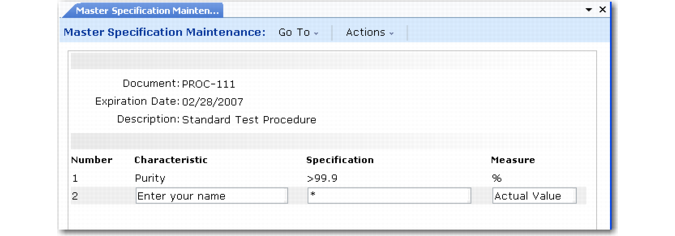
When a set of tests apply to more than one item, set up the specification in Master Specification Maintenance (19.1.1). A master specification is a list of index numbers, characteristics, specifications, and units of measure, and additional information entered as transaction comments.
You can include tolerances, or acceptable deviations from standard value. These specifications are used by quality orders and in-process inspection operations.
Master Specification Maintenance (19.1.1)
The index numbers associated with characteristics and specifications must be unique but need not correspond to an actual test or inspection sequence.
Specification Values
A specification can take any of the following forms:
• A character string. This is a list of elements separated by semicolons. For example, if acceptable colors for an item are gray and black, the specification is gray;black.
• A numeric value with a tolerance. This is stated as a range, with minimum and maximum values separated by the pipe (|) character (Shift+\). For example, if the idle speed of an engine is 1000 +/– 150 rpm, the specification is 850 | 1150.
You can also designate a range within a range. In the previous example, a range of +/– 50 rpm, together with a tolerance of +/– 150, is designated by the string 850 | 950 | 1050 | 1150. The system looks only at minimum and maximum values, but this format allows you to see the optimal range within a tolerance.
• A comparative symbol (<, >, <=, or >=) and a numeric value. This type of specification provides a value against which a measurement is seen as less than, more than, less than or equal to, or more than or equal to. For example, if the acceptable weight for an item is less than 25 grams, the specification is entered as <25.
• An asterisk (*), indicating a wildcard value. This allows any value to be recorded and accepted, a useful feature for collecting data for failure analysis.
Note: You can record the name of a tester by calling the first test Name and defining its specification as the wildcard. The first required test result is then the tester’s name.
Defining Item Specifications
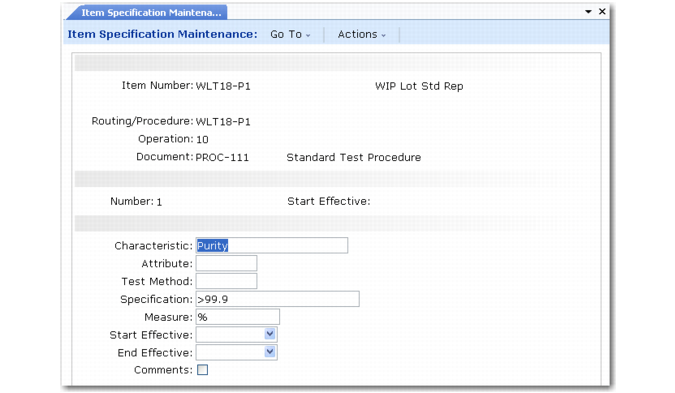
Use Item Specification Maintenance (19.1.13) to attach a set of specifications to a routing or quality control operation. You can use a master specification as a template. You can change and add to the information that comes from a master specification.
An item specification can list several characteristics and specifications, but only for a single item and a single operation. Also, a quality control operation is linked to only one item specification. Each specification can include any number of steps, indicated by the Number field.
If several item specifications are required to inspect an item, they must be spread out over several operations, one operation for each specification.
Item Specification Maintenance (19.1.13)
If an item does not have a routing or procedure, you can still link it to a specification by leaving Routing/Procedure blank and Operation as zero (the default).
Use specifications to record information about sample size. For instance, you can set up an item specification with three test steps:
• One for sample size
• One for quantity accepted
• One for quantity rejected
Item specifications can be maintained in the Product Change Control module. The effective date is used to phase in changes managed with product change orders.
See User Guide: QAD Master Data for information about the PCC module.