Troubleshooting Lot Trace Workbench
In an ideal manufacturing environment, all processes flow in the correct sequence as shown in
Example of an Item’s Process Flow. In some cases, when ERP actions are performed out of sequence, you may not be able to see all the required data when tracing backward.
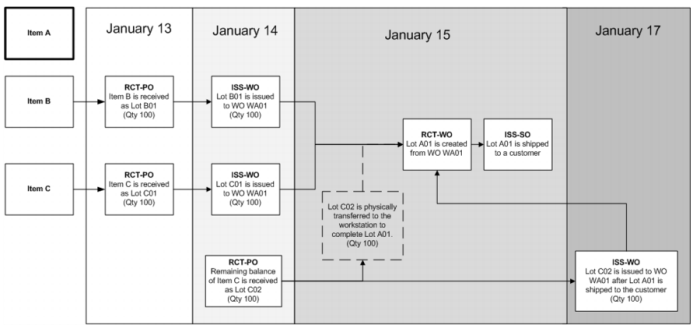
Tracing Backward expands on the example in
Lot Trace Workbench Flowcharts. In this example, the supplier splits item C into two shipments. The first shipment is received as Lot C01 on January 13 and the next day, lot C01 is issued to WO WA01. The second half of the shipment for item C is received as lot C02 on January 14 and they are physically moved to the workstation to complete the order for item A, but the parts are not issued to WO WA01. The workstation makes item A, creates lot A01 from WO WA01, and then ships lot A01 to the customer. A couple of days later, lot C02 is issued to WO WA01.
Because lot C02 was issued to WO WA01 after the lot for item A was received and shipped, when you perform a backward trace using the sales order number, you would not be able to see that lot C02 was issued to WO WA01. To see that lot C02 was issued to WO WA01, you must perform a backward trace using the work order number (WO WA01).
Tracing Backward