Create Live Main Database
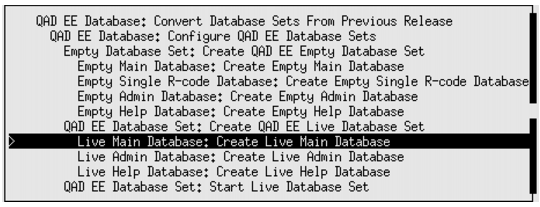
Conversion Option Menu
Note: The Edit Database Locations screen now allows you to specify the processes used to startup and shutdown the live main databases. The options for starting and stopping databases are dbman and dbman, proserve and proshut, and dbman and proshut, respectively.
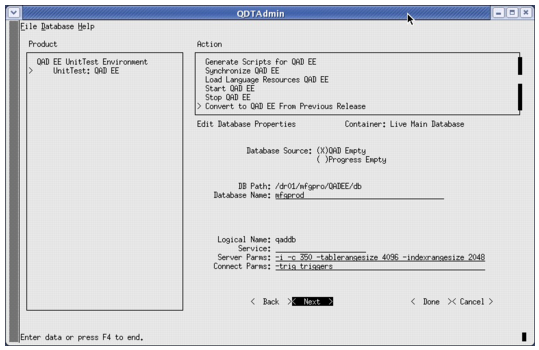
Live Main Database Option Screen 2
3 Modify the Server Parms field to include the -i setting as indicated in the figure.
4 Select Next.
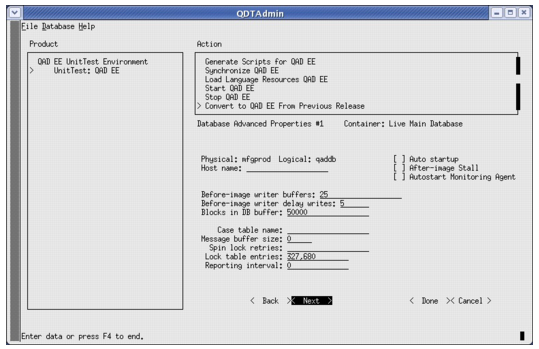
Live Main Database Option Screen 3
6 Select Next and press Enter four times. You are now on the sixth menu screen for Live Main Database: Create Live Main Database.
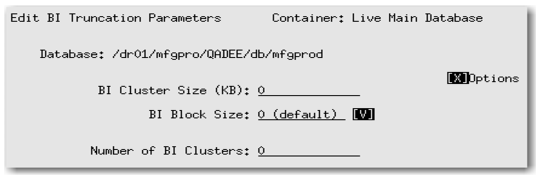
7 Tab to the Options field and press Enter to bring up more settings as shown in
BI Block Options.
BI Block Options
8 Change the BI parameters as follows:
• BI Cluster Size (KB): 32768
• BI Block Size: 16k
• Number of BI Clusters: 6
These changes to the BI cluster size can greatly improve performance, but could lead to issues at the compile step. If you encounter difficulties, change these settings after the compile step by running the following command:
proutil mfgprod –C truncate bi –bi 32768 –biblocksize 16