Manufacturing/Supply Chain Enhancements
Enterprise Asset Management Integration
EAM 2015 is now available to run in the same instance of the AppShell and in the same workspaces as EE. It is visible in the EE menu when properly licensed.
Serialization
Important: Serialization is currently in Limited Availability status and requires a special license code to unlock. Please contact your QAD representative for information.
The Serialization functionality introduced to QAD Enterprise Applications consists of the item serialization and the license plate inventory management capabilities. It provides a framework for tracking and tracing both lot numbers and serial IDs independently, but linking them together where both are used. Serialization provides accurate, real-time data updates on inventory processing and resolves inventory track and trace issues. By providing unique serialized IDs to every level of the packaging, serialization capabilities combat counterfeit efforts. The following topics discuss the individual functions that Serialization provides.
Packaging
Serialization functions let you:
• Define any type of packaging unit—boxes, cases, or pallets, for example—and any number of packaging levels.
• Define packaging structures based on item, origin, or destination.
• Assign label formats by packaging type, origin, or destination.
• Attach printed label IDs to packs, which become the identifier for your product or package. By using the serial IDs assigned to packaging units, material handlers move inventory more efficiently, which, in turn, moves the entire content of a package.
• Build packs, remove inventory from packaging units, and decommission package structures.
Serialized Data Management
Serialization functions let you define serial ID ranges according to various industry standards. You can generate serial numbers on request.
You can track and trace a serial ID throughout its lifecycle from creation, commissioning, receiving to inventory, aggregation onto a packaging unit, issuing, and shipping to a customer.
Using Serialization functions, you can also change pack stages between inactive stages.
Serialized Inventory Management
Serialization functions provide an efficient way to manage packaged inventory. They provide the capabilities to identify inventory with unique packaging units during order processing. You can capture, store, and retrieve unique serial ID records for each packaging unit level. Serialization helps you increase material handling efficiency and inventory accuracy.
You can use Serialization functions for discrete order processing during:
• PO receipts, including PO lines for subcontract work and supplier scheduled orders.
• SO and customer scheduled order shipping and truck loading. Serialization provides transactions for specific picking, packing, and truck-loading activities before goods are issued or dispatched.
• Returns for POs, supplier scheduled orders, SOs, customer scheduled orders, and DOs.
Note: Serialization supports supplier consignment and customer consignment. You can receive goods by pack into inventory as supplier consignment. You can also ship packs of non-serialized items to your customer as consignment.
You can use Serialization functions for production processing during:
• Component transfer or stock movements on the shop floor
• Component issues
• WO receipts
You can also use Serialization functions for repetitive and advanced repetitive processing during:
• Component transfer to the shop floor
• Finished goods receipts
• Backflush transactions
• Finished goods transfer
• Scrap and reject of components
You can use Serialization functions for cycle counting and physical inventory.
Communication and Integration
Serialization lets you:
• Communicate externally with customers or trading partners to request new serial numbers for production.
• Communicate production status of a serial number.
• Communicate serial numbers shipped to a particular destination.
Communication can be done through EDI or through specific ePedigree protocols to exchange data from and to specific portals, and through reports.
APIs and the integration foundation of QAD also provide for easy internal communication with other application systems, such as Manufacturing Execution Systems (MES), Line Management Systems (LMS), and data collection devices.
Item Attributes and Quality Control
QAD Item Attributes and Quality Control (IAQ), which is available in EE 2015, provides manufacturing companies with critical control over product quality through centralized visibility of tracking quality issues during the manufacturing and distribution processes. QAD IAQ ensures that all items meet product quality standards and specifications from the point of receipt, through production, to customer shipment.
QAD IAQ allows you to assign specific attributes to items such as quality specifications, use-by dates, or country of origin to ensure that you meet the quality specifications required by your customers or industry and governmental regulators.
Note: The existing Quality functionality is still available and it has been moved to the QM Quality Management menu (19.26).
Values and Benefits
The primary value you will receive from QAD IAQ will be improved visibility into product quality. You will resolve quality issues earlier in the process, resulting in fewer defects, returns, and recalls. You will be better able to achieve your performance targets for key customer satisfaction and fulfillment metrics.
Additionally, QAD IAQ:
• Improves product quality tracking. Allows assigning, tracking and documenting key product specifications for items, and provides visibility from supplier receipt, through manufacturing to final customer shipment.
• Streamlines the receiving process. Allows defining multiple test specifications for incoming raw materials and components, ensuring that you only receive and send to production approved quality materials.
• Supports regulatory compliance. Captures and reports item attributes required by government or industry regulations to simplify regulatory document filing.
• Reduces customer returns. Provides required documentation to prove that products produced and shipped adhere to customer specifications.
• Improves inventory visibility. Provides better visibility through centralized storage of key item attributes and specifications; ensures improved inventory accuracy during purchasing, manufacturing and shipping.
• Reduces time and effort for quality compliance. Streamlines production processes by automatically generating quality test orders and ensures that parts adhere to required quality standards prior to moving to the next stage of production.
• Reduces product recall scope and costs. Enables prompt response to customer complaints, adverse events, and auditor inquiries using forward and backward lot tracking and tracing for products, which reduces product recall scope and costs.
Key Features
• Assigns key product specifications to any raw material, component, and sub-assembly material used in the manufacturing process, resulting in improved quality and better visibility of defect issues
• Tracks key components and finished products through the manufacturing and distribution processes to enable rapid identification of products that are subject to recall
• Captures unlimited generic or qualitative characteristics by item, lot, or sub-lot—supporting required documentation and reports for auditors, as well as for industry and government regulators such as RoHS, Dodd-Frank, cGMP
• Allows multiple item attributes, such as acquisition and use-by dates to items, assigned to lots and sub-lots—meeting customer-specific requirements and reducing product spoilage
• Allows assigning country of origin to raw materials, components, and finished products for governmental and regulatory reporting
• Provides control over product usage and shipment based on item profiles specific to bills of material, or specific customers or unique orders
• Defines multiple product specifications at various levels including items by supplier, work-in-process, items by customer, and finished goods
IAQ Integration with QAD QMS for NCR/CAPA
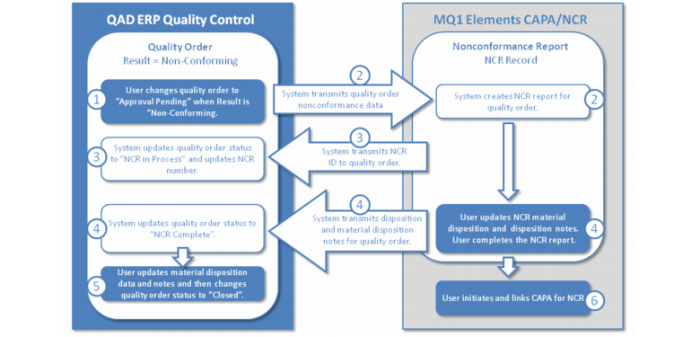
Item Attributes and Quality Control (IAQ) is integrated with QAD QMS for NCR/CAPA. A non-conformance report (NCR) is an analysis of a material non-conformance and a statement of actions that should be taken as a result of the non-conformance. Corrective Action and Preventative Action (CAPA) describes the specific activities to address and to prevent a non-conformance.
The IAQ and QAD QMS integration eliminates redundancy and duplicate data entry, and it assures the initiation of non-conformance reports. Quality orders that have a non-conforming quality result provide the source data for NCR. The following graphic displays the process flow when IAQ is integrated with QAD QMS for NCR/CAPA:
Periodic Costing
The following topics discuss enhancements for this release.
New Periodic Costing Utilities Submenu
A new Periodic Costing Utilities submenu (30.5.7.25) is now available in the Periodic Costing Calculation Menu (30.5.7). It provides numerous verification and balance reports. Use the reports for reconciliation purposes:
New Periodic Costing Utilities
Menu Number | Periodic Costing Utilities Menu | Description |
30.5.7.25.1 | PC Inv Verification | This report lets you verify that the operational inventory transactions add up to the same amount as the value posted to GL. |
30.5.7.25.2 | PC WIP Calc Verification | Use this function to verify that the values added to and subtracted from WIP by the operational transactions add up to the same amount as the value posted to GL. |
30.5.7.25.3 | PC Journal Validation | You use this report to verify that all data from Periodic Costing is posted correctly to GL. You can review and validate Periodic Costing journal postings. |
30.5.7.25.13 | PC Inventory Account Balance Report | This report is useful to see inventory movement by items. You can view account balance data. You specify the year, period, entity code, and whether the report displays empty lines. |
30.5.7.25.14 | PC WIP Balance Report | Use this report to view WIP balance data. You can specify the debit account, year, period, entity code, and whether the report includes zero amount work orders. The report displays the account and sub-account, cost center, beginning balance, period movement debit and credit, and ending balance at the top portion. |
30.5.7.25.15 | Labor Burden Reconcile Report | Use this report to view labor burden data so that you can reconcile discrepancies. |
New Operations Reports
This version provides several new operations reports in the Periodic Costing Operations Reports Menu (30.5.15):
New Periodic Costing Operations Reports
Menu Number | PC Operations Reports Menu | Description |
30.5.15.6 | PC WO WIP History Inquiry | Use this inquiry to view WO WIP history data. You can specify the cost set and operation type, which are mandatory fields; then specify whether the WO master, WO detail, or WO routing data displays in the inquiry. |
30.5.15.13 | Operational Trans Detail Inquiry | Use this inquiry to view operational transaction details. |
30.5.15.14 | Op Operational GL Transactions | Use this browse to view GL transaction data, including the transaction number, GL reference, effective date, reference ID, GL transaction type, account, sub-account, cost center, project, BC debit and credit, documents, orders, item number, site, entity, ID, and operation. |
30.5.15.24 | Operational Inv Transactions | Use this browse to view inventory operational transactions. You can view the transaction number, GL reference and reference ID, GL transaction type, account and sub-account, cost center, project, BC debit and credit, and more. |
30.5.15.25 | WO Receipts | Use this browse to view WO receipt data including the transaction number, effective date, transaction type, date, order, item number and description, site, location, location quantity change, transaction price, standard amount, Periodic Costing unit cost and amount, entity, address, and cost set. |
30.5.15.27 | Operation Transaction | Use operation transaction to view operation and labor transaction data, including the WO number and ID; item number; operation number and description; transaction number and type; effective date; employee; setup and run time; quantity completed, rejected, reworked, and scrapped; labor and burden cost standard; Periodic Costing amount; labor type; PO and receiver number; work center, department, and machine; and sequence number. |
30.5.15.28 | Subcontract Receipts | Use this browse as a drill down to view subcontract receipt data including the transaction number, effective date, transaction type, date, order, item number and description, site, location, location quantity change, transaction price, standard amount, Periodic Costing unit cost and amount, entity, address, shipper number, operation ID, and flag. |
30.5.15.29 | PC Cost Detail | Use this browse as a drill down to view operation cost adjustment transactions, including the transaction number and type, cost set and cost element, and level data. The report supports six transaction types. |
Additional New Reports
Two new reports were added:
• PC Cost Fluctuation Report (30.5.17.16)
• .NET UI SF Movement Report
PC Cost Fluctuation Report
The PC Cost Fluctuation Report was added to the Periodic Costing Accounting Reports Menu (30.5.17). Use the report to determine when any item’s unit cost varies by a large amount compared with previous periods after you run PC Calculation using either WAVG or FIFO methods.
New SF Movement Report
A new .NET UI-only WO Close Variance Item Summary Report was added to the Inventory and SF Movement Reports menu (30.5.19). You can use the report to view WO close variance item data. You can view how WO close allocates remaining WIP cost to co-/by-products in the Inventory and SF Movement Report.
New Grouped Site Logic
There is new behavior implemented for grouped sites:
New Grouped Site Logic
Function | Description |
Transfer or perform DRP between grouped sites | Periodic Costing calculation handles transfers between sites that are in the same group as local transfers. The Periodic Costing unit cost is no longer affected by them. Previously, intersite transfers and DRP were processed in DRP receipt calculations before the unit cost calculation. Now, all local transfers are processed after unit cost calculations. |
Apply PC unit cost adjustment to grouped sites | You can use PC Unit Cost Adjustment (30.5.5.1) for a site in a group to adjust a period cost. The system creates the PCCST-AD transaction for every site in the group and applies the PC calculation to the new unit cost to all sites in the group. This functionality is also available when you use PC Unit Cost Adjustment Upload (30.5.5.4). |
Account balancing for grouped Sites | Periodic Costing now does account balancing across all sites in the group. |
View grouped sites in inventory and SF Movement Report | Inventory and SF Movement Report (30.5.19.1) now shows all grouped sites as one. The report now displays all sites in the group data when you choose any site from the group. Previously, the report did not show grouped sites together. |
Standardized FIFO Negative Stock and Unit Cost
The system now consumes negative transactions in previous-period inventory. PC Calculation (30.5.7.1) no longer results in negative stock and negative unit cost when there is no over-issue. Previously, using PC Calculation, the following scenarios resulted in negative stock or negative unit cost:
• When the location inventory quantity increases through SO returns. This can increase quantity to previous or current periods and cause rework of ISS-WO issues for more receipts in a bucket.
• When negative RCT-WO issues are more than positive RCT-WO issues in one bucket and WO close is in the same period.
• When no WO close is in the same period and there is not enough inventory in the period. In this scenario, the system costs RCT-WO as 0 (zero), and the unit cost calculation results in negative quantity and 0 unit cost.
Previously, the following scenarios resulted in negative stock using FIFO:
• ISS transactions:
• The period has no receipt but has an ISS transaction with a positive location quantity change.
• When you make cross-site ISS transaction corrections, the system adds to the earliest period with a quantity.
• ISS-WO transactions:
• When these occur, and the system consumes the current period quantity and you conduct a unit cost calculation for the current period, this can result in negative unit cost.
• Cycle count or unplanned receipts with a rework for ISS-WO issues that are more than one receipt in one bucket can result in negative unit cost also.
• The location inventory quantity increases by an in-site transfer and rework ISS-WO issues are more than receipts in a single bucket.
Now, with standardized negative stock and unit cost enhancements:
• Negative order receipts consume the quantity from previous period. When non-order receipts add quantity to the previous period—for example, through SO returns—the system processes them before the negative order receipts. When a unit cost calculation results in 0 or negative unit cost, the system sets the unit cost to that of the latest period with unit costs, and posts deviations to discrepancy.
• Negative receipts are considered as corrective action of positive receipts. When the total quantity is negative for a unit cost calculation, there is a correction for the previous period, So, the system absorbs negative stock by previous periods.
• You can maintain prior period unit cost in PC Unit Cost Adjustment (30.5.5.1) when it does not exist. Where no previous period has costs, the system logs the exception in the exception log.
• When PC Unit Cost Calculation results in 0 or negative costs, the system sets the cost to the one from the latest period with cost and post-cost deviation to discrepancy.
New Functions for Processing Costs for Newly Added Products
With this release, the system includes new functions and processes for evaluating costs for newly added products.
You can now use PC Unit Cost Adjustment (30.5.5.1) to create a prior period for new items that you added after Periodic Costing initialization.
Previously, when Periodic Costing calculated the unit cost—referred to as the prior-period cost—for new items that you added after Periodic Costing initialization, there was no prior period to which to refer. Now, for FIFO and WAVG methods, you can establish an initial cost set prior to the period for which you added the item using PC Unit Cost Adjustment.
Zero or Negative Unit Cost Now Reset to Latest Period Cost
For some items and sites, occasionally, there is no Periodic Costing unit cost for the period or the Periodic Costing unit cost is negative. In these situations, the system now resets the current period unit cost to the cost at the latest period that has unit cost so that the inventory quantity can be costed properly. Previously, when there were issue or receipt transactions, which increased or decreased inventory in the current period, the system set the cost of the inventory quantity as 0 or a negative unit cost.
PC Calculation Enhancements
Several enhancements were made to PC Calculation (30.5.7.1):
• General Enhancements
• Improved PC Calculation Performance
• New PCCSTCOR Transaction
• Periodic Costing Calculation Exceptions Now Display
General Enhancements
You can now determine which transactions are not processed by PC Calculation.
• In Transaction PC Cost Browse, you can select records by using the condition “Sequence contains 000000000” to select all transactions that are not processed by PC Calculation.
• PC Calculation no longer processes RCT-UNP transactions as receipts.
• For WAVG, the system costs RCT-UNP using current period cost. For FIFO, the system costs RCT-UNP with positive quantity using the current period cost; RCT-UNP with negative quantity is considered an issue,
Improved PC Calculation Performance
This release provides the following PC Calculation performance improvements with summarized ISS-WO and Op_Hist records:
• The system summarizes multiple ISS-WO of the same component issued from the same location in the same operation and generates a PCISSWOT transaction for the summary.
• The system summarizes operation transactions by WO ID, operation, department, work center, and machine. The system summarizes multiple operation transactions by department, work center, or machine, depending on the transactions, and generates the PCLABORT transaction for the summary.
• The system does not generate a PCISSWOT or PCLABORT if there is only one transaction for a particular combination of the key fields mentioned above. In this case, the PC amounts are added to the respective individual transaction.
Also, note the following ISS-WO improvements:
• ISS-WO of the reworked item is costed as the latest period with cost.
Previously, for example, if you had an ISS-WO for -10, another for + 10, then you deleted the WO bill and closed WO accounting, then ran PC Calculation, the ISS-WO was not processed before the WO close, the material cost was incorrectly calculated and displayed as such in PC WO WIP History Report (30.5.15.2), and the remaining WIP was 0.
• When using WAVG, and for a rework work order, when the previous period has no quantity but has cost:
• ISS-WO of the reworked item is costed as the latest period with cost.
• The system adds the quantity to the unit cost calculation of the current period.
• The system logs the exception when no previous period has costs.
Previously, the work order issue transaction (ISS-WO) for a reworked item was costed as 0 when the previous period had no quantity.
• When using FIFO, and for a rework work order, when the previous period has no quantity but has cost:
• ISS-WO of the reworked item first consumes the quantity from the previous period.
• When the previous period has insufficient quantity, the system costs the remaining quantity as the latest period with cost and considers it in the unit cost calculation of the current period.
• When there is no need to refer to previous cost that did not exist, the system logs the exception when no previous period has cost.
The system now simplifies the calculation for intra-site transfer issue transactions (ISS-TR/DO/GIT) and receipt transactions (RCT-TR/DO/GIT). The system does not create GL (trgl_det) transactions for these types of records. The system revalues the transaction amount at the PC value. The PCACCBAL transaction handles any value transfers between accounts.
New PCCSTCOR Transaction
When the PC unit cost calculation results in negative values for any of the cost elements, the system now creates the PCCSTCOR transaction to reset unit cost. The system records the actual calculated unit cost before the reset.
You can now view PC cost detail of PCCSTCOR for the unit cost before unit cost is reset in the PC cost calculation in the Transaction PC Cost drill-down.
Periodic Costing Calculation Exceptions Now Display
The Periodic Costing Calculation program generates exceptions during the calculation that show transactions that were not processed as expected so that you can identify the reason and make corrections. You can use the program-supplied exception log or the PC Exception Log Browse (30.5.7.2) to quickly view the transactions that cause the exceptions. The exceptions are typically due to unexpected data values. The exceptions that display in the log or report are:
• Not enough quantity for a negative receipt WO.
• Discrepancy during WO close when there is negative WIP.
• When the system processes PC total cost adjustment, the full adjustment value cannot be deducted from the first level and subsequent lower-level costs, and the remaining value is booked to the discrepancy account.
• PC total cost adjustment will not take effect when there is no inventory quantity of the period.
• When a WO receipt is done with 0 (zero) WIP value.
• When an invoice is not matched and when you set Use Supplier Invoice Cost to Yes in Periodic Costing Control (30.5.24).
• When transfers clearing accounts are not zero. (The transfer clearing account should be zero, assuming all ISS-TR or RCT-TR match.)
• A negative in the beginning or ending balance.
• Subcontract receipts that are missing the SUBCNT operation transaction.
Determine By-Product Periodic Cost by Last Period’s Unit Cost
The system now evaluates the by-product PC cost by the last period’s PC unit cost.
When the system calculates by-product WO receipts and base item WO closures, it evaluates by the last period PC unit cost. Previously, when PC processed a by-product’s WO receipt or closure, the system used the by-product’s standard cost because there was no method for you to determine the PC unit cost for the previous period when there was no quantity in that period.
Now, you can modify a by-product’s low-level cost of the last period, so the system can use the data to evaluate the current period cost.
For co/by-product items, the system does not create a GL transaction for PC and does not calculate the ending cost correctly when the accounting period close is not in the same as the WO receipt period.
Determine Item’s Receipt Quantity and Element’s Receipt Cost
You can now inquire the received quantity and value by element for each item site that determines the PC unit cost.
The system creates a new inventory transaction—PCCSTCAL—for each item site when it calculates the PC unit cost of the period/bucket. The system displays the PCCSTCAL transaction data after all transactions receipt at cost and before all transactions receipt at average. In the Transaction PC Cost browse, you can drill down by right-clicking on the PCCSTCAL transaction number; then, selecting PC Cost Detail. A second-level browse displays the receipt cost of each element of the item site of the period/bucket.
Enhancements to Browse Collections/Reports
The following enhancements were made to Periodic Costing browse collections or reports:
• Transaction PC Cost Browse Collection
• A new right-click menu displays when you click on the transaction number in the top browse. Some supporting browses for the transaction number let you drill down into other browses or more data.
• You can now view WO issue history transactions with the related ISS-WO to help you reconcile GL.
• The system now creates a new PCISSWOT history transaction to post accounting while it stores PC amounts to individual WO issues. In the browse, you can drill down to the supporting Summarized Component Issue browse and view reconciled summarized WO issues or labor transactions. The system displays the ISS-WO with the same WO, ID, operation, item, site, and location.
• A new Qty Change field was added to the Transaction PC Cost browse.
• A new Sequence field was added to indicate the transaction processing sequence by Periodic Cost Calculation.
• You can now view PC cost detail of PCCSTCOR for the unit cost in the PC Cost Detail child browse.
• You can now view extended information when you right-click the Transaction Number field, including data for the cost detail by element for the PC adjustment transactions, subcontract transaction information, and transaction details.
• Operation History Browse
Enhancements were added to the Operation History Browse Collection, including the following:
• The browse was improved, providing a better search capability of operation transactions.
• You can now search:
• Operation transactions across work orders
• Operations by additional fields, such as department, work center, and more
• You can now right-click on Transaction Nbr column of the top-level browse in the Operation History Browse Collection to access a menu of supporting browses for transaction data.
• You can now use a new Department field in the Operation Transactions supporting browse of the Operation History Browse Collection to view or search by department for each operation transaction and search operation transactions by department.
• New Qty Completed, Qty Reject, Qty Scrap, and Qty Rework were added to the Operation History Browse Collection’s top-level browse. The Quantity column was removed. Also, the columns in the supporting Summarized Operation Transactions browse now match those of the top-level browse.
• Inv Detail by PC Cost Browse now always displays the up-to-date unit cost.
• Inventory and WIP Balance Report (mod7) displays the historical cost as of the period of the cost set you select.
PC Calculation Reverse
PC Calculation Reverse now runs at domain level so that you can use it to reverse periodic costing cross-company postings. Cross-company postings can occur when reversing distribution order receipt transactions and inventory transfers.
Planning and Scheduling Workbenches
Component Availability Check Renamed Component Availability
The QAD Planning and Scheduling Workbenches-embedded Component Availability Check (CAC) function was renamed Component Availability. All references to CAC were removed from QAD Planning and Scheduling functions and options and from the Workbench Control File (22.20.24).
New Workbench Control File Field
A new MRP Plan Order Routing Create field was added to the Workbench Control File (22.20.24). When set to Yes the system creates MRP routing detail records for P(lanned) orders that are created.
Production Line Item Update Enhancements
Two fields in Production Line Item Update (18.22.1.21) now work in conjunction, and you can now run Production Line Item Update with a blank value in the Production Line field. When you do, you cannot update the Make Primary field. The Make Primary field is updateable only when you run the program and specify a production line.
Performance and Memory Improvements
• MSW now shows improved performance when calculating Component Availability statuses. Previously, the performance was poor, which was a result of excessive abs_mstr reads.
• MRP (23.1, 23.2, and 23.3) performance fixes include the following:
• For sites that are enabled for the MSW/PSW, the MRP functions now have the ability to optionally create routing detail records for P(lanned) orders that are created. This option is controlled by the MRP Plan Order Routing Create field in the Workbench Control File (22.20.24); see
New Workbench Control File Field. Previously, for sites enabled for the MSW/PSW, routing detail records were always created for P(lanned) orders and this resulted in increased MRP run times and database disk space usage.
• For sites that are enabled for the MSW/PSW, the MRP functions and the Schedule Explosion function (18.22.2.4) now show improved performance when refreshing the routing and component detail for scheduled work orders. Previously, the schedule refresh would completely delete and re-create the routing and component detail and this resulted in increased MRP run times.
• The MSW/PSW now uses much less memory when processing. Previously, searches that retrieved large amounts of data could result in out-of-memory issues.
• For workbench-related EE programs, Workbench Setup Utilities (22.20.2) and Schedule Maintenance (18.2.1 and 18.22.2.1) have improved performance.
Product Structure Maintenance
The QAD .NET UI-enabled version of Product Structure Maintenance has undergone a code overhaul. The enhanced version includes significant improvements in performance and reliability. Additionally, the updated code is controlled as a plug-in module, simplifying the deployment of potential future enhancements and fixes.
The code changes do not affect the way you use Product Structure Maintenance. The only visible change in the user interface is the addition of an About button, which lets you determine the specific version of the plug-in that is installed.
To ensure that you are running the QAD .NET UI version of Product Structure Maintenance, right-click the program in the menu, select Properties, and verify that Open With is set to .NET User Interface.
Note: As with earlier releases of Product Structure Maintenance, you can also use the program in Desktop and Telnet (Character) mode. However, the navigation and functionality features of the .NET UI version are not available.
Work Order Release/Print
A new Auto Pick field was added to Work Order Release/Print (16.6) that lets the system automatically perform detail allocations when you release or print the work order using the program. Previously, auto-picked components logic was determined by Inventory Control (3.24).