Data Levels
One advantage to having business operations represented by different domains and entities in a single database is that some system administration functions can be managed across domains, such as defining users, currency codes, country codes, menus, messages, and labels. System administrators can control exactly which users have access to data in which domains.
Data Model
Other data updates take place within the context of a specific domain. So, for example, users exist at the database level and can be referenced in different domains, while items, product lines, and sales and purchase orders reside within a domain.
With shared sets, you can share some common master data across domains, where appropriate. You can also use processes such as distribution requirements planning (DRP), enterprise material transfer (EMT), enterprise operations planning (EOP), and shared Financials services (centralized payments and credit control) among domains in a database.
Most financial transaction data is not stored by domain but by entity; the association with a domain is defined when the entity is set up.
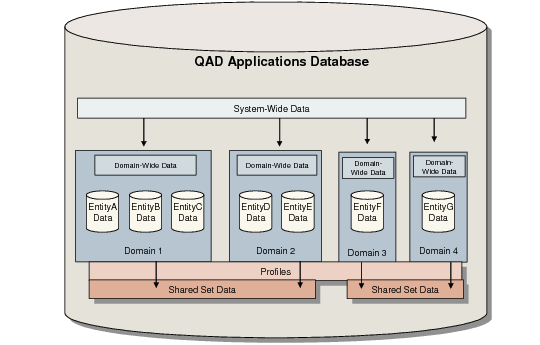
In the basic system foundation of a QAD implementation, data items can be shared at the following levels:
• System-wide data is shared by all domains and entities and includes:
• Business relations and address-related data such as address types, corporate groups, currencies, rounding methods, languages, counties, states, and countries. Also included is address-related tax data such as tax zones, tax environments, tax classes, tax usage codes, and tax types.
• Financial data, such as shared set codes, credit terms, invoice statuses, profiles, and Supplementary Analysis Fields (SAFs).
• Security data such as users and roles.
• Administrative data such as e-mail definitions and printers.
• Some EDI eCommerce setup data.
• User interface information such as labels, menus, messages, and look-up definitions.
• Most operational data is domain-specific. This includes the setup for items, as well as most purchasing, sales, and manufacturing functions. Some financial data is also domain-specific, such as GL masks—which determine valid combinations of accounts, sub-accounts, cost centers, and projects—and accounting periods.
• Although business relations are generally shared system wide, you can create business relations that are owned by a domain and that can only be accessed from within that domain.
• Entity-specific data belongs to a particular entity within a particular domain, and includes employees, bank account numbers, period closing status, and accounting transactions (general ledger and sub-ledger transactions and balances).
In Financials, the transaction numbering is per entity. There are exceptions where entities can share numbering; for example, additional GL numbering. See
Additional GL Numbering Tab.
• Some data can be shared among two or more domains. All the entities within a domain must use the same shared data, but entities in other domains can use this data as well. The data types included in shared sets are GL account components (accounts, sub-accounts, cost centers, and projects), customers, suppliers, daybook codes, and exchange rates.
• Profiles link specific data items in shared sets to other elements within domains.
Generalized Codes Example
When you install a new QAD database, a number of system and reference fields accept any kind of data, as long as it does not exceed the field length. You can customize the user interface by adding generalized codes and lookups.
Generalized codes are domain specific. Since domains can represent businesses in diverse geographical and political locations, these codes may vary widely.
For example, sales distribution channels and buyer/planner codes could differ between a domain representing a business in England and one in Germany, even though they are in the same database.
However, some programs that update system-wide data such as User Maintenance (36.3.1) also reference generalized codes. These generalized codes must exist in all domains or you may encounter errors editing a user record in one domain while you can successfully edit it in another domain.
For detailed information on generalized codes, see
QAD System Administration User Guide.