Creating and Confirming Domains
Use the Domain activities (36.1.1.1) to define domains in the current database and confirm them for use in the system.
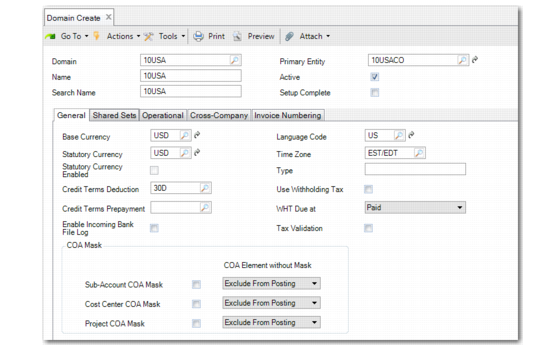
Domain Create
Field Descriptions: Header
Domain
Enter a code (maximum eight characters) identifying a specific domain. Codes are restricted to the characters A–Z, a–z, and 0–9. A primary domain code must be unique within a database and across connected databases.
Note: QADRSRV is a reserved name and cannot be used.
Name
Enter a descriptive name to associate with this domain (maximum 28 characters). This name must be unique within a database and across connected databases.
The name displays in the workspace identifier in the .NET UI, in the lookup associated with Domain fields, and on various reports and inquiries, as space permits.
In the .NET UI, the full domain and entity context for the current workspace displays in the .NET UI title bar in this format:
Domain Code: Domain Name [Currency] > Entity Code: Entity Description (Number of open forms)
Search Name
Enter a brief name (maximum 14 characters) to associate with this domain. This name must be unique within a database and across connected databases.
The domain search name displays in the program title bar in the character interface based on the setting of Header Display Mode in Security Control (36.3.24).
Primary Entity
Select the entity that should be considered primary in this domain. The primary entity has these functions:
• It is the default entity for each new site created in the domain.
• It is the default entity when users log in to the character user interface.
• When site connection records are created, they are always associated with the primary entity of the target domain.
You cannot confirm the domain until an entity has been specified. The first entity can be created from within an unconfirmed domain.
Active
Indicate whether this primary domain is currently active.
Yes (the default): This domain can be referenced in other system functions.
No: This domain is not active in the current database.
Note: Unless you have purchased the Shared Services Domain module, the system lets you have only one active domain. If you attempt to activate a domain when your database already has an active domain, an error message displays.
When new sites are created in Site Maintenance (1.1.13), a site connection record is created in active domains only.
The system performs the following validations related to this field:
• You cannot change the Active setting of your current domain. Switch to another domain; from there you can set the first domain to inactive.
• You cannot change this field if the domain is a connection record (referencing another database). You must change this field in the domain’s primary database.
• In a multiple-database environment, you can change this field for a domain in the current database only when all other databases are active and connected. The system modifies the Active field for the connection records that exist in the other databases. An error displays if any database cannot be accessed and the field cannot be changed.
• You cannot deactivate a domain unless all associated entities are also inactive.
Setup Complete
Indicate if you are satisfied with all aspects of this domain and are ready to establish these settings permanently.
Important: Be aware that after completion, you can no longer modify the domain shared sets, the base currency, and the statutory currency. The association between entities linked to this domain is permanently set and cannot be changed.
No: The domain is not available in any operational functions. You can modify the shared sets and base currency as needed.
Yes: The domain is now available to operational functions. Changes can no longer be made to the list of shared sets, to the base currency, the statutory currency, or to the linked entities (new entities can still be added).
To complete a domain, the following must be true:
• Active is set to Yes.
• All shared set codes are defined.
• Only one primary entity is associated with the domain.
• Cross-company accounts have been defined.
See
Confirming Domains for more details about confirmation.
Important: Once set to Yes, this field cannot be changed. In addition, you can no longer modify the primary entity, shared set list, or currency of the domain. A warning displays before the domain is confirmed.