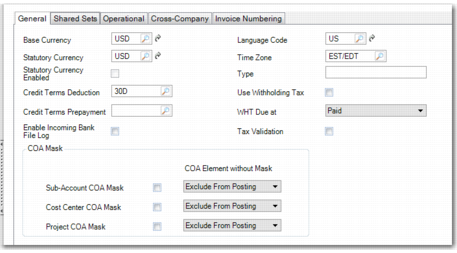
General Tab
Domain Create, General Tab
Field Descriptions
Base Currency
Enter the base currency for this domain, which is the currency in which all entities within the domain conduct business. Exchange rates must exist between the base currency and any foreign currencies specified on transactions. The base currency is used for recording all financial transactions within the domain.
The base currency is the primary currency for Financial Reporting. Although reports can be generated on the spot in any desired currency, the amounts on the reports is the translation of the base currency to the reporting currency using the current accounting rate. However, the statutory currency is an exception to this. If a statutory currency is active within the domain, all transactions are also converted to the statutory currency using the statutory exchange rate active on the transaction date.
Base currency determines the default currency for new customers and suppliers created while logged into an entity in the domain. This field is required even when transactions take place in multiple currencies.
The code you enter must be a valid, active currency. It cannot be changed after the domain is confirmed.
Language
Enter the default language for this domain. The system uses this language for selecting descriptions to display in operational functions when multiple language descriptions exist. See
Introduction to QAD Enterprise Applications User Guide for more information on the Translation Option.
Statutory Currency
Specify a second base currency, used for generating reports for local authorities. The need for a statutory currency arises from a combination of global IFRS requirements and local GAAP in some countries. The statutory currency applies to all entities in the domain.
By default, the system proposes the same currency code as the base currency, but you can change this value.
You can change the value of the Statutory Currency field when the Setup Complete field in the header is cleared. When the Setup Complete field is selected and saved, the Statutory Currency field becomes read-only. It can only be changed with a special utility that re-initializes all statutory currency fields in the database.
See
Statutory Currency for detailed information on the concept of statutory currency.
Statutory Currency Enabled
This field is read-only and is selected if the statutory currency has been enabled for the current domain, and if the domain setup is complete.
Type
Enter a code identifying the type of domain. You can use this field to group domains based on a user-defined convention.
Each database has one system domain, defined in System Control. Its type is set to SYSTEM and cannot be changed. The system domain is used as a template for supplying default data when other domains are created. See
System Domain.
Note: You cannot change the type field to SYSTEM in this function.
Time Zone
Use the lookup to specify a time zone for the domain. All transactions in that domain are assigned system dates and times based on that time zone.
When using your QAD application, if you change to another domain with a different time zone, that time zone now applies and any transactions you create in that domain are assigned dates and times relative to the time zone you have switched to. When calculating the time zone offset, the system also determines whether daylight savings time is in effect for that time zone, and adjusts accordingly.
If the Use User’s Time Zone for Default Domain field is activated in Database Control (36.24.1), your default time zone from User Maintenance (36.3.1) is used when you switch to your default domain. The Use User’s Time Zone for Default Domain field is deactivated by default
See
QAD System Administration User Guide for more information on multiple time zones and on time stamping.
Use Withholding Tax
Select the field to enable withholding tax for the domain.
The domain-level withholding tax control settings are applied to all the entities within the domain, and you cannot update this setting within an entity.
If withholding tax is enabled for a domain and withholding tax records exist, you should not subsequently disable withholding tax for that domain.
See
QAD Global Tax Management User Guide for information on withholding tax.
WHT Due at
Specify when you want withholding tax to be posted. There are two options:
• Paid - when the payment is complete.
• For Collection - when the payment is created.
The value of this field can only be changed when there are no existing payments with the status For Collection in the domain. If the WHT Due at field is set to For Collection and the supplier payment status changes to Bounced or Void, or the supplier payment selection is unconfirmed, then the withholding tax posting is reversed.
Enable Incoming Bank File Log
This field relates to processing incoming bank files. When this field is selected, the detail processing log on summary level or detail level is displayed on the report log section when you run Imported Bank File Report (31.1.11).
Tax Validation
Select the field to validate the fiscal tax codes for withholding tax according to a predefined country-specific format for Italy. You specify a supplier’s fiscal code when defining the supplier’s withholding tax information in the Supplier record.
For information on withholding tax, see
QAD Global Tax Management User Guide.
Sub-Account, Cost Center, Project Mask
A Chart of Accounts (COA) mask is a matrix that defines valid combinations of COA elements for transaction posting. Each mask applies to all entities within a domain.
Use the three mask fields to define the combinations of COA elements the system verifies when you post a transaction.
Each COA element has a separate COA mask maintenance function.
• Sub-Account Mask Create (25.3.9.1.1)
• Cost Center Mask Create (25.3.9.2.1)
• Project Mask Create (25.3.9.3.1)
The mask maintenance function for a COA element is disabled if the corresponding mask field is not selected for the domain.
If you do not select any of the options, the system permits all combinations, provided that each code is valid. It is recommended to keep the COA masks inactive during initial system implementation when you are testing and setting up your accounting structure. You can then change the COA mask settings later.
COA Element without Mask
Indicate how the system treats COA elements that are not assigned a COA mask. Each COA mask type has a corresponding COA Element without Mask field. There are two options:
Exclude from Posting: If you select this value, COA elements that are not assigned a COA mask are excluded from use in postings.
No Posting Restrictions: If you select this value, COA elements that are not assigned a COA mask can be used in any posting.
Credit Terms Deduction
Specify the default deduction credit terms for this domain. This field is optional.
When deductions are created, the domain-level deduction credit terms are used instead of the customer’s default credit terms. The due date of the deduction is then calculated using the domain credit terms.
If you do not specify a deduction credit term for the domain, the system displays an error when you try to create deductions.
The credit term you specify for the domain cannot be a staged credit term and cannot include discounts.
See
Credit Terms for more information on credit terms and see
Processing Deductions for more information on deductions.
Credit Terms Prepayment
Specify the default prepayment credit terms for this domain. This field is optional.
When prepayments are created, the domain-level prepayment credit terms are used instead of the customer’s or supplier’s default credit terms. If you do not specify a prepayment credit term at domain level, the system uses the credit terms specified in the customer or supplier record for the prepayment.
The credit term you specify for the domain cannot be a staged credit term and cannot include discounts.
See
Credit Terms for more information on credit terms.