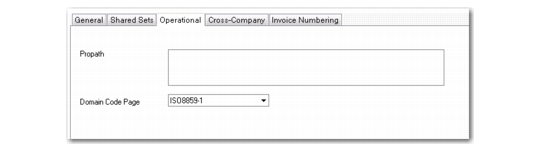
Operational Tab
Use the Operational tab to specify values for use with operational functions.
Domain Create, Operational Tab
Field Descriptions
Propath
Enter a comma-separated list of directories—in addition to those defined at login—that the system should use for this domain. The system validates that the entry does not exceed 1950 characters—the maximum size of the database field—and that all elements represent valid directories.
Note: You cannot change this field in the domain that is part of your current workspace; in this case, the Propath field is disabled. If necessary, change your current workspace.
For more details about the propath, see
QAD System Administration User Guide.
Domain Code Page
Specify the code page that a character client must use to access the domain. See
Domain Code Page for details.
The character client must use a code page that is compatible with that of the domain. Access to the domain from a client session with an incompatible code page is blocked because it may distort the character display and possibly cause data corruption.
If the code page of the domain is UTF-8, enter a non-Unicode code page you want to use with the character client.
Note: Entering data through the character client using one code page and then changing to another may corrupt the data entered previously.
If the domain uses a code page other than UTF-8, enter the same code page used by the domain.
This value defaults to iso8859-1.