Changing the Current Domain
If you are using the character UI, you can use Change Current Domain (36.1.1.1.10) to change the active domain in your current session to another domain that you have access to. In the .NET UI, when you have access to more than one domain, the Workspace menu lets you choose the one you want to work in. If the company represented by the workspace is in a different domain, the domain switching occurs automatically.
Workspace Menu
When you first log in, you must choose a workspace. When you exit the QAD .NET UI, the active workspace is saved and displays when you log in again.
When you change workspaces, any programs you have running in the current workspace remain open. You can return to the workspace later to complete any open transactions.
The number of workspaces that display in the Workspace menu is restricted by the window size. If you have access to more workspaces than the window can display, a More option displays at the end of the Workspace menu items.
More Option
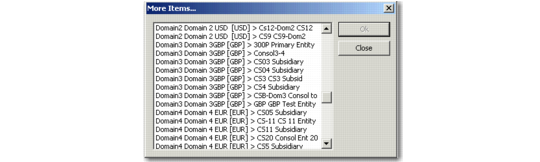
If you select the More option, the system opens More Items window, which the lists all workspaces to which you have access. From the list displayed, select the workspace you want to access and click OK. The system then displays that workspace.
More Items
Note: The Workspace menu displays only when the logged-in user has access to more than one workspace.
This function is useful for system administrators or others with system-wide responsibility who regularly access and update information in multiple domains.
This function affects your current session only. Each time you log in using the character UI, you are prompted to specify a domain. The domain designated as default in Domain/Entity User Access displays the first time you log in.
For more information on user access, see
QAD Security and Controls User Guide.
When you change domains, the system accesses information about the new domain, such as the base currency, statutory currency, and primary entity.
Domain Access
You can change to only an active domain you have been given access to in Domain/Entity User Access. If you are assigned to a different role in the new domain or entity, the functions you can perform may be different from the functions you performed in the previous domain or entity. Therefore, the application menu is refreshed when you change the current workspace.
Domain and entity access is controlled by the Role Permissions function. See
QAD Security and Controls User Guide for more information.
Database Switching
If you change to a domain associated with a database other than the current one, database switching is initiated. The system connects to the database using the information set up in Database Connection Maintenance. If the connection cannot be made, a message displays.
This is equivalent to logging out of the current database and starting a new session in a different database.
Note: When you switch databases using this program, the system checks your security access based on the roles defined for your user ID in the target domain and database.