Rounding Methods
Use the Rounding Method activities (26.2) to define the methods the system uses to round monetary amounts for data entry and display. They are also used in the display of financial amounts in browses. Rounding methods are used in all calculations of monetary values, and are defined at the database level.
The Rounding Method function lets you define a rounding unit and a rounding threshold. The rounding unit determines the value by which a monetary amount is modified when subject to rounding.
The rounding threshold determines the value above which a digit is rounded up, rather than removed, and the position after the decimal point where the rounding takes place; that is, the number of decimal places.
Associate a rounding method with each currency. These methods apply when you enter monetary amounts and also when you view data online or generate reports.
Rounding is performed using an identical process for all currencies; the only variable is the number of decimals to use in rounding. For example, for a two-decimal currency, such as the US dollar or euro, if the third digit after the decimal point has a value of 5 or higher, the second digit after the decimal point is rounded up by 1. If the third digit after the decimal point has a value of less than 5, the third and subsequent digits after the decimal point are dropped.
The decimal point indicator is determined by the country code associated with the user in User Maintenance, so can vary according to regional requirements. See
Currencies and
Currency Display.
Note: You cannot delete a rounding method if it is associated with a currency, referenced in Global Tax Management Control (29.24), or associated with a tax environment in Tax Environment Maintenance (29.3.1).
Three rounding methods exist by default:
0. Round to zero decimals, using 0.5 as the rounding threshold.
1. Round to one decimal, using 0.05 as the rounding threshold.
2. Round to two decimals, using 0.005 as the rounding threshold.
Define additional rounding methods as needed. For example, you can set up a custom rounding method to support the optional invoice rounding feature, which lets you meet requirements in countries such as Switzerland. This feature is enabled and set up in Sales Order Accounting Control (36.9.6). For information on special invoice rounding requirements, see
QAD Sales User Guide.
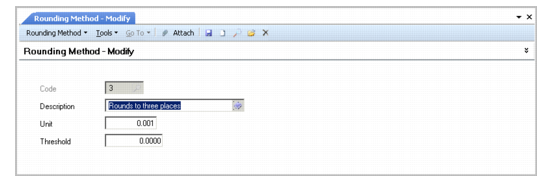
Rounding Method Modify
Field Descriptions
Code
Enter a one-character code identifying the rounding method.
Description
Enter a brief description (maximum 24 characters) of the rounding method. This description displays on various reports and inquiries. You can optionally enter descriptions in more than one language. See
Introduction to QAD Enterprise Applications User Guide for more information on the Translation Option.
Unit
Enter the number of decimal places used when rounding monetary values. For example, to specify rounding to three decimal places, enter 0.001. Rounding units must be a positive numeric value; you cannot define a negative value.
Threshold
Enter the number at which monetary values are rounded up. This number must be less than the number entered for the rounding unit. The rounding threshold must be a positive numeric value; you cannot define a negative value.
For example, if the rounding unit is 0.001, entering 0.0025 for the rounding threshold tells the system that decimal values of 25 ten-thousandths and higher are to be rounded up to the nearest one-thousandth. Amounts are rounded based on their absolute value. For example, –9.99 is rounded the same as 9.99.