Setting Up Multiple Currencies > Exchange Rate Types
  
Exchange Rate Types
Use the Exchange Rate Type activities (26.3) to create, view, modify, and delete exchange rate types.
Before setting up exchange rates, you can add user-defined exchange rate types if necessary. A number of predefined types are supplied with the system, which are used in financial and operational functions.
Note: If the exchange rate type selected in a function or report does not exist, the system uses the accounting exchange rate type by default.

Exchange Rate Types
 
Exchange Rate Type
Financials Only
Description
ACCOUNTING
No
Used in the general operation of the system, such as sales and purchasing activities. It is the default exchange rate type for the system.
BUDGET
Yes
Used for budgets stated in non-base currencies.
CASH
Yes
Used for cash flow forecasts denominated in non-base currencies.
INTRASTAT
No
Used in Intrastat reporting to provide specific exchange rates. For details about Intrastat, see QAD Intrastat User Guide.
INVENTORY
No
Used for inventory, purchase order, scheduled order receipt, and work order transactions to convert between the transaction currency and the base currency.
The system also uses the inventory exchange rate to convert inventory transaction amounts to statutory currency. If the inventory rate is not available, the system calculates the statutory currency value using the statutory rate, with the option to fall back to using the accounting rate.
REVALUATION
Yes
Used for revaluing GL accounts denominated in non-base currencies relative to the base currency.
It can also be used to revaluate the transaction currency, relative to the statutory currency.
STATUTORY
 
Used to convert transaction currency amounts to statutory currency.
The system always looks for a statutory exchange rate type first. If the system cannot find a statutory exchange rate that is valid for that date, it reverts to using the accounting exchange rate, if the Fallback to Accounting field in Exchange Rate Type Create (26.3.1) is selected for the statutory exchange rate.
TAX
Yes
Used to translate amounts in tax reports.
See QAD Global Tax Management User Guide for more information on tax reports.
Accounting exchange rates are the standard rates used throughout the system in manufacturing and distribution transactions.

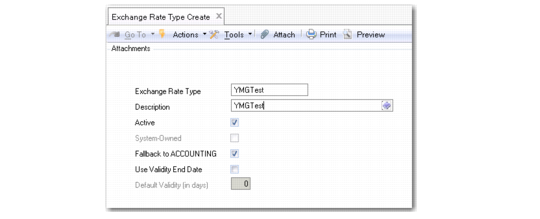
Exchange Rate Type Create
Field Descriptions
Exchange Rate Type
Enter a code identifying an exchange rate type. A number of types are predefined and required by the system.
Description
Enter a brief description (maximum 40 characters) of the exchange rate type to help identify its use.
Active
Indicate if this is an active record.
System Defined
This read-only field indicates if the record is supplied with the system or has been added after installation. You cannot delete system-defined records.
Fallback to ACCOUNTING
Select this field if the system must revert to using the accounting exchange rate when it cannot find a valid exchange rate of the type for which you have enabled this option.
Use Validity End Date
Select the field to users to specify the validity end dates for exchange rates of this type.
Note: You cannot use the validity end date option for an exchange rate type if you are also using the Fallback to Accounting option. Having these options mutually exclusive prevents the system from reverting to looking for an accounting type rate when the exchange rate’s validity has passed.
Default Validity (in days)
Specify the default number of days that exchange rates of this type is valid.
When a new exchange rate of this type is created in Exchange Rate Create, the system automatically proposes a validity end date by adding the default validity days value to the start date entered, and then deducting one day.
Example: If the exchange rate start date is 01/15/2014, and the default validity days value is set to 1, the default validity end date is 01/15/2014— the same as the exchange rate start date.
If the exchange rate start date is 01/15/2014, and the default validity days value is set to 7, the default validity end date is 01/21/2014— seven days, including the start and end dates.