Journal Entries and Daybook Security
Daybooks security lets you restrict access to transactions associated with certain daybook types to users that have roles linked to that daybook. See
Daybook Security for more information on daybook security.
You can apply daybook security to journal entry transactions posted to daybooks with a control type of Financials or External. If implemented, the restriction applies to all journal entry activities, except the View activity.
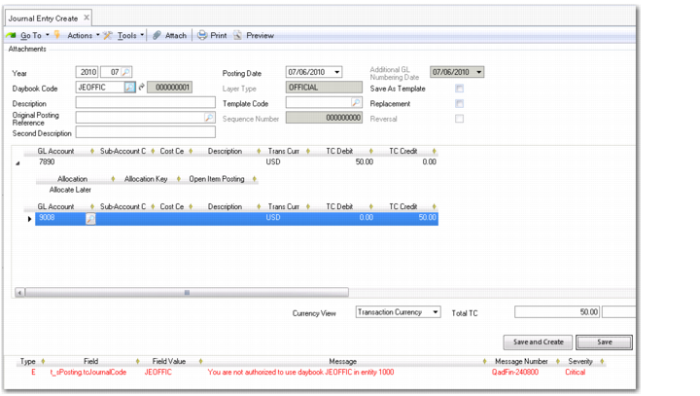
When saving a journal entry posting in Journal Entry Create or Journal Entry Reverse, the system checks the daybook and displays an error if the transaction uses a daybook that you do not have role permissions for. You cannot subsequently save the posting. See
Journal Entry Create, Daybook Security Error.
In Journal Entry Modify, Journal Entry Delete, and Journal Entry Reverse, if you select a posting in an unauthorized daybook, the system displays a warning and you can only view the posting.
Note: Daybook security for journal entries also applies to journal entries created using Journal Entry Excel Integration, Journal Entry Excel Integration Repair, and Journal Entry Cross Co Excel Integration.
Journal Entry Create, Daybook Security Error