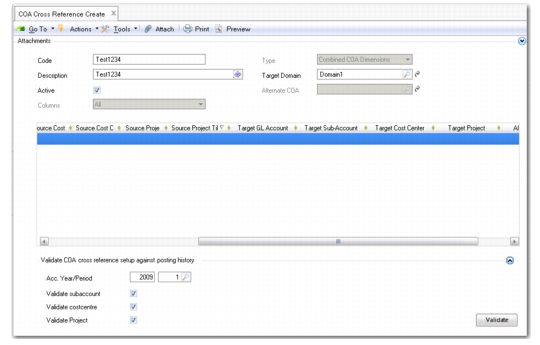
Creating COA Cross-References
COA Cross Reference Create (25.3.14.1)
Code
Enter a maximum of 20 characters for the code that identifies the COA cross-reference.
Description
Enter a brief description (maximum 40 characters) of the COA cross-reference. You can optionally enter descriptions in more than one language. For more information on the Translation Option, see
Introduction to QAD Enterprise Applications User Guide.
Type
Specify the type of cross-reference that you want to define. You cannot change the type after the cross-reference has been saved.
Target Domain
Specify the target domain. This field is relevant when creating separate or combined mappings for use in consolidation. You must have already defined the target consolidation domain in Domain Create (36.1.1.1.1).
After you have saved the COA cross-reference, you can only change the target domain to a domain that uses the same shared sets of GL accounts, sub-accounts, cost centers, and projects as the current target domain. See
Setting Up Domains for more information.
This field is not required when creating alternate COA mappings.
Active
Indicate if this is an active cross-reference.
Alternate COA
Specify the alternate COA structure to which the alternate account belongs.
This field is only enabled when you select the value Alternate COA in the Type field.
Columns
This field is only enabled when you select the value Separate COA Dimensions in the Type field. The Columns filter lets you focus on one element at a time, and you can change the filter type during input.
Specify which grid columns you require to create separate COA cross-references. The options are:
All: Displays fields for mapping ranges of source GL accounts, sub-accounts, cost centers, and projects to COA elements in the target domain.
GL Account: Displays fields for mapping ranges of source GL accounts to a single GL account in the target domain.
Sub-Account: Displays fields for mapping ranges of source sub-accounts to a single sub-account in the target domain.
Cost Center: Displays fields for mapping ranges of source cost centers to a single cost center in the target domain.
Project: Displays fields for mapping ranges of source projects to a single project in the target domain.