Grid Fields
COA Cross Reference Grid
Source GL Account/Sub-Account/Cost Center/Project From
Specify the first COA element in the source range that you want to map.
Source GL Account/Sub-Account/Cost Center/Project To
Specify the last COA element in the source range that you want to map.
Target GL Account/Sub-Account/Cost Center/Project
Specify the target COA element that you want to map to.
Alternate COA
Specify the name of the alternate COA account to which the source COA elements must map. You can only use this field when creating alternate COA mappings.
The available alternate COA values are restricted to those associated with the alternate COA structure specified in the Alternate COA field in the header.
Only the lowest level code (no children) in the alternate COA structure can be mapped.
Cross-Reference Validation
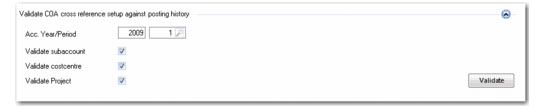
The validation facility in COA Cross Reference Create lets you check the mapping combinations that you have specified for the source and target against posting history. If the COA cross-reference type is Combined COA Dimensions or Separate COA Dimensions, you can indicate whether to include the sub-account, cost center, or project in the validation.
Validation Fields in COA Cross Reference Create
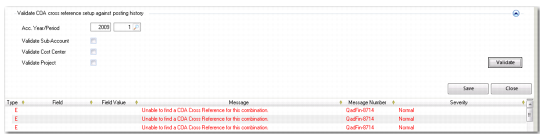
If a cross-reference contains invalid or missing mappings, this impacts the output of reports run using alternate COA or the result of a consolidation. The validation facility lets you to determine if the mappings are valid against the current posting history and chart of accounts (both operational and alternate). The result of the validation is displayed in the standard error viewer.
Validation Results
Even if a corresponding mapping does not exist in posting history or in the chart of accounts, you can still save cross-reference mappings that return error messages. Posting history is constantly growing with new transactions, and the chart of accounts can change also. Therefore, mappings that are currently invalid could become valid at a later date. However, you receive an error if you try to save a cross-reference that contains invalid mappings.
Accounting Year/Period
Specify the GL calendar year and GL period for which you want to validate COA cross-reference mappings against posting history.
The system validates against all postings from the GL calendar year and GL period you enter up to the current system date.
Note: You can also enter a future GL calendar year and period to validate postings in the posting history table. In this case, the system validates postings future-dated from the specified GL calendar year and period, and after.
Validate Sub-Account
Select the field to validate sub-accounts in the COA cross-reference mappings against posting history for the specified time period.
Validate Cost Center
Select the field to validate cost centers in the COA cross-reference mappings against posting history for the specified time period.
Validate Projects
Select the field to validate projects in the COA cross-reference mappings against posting history for the specified time period.