GL Implementation Considerations
Before any transactions can be posted, the Verify GL Accounts field in Domain/Account Control (36.9.24) must be selected. When selected, this option ensures that your operational account setup has been validated for transaction posting.
Often, other modules are implemented before General Ledger. Activities in these modules create unposted transactions. Before entering GL account balances during GL implementation, you should delete unposted transactions from other modules so they do not post and overstate GL balances. With the Delete field cleared, run GL Transaction Delete/Archive (36.23.2) to print a report identifying transactions to be deleted. Review the report, adjust the selection criteria as needed, then select Delete and run the program again.
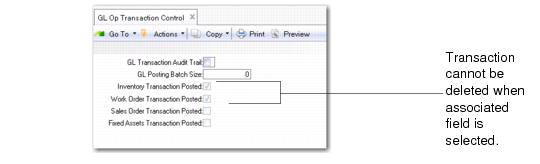
Important: GL Transaction Delete/Archive can be used only before implementing GL. Once any transactions have been posted (either IC, FA, SO, or WO), any additional transactions of that type can no longer be deleted. The first time a transaction posts successfully, the system selects a read-only field in GL Op Transaction Control (36.9.13). GL Transaction Delete/Archive does not let you delete any transactions for a selected type.
GL Op Transaction Control (36.9.13)
After archiving/deleting transaction records, use Op Acct Structure Validation (36.9.20) to report on the account, sub-account, cost center, and project combinations defined in the following programs.
• Product Line Maint (1.2.1) | • Logistics Accounting Control (2.15.24) |
• Purchasing Account Maint (1.2.5) | • Trailer Code Maint (2.19.13) |
• Work Order Account Maint (1.2.9) | • Mirror Table Maint (3.20.1) |
• Inventory Account Maint (1.2.13) | • Inventory Control (3.24) |
• Sales Account Maint (1.2.17) | • Purchase Approvals Maint (5.1.1) |
• Inventory Movement Code Maint (1.1.9) | • Purchasing Control (5.24) |
• Site Maint (1.1.13) | • Department Maint (14.1) |
• Inbound Account Maint (1.2.21.1) | • Repetitive Control (18.22.24) |
• Outbound Accrual Account Maint (1.2.21.13) | • Class Maintenance (32.1.17) |
• Outbound Expense Account Maint (1.2.21.16) | • Fixed Asset Maintenance (32.3) |
• Price List Maint (1.10.1.1) | • Domain/Account Control (36.9.24) |
• Logistics Charge Code Maint (2.15.1) | |
This program prints a report of any invalid combinations it finds, and lets you identify account combinations that have been invalidated, for example, because of inactive elements.
Validations are based on tables and fields delivered with the standard product. If your environment includes custom tables or fields, you can use Account Table/Field Maintenance (36.9.21) to add custom information before running the validation procedure.