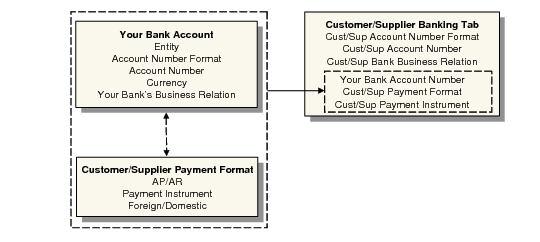
Associating Your Bank with Customers or Suppliers
You set up the relationships between your entity bank account and customer and supplier accounts on the Banking tab of the customer and supplier definitions. See
Banking Tab.
Associating Your Bank with Customers and Suppliers
You can assign multiple bank account numbers to the customer or supplier, but you designate one default account. The business relation you specify for the customer or supplier in the Banking grid is that of the customer or supplier’s bank.
Once you have completed the setup, the system automatically loads the account and format details when you create a customer or supplier payment.
The Financial Info tab of customer and supplier invoices displays the customer or supplier bank number, your entity bank number, and the payment format and payment instrument to apply to the invoice.
For customer or supplier payments, the system loads your bank account, the customer or supplier bank account number, and the payment format to apply to the payment. To load a different format for the customer or supplier, select a different account number. Create a new line in the grid for each account number.
When you change the bank account and linked format on an initial supplier payment selection, the system automatically loads the new account and format details into the Banking tab of the supplier definition. See
Changing Bank Accounts on a Payment Selection.