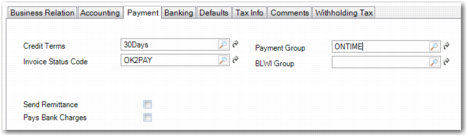
Payment Tab
Supplier Create, Payment Tab
Field Descriptions
Credit Terms
Specify the default credit terms for this supplier. This field is required. The credit terms determines the due date calculated for the supplier invoices. See
Credit Terms.
Invoice Status Code
Specify the default invoice status for determining the approval, payment, and allocation status of invoices for this supplier. This field is required. See
Invoice Status Codes for details.
Payment Group
Specify the payment group. A payment group can be used as a filter criterion when making a payment selection.
BLWI Group
Specify the default group associated with this supplier for Belgian-Luxembourgian BLWI reporting. The default code is 999.
Send Remittance
Select this field to indicate which suppliers you want to send remittances to.
You can then print the remittance using Supplier Remittance Print (28.9.9.8) after you have run the supplier payment selection. This report is addressed to the Remittance address defined for the supplier’s business relation.
Pays Bank Charges
Select this field to indicate that the supplier pays any bank charges that may apply to payments that you make for invoices. See
AP Bank Charges. This field is hidden by default and can be added using design mode.
Individual Payments
Indicate whether each invoice gets an individual payment line in payment files.