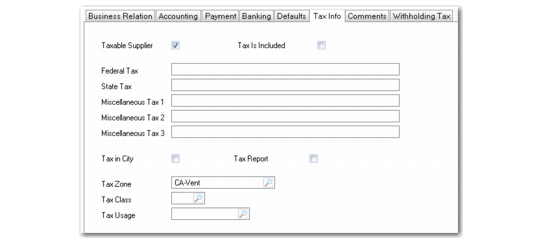
Tax Info Tab
Tax values default to documents created for the supplier and can be modified during transaction processing. The values for the Taxable Supplier, Tax Is Included, and Tax in City fields default from the Business Relation.
You can modify the default details as needed. See
Tax Information Tab for a description of the fields.
Note: You can use non-intrusive customization to implement validation for federal and state tax IDs to ensure they meet the requirements of your local tax authority. This validation is then applied when you enter federal and state tax IDs in this tab, or in the Tax tabs on the Business Relation and Customer records. For more information, see
QAD System Administration User Guide.
Supplier Create, Tax Info Tab
Tax Report
Select this field to authorize generation of a supplier tax activity (1099) report to this supplier. The 1099-MISC Report references this field.
Select: The system reviews all payments to this supplier over the time period specified. If the sum of these payments is greater than the minimum 1099 amount specified, this supplier is included on the 1099 report listing the supplier name, address, and tax ID, along with a detailed or summarized list of payment amounts.
Clear: The 1099-MISC Report excludes this supplier regardless of selection criteria.
When this field is selected, the headoffice address of the associated business relation must have values for name, first line of the street address, city, state, zip code, telephone number, and federal tax ID. In addition, a default purchase type must be specified.
Details about 1099 reporting are included in
QAD Global Tax Management User Guide.