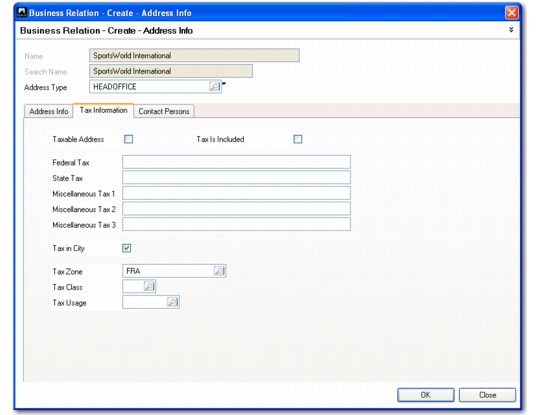
Tax Information Tab
Use the Tax Information tab to enter details that determine how taxes are calculated for this address. Tax codes must be set up using functions on the Global Tax Management (29) menu before specifying them here.
You can modify tax data for customers and suppliers. This is important in cases where a customer and a supplier are both linked to the same business relation, but the tax details of the customer must be different than those of the supplier.
Business Relation, Address, Tax Information Tab
Field Descriptions
Taxable Address
Select this field if business activities for this address are normally subject to tax. The taxable status of the address defaults to transactions where the address is used.
Note: A taxable status does not necessarily mean a tax amount is calculated. You can use tax types and zero-percent tax rates to report tax exemptions.
Tax Is Included
Indicate if line item prices for this address normally include tax. The value of Tax Is Included defaults to the header of transactions created for this address.
Clear: Tax is calculated and added to line item prices.
Select: The prices include tax. During line item entry, the system retrieves the item price, reverse-calculates the tax amount, and displays the item price exclusive of tax.
Federal Tax
Enter the tax ID assigned to this address by the federal or national government.
Tax ID prints on tax reports and other selected documents, such as orders and invoices, where it is legally required.
If Tax Report is selected on the General tab, the Federal tax ID must be unique; otherwise, related business relations can share an ID.
Note: You can use non-intrusive customization to implement validation for the federal tax ID to ensure it meets the requirements of your local tax authority. This validation is then applied when you enter federal tax IDs in this field, or in the Federal Tax fields in the Customer and Supplier records. See
QAD System Administration User Guide for more information.
State Tax
For reference and documentation purposes, enter either a state or provincial tax identification number or a VAT registration number. If the country specified for the address is an EU member, the ID is validated based on the tax format associated with the country. See
Tax Format.
Note: You can use non-intrusive customization to implement validation for the state tax ID to ensure it meets the requirements of your local tax authority. This validation is then applied when you enter state tax IDs in this field, or in the State Tax fields on the Customer and Supplier records. See
QAD System Administration User Guide for more information.
Miscellaneous Tax 1, 2, 3
For reference and documentation purposes, enter any other tax identification numbers that are useful.
Tax in City
This setting determines whether the address is in the city limits for taxation purposes. It is used only with the Sales and Use Tax Interface for US and Canadian tax processing. See Technical Reference: QAD Sales and Use Tax Interface.
Tax Zone
Enter the tax zone for this address, defined in Tax Zone Maintenance (29.2.1). A value is required. The system searches for a default based on the country, state or province, county, city, and postal code of the current address.
If a default is not found, the tax zone specified in Global Tax Management Control (29.24) displays. This normally indicates an error condition and a warning displays when this zone defaults.
The system uses tax zones to help identify the tax environment for transactions involving this address.
Tax Class
Enter a tax class previously defined in Tax Class Maintenance (29.1.5). Tax classes group addresses taxed at specific rates or that are tax-exempt and help determine the default tax environment (set of tax types) for related transactions.
The value of Tax Class defaults to the header of transactions created for this address.
Tax Usage
Enter a tax usage code previously defined in Tax Usage Maintenance (29.1.9). Tax usage codes identify the normal use of items sold to this address.
Tax usage codes, along with tax class and tax date, determine which tax rates apply. Tax rates vary, depending on the nature of operation of the buyer or seller or on the intended usage of the item. Common tax usages are retail, manufacturing, and industrialization.
The value of Tax Usage defaults to the header of transactions created for this address.