Adjusting Open Items
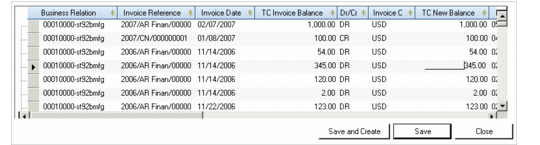
Adjust the open item by entering a new balance in the TC New Balance column for the item. You can adjust a number of items in the same transaction.
The new balance is always in the currency of the open item, and must net to zero. You clear the balance by creating a new open item, or by allocating it to a GL account. The new balance must also net the original balance.
When the transaction currency is different than the base currency, the balance must still net to zero. If you allocate the new balance to a GL account, you must use the same transaction currency as is used in the invoice.
Example: You adjust the balance of an invoice from $500 US dollars to $2000 US dollars. To net this balance to zero, you can allocate to a GL account. When you create the posting line in the Allocate GL screen, you allocate $1500 in US dollars, and not in the base currency (providing the base currency is not USD).
The exchange rate used for multi-currency adjustments is that of the original open item, and rounding differences are automatically applied.
Click Apply to apply the adjustment.
Open Item Adjustment, Search Results Grid
BC Balance
This field displays the new account balance when you apply the adjustments.
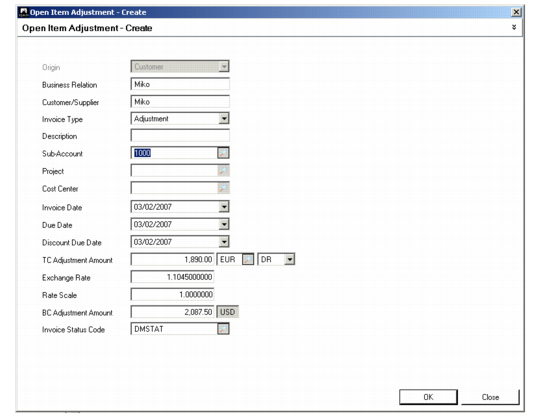
New Item
The New Item screen is available when the open item search has returned results. Depending on the type of search you conducted, the New Item screen defaults to new items for customers or suppliers.
You enter the open item date, due date, and the adjustment amount. The GL calendar year, GL period, daybook, and voucher of the invoice created are the same as the adjustment parameters you specified in the header of the main Open Item Adjustment screen.
Open Item Adjustment, New Item
Field Descriptions
Origin
This read-only field indicates the type of new item—either Customer or Supplier.
Business Relation
Specify the business relation for which the open item applies.
Customer/Supplier
Specify the customer or supplier for which the open item applies.
Invoice Type
Select Adjustment or Prepayment to indicate the type of open item.
Description
Enter a brief description (maximum 24 characters) of the open item.
Sub-Account/Project/Cost Center
Specify an sub-account, cost center, or project to add analysis to the customer or supplier control account used for the adjustment posting.
Invoice Date
Specify an invoice date. This is normally prior to the posting date and within the same GL period.
Due Date
Specify a due date for the invoice.
Discount Due Date
Specify a discount due date for payments that are subject to discount.
TC Amount Adjustment
Enter the adjustment amount in the transaction currency.
Exchange Rate
This field displays the accounting exchange rate when the transaction currency is different from the base currency. You can modify this value.
Scale Factor
This field displays the scaling factor for the exchange rate.
BC Amount Adjustment
This field displays the adjustment amount in the base currency.
Invoice Status Code
Specify an invoice status code to associate with the invoice. The code indicates whether the invoice is contested, allowed to be paid, approved, or locked for payment.