Allocate GL
Click Allocate GL to post the adjustment balance to a customer or supplier control account, or to a standard GL account. The Allocate GL option creates a journal entry in which completed adjustments are made in control accounts. You balance the accounts by creating additional posting lines on standard GL accounts. You can optionally apply sub-account, intercompany, cost center, project, and SAF analysis to the postings. You typically use the Allocate GL option to write off bad debts or short payments, or to reduce the outstanding balance on an account. Select the open item, net it to zero, or reduce it, and click Allocate GL for the remainder of the balance.
Example:
A customer has been invoiced for $1000 and the invoice remains open.
Open Item Line
A payment of $700 from the customer is netted against the open balance, and the value is entered in the TC New Balance field.
Adjusted Open Item
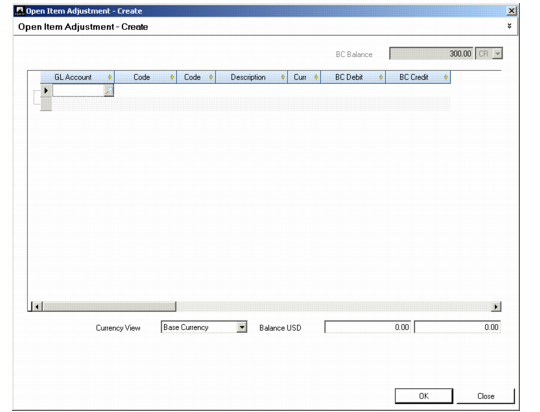
The user then clicks the Allocate GL button in the main Open Item Adjustment screen. The Allocate GL screen opens with the balance remaining on the invoice ($300) displayed in the top right. The user can then allocate this value to a control account.
Allocate GL
Field Descriptions
GL Account
Specify the account to which you want to assign the adjustment balance
Description
This field displays the year, period, journal type, and adjustment type.
Curr
This field displays the transaction currency. Specify a different currency if required.
Debit TC/Credit TC
Net the adjustment to zero by entering the netting amount as a credit or debit to the account.
Currency View
Choose to view the transaction balance in the base or transaction currency.
Balance CUR
This field displays the account balance and the adjustment balance.
Realized Exchange Gains and Losses
Realized exchange gains and losses in open item adjustment typically occur in the following two situations:
• When handling prepayments in foreign currency, customers typically use the same exchange rate on invoices as on prepayments. Since this is a manual process, exchange gains or losses are likely to occur.
• When recording payments in advance before a customer has provided details of the invoices to be paid. When you match the prepayment to the invoices in Open Item Adjustment, exchange gains and losses can occur.
The Allocate GL option in Open Item Adjustment lets you post the difference to either an unrealized exchange gain account or an unrealized exchange loss account, depending on whether the difference is a debit or credit value.
Open Item Adjustment Create (25.13.5) does not automatically create postings for gains or losses in statutory currency. An error message displays when the amounts in statutory currency do not balance. To rectify this, you must manually create an additional line using the Allocate GL option, and manually post the statutory currency exchange rate gain or loss. You can enter the statutory currency amount in the posting grid on the sub-level detail line that opens when you click the line expander (+) on the main GL entry line. You can leave the base currency amount at zero, and then enter a statutory currency amount.