Defaulting
The system defaults values if you do not specify data in all required fields in the imported Excel spreadsheet. If you specify all required values, no defaulting occurs.
If you leave certain fields blank at lower levels, such as the daybook, posting date, and description, these values default from level 1 when you load the Excel file in Journal Entry Cross Co Excel Integration and click Save.
All defaulting is done when you import the Excel spreadsheet to Journal Entry Cross Co Excel Integration and click Save. No defaulting occurs until this point.
• Currency
If the Currency field is blank at level 1, the system defaults the base currency of the source entity. If the Currency field is blank at level 3, the system defaults the currency value from level 1.
• Exchange rates
If the loaded spreadsheet contains a base currency amount and a transaction amount, but does not specify an exchange rate between the two, the system calculates the exchange rate and uses that value. However, if the spreadsheet does not contain a transaction amount or an exchange rate, the system retrieves the current accounting exchange rate for the base and transaction currencies from the exchange rate table and uses that to calculate the transaction amount.
If you specify an exchange rate in the Excel file, the system uses this value instead.
• Year and period
For source entity postings, if no GL calendar year and GL period are defined, the system calculates the year and period values from the posting date. For non-source entity postings, the system also uses the posting date to calculate the year and period in the target entity.
• Posting date and description
If you do not define the posting date and description on a level 2 line, these values default from the level 1 line.
• Entity
If you do not specify an entity at level 2, the system defaults the source entity when you import from Excel and click Save. The source entity defaults from the entity you are logged in to when you import from Excel.
• Daybook
If no daybook is defined at level 2, the daybook defined at level 1 defaults to the level 2 line.
The system validates that daybooks entered at level 2 are valid within the target entity they are specified for.
• Control account
Cross-company postings to an entity must contain the cross-company control account for that entity. If you do not specify cross-company postings in the Excel file, the system generates these postings when you click Save. If you specify cross-company postings in the Excel file, the system uses these postings and does not generate its own.
If an entity posting does not specify a cross-company control account, and the sum of the specified lines is zero, an error message is displayed.
The cross-company control account used is defined in the domain record of the domain to which the entity belongs.
Example:
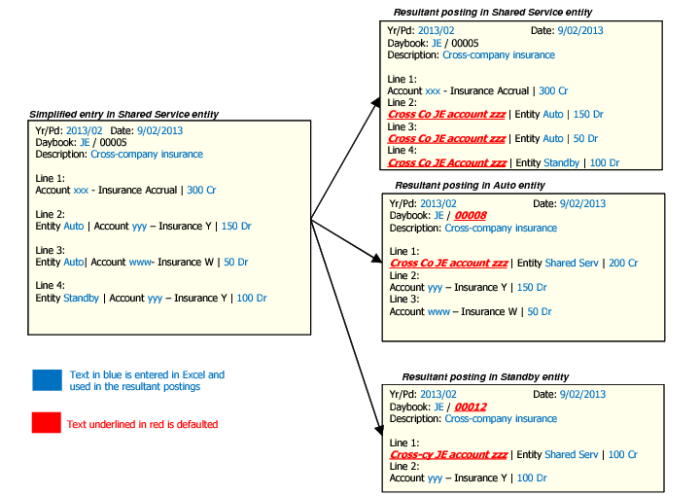
This example illustrates defaulting, and shows cross-company postings from the source entity Shared Service to two target entities Auto and Standby.
In Excel, you specify the Year/Period, Posting Date, Daybook, Voucher Number, and Description fields at level 1. In the first level 2 line, you specify the account, debit or credit indicator, and amount. For lines 2 and 3, you enter the entity, account, amount, and debit or credit indicator.
You save the Excel file and import it into Journal Entry Cross Co Excel Integration from within the Shared Services entity.
The values loaded from Excel are shown in the simplified entry to the left of
Cross-Company Journal Entry Defaulting. Some of the required values are missing, and are defaulted by the system when you click Save.
The system defaults the values shown on the right of
Cross-Company Journal Entry Defaulting. Values underlined in red are generated by the system. The right side of
Cross-Company Journal Entry Defaulting also shows the postings generated in the Shared Services, Auto, and Standby entities when the data is saved.
Cross-Company Journal Entry Defaulting
Example:
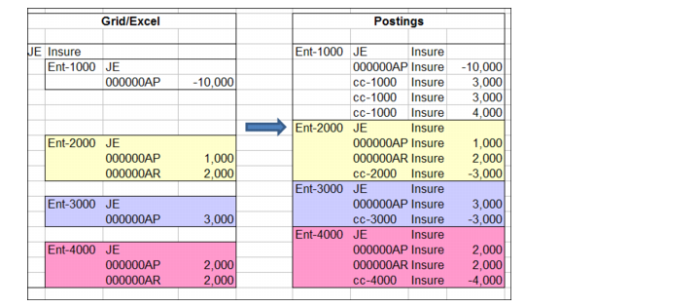
This example illustrates how control accounts are used and defaulted in the cross-company journal entries loaded from Excel.
You are posting from source entity Ent-1000 to target entities Ent-2000, Ent-3000, and Ent-4000.
As shown in
Excel Spreadsheet Data and Resultant Postings, the Excel spreadsheet entries for the target entities do not contain a cross-company control account so the system adds postings to the relevant cross-company control account for the target entity when you save.
Using the example of Ent-2000 in
Excel Spreadsheet Data and Resultant Postings, the cross-company journal entry posting created in Ent-2000 contains the two posting lines from the original Excel spreadsheet data, and a third posting to the cross-company control account for Ent-2000 with the reversed amount.
Excel Spreadsheet Data and Resultant Postings