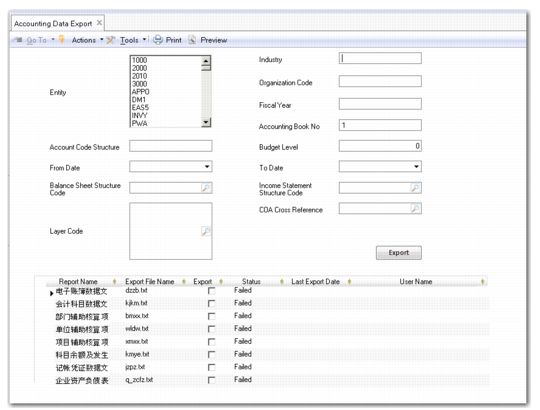
Accounting Data Export
Use Accounting Data Export (25.13.23.1) to export accounting data in standard files and formats as required by financial authorities in certain countries.
Accounting Data Export
Field Descriptions
Entity
Select the entity with the accounting data you want to export. By using the Ctrl key, you can select multiple entities; the accounting data is then combined in data files.
Measure 1 From Date, Measure 1 To Date, Measure 2 From Date, Measure 2 To Date
Specify various dates to set the date ranges for the export files in the following table.
Note: Other export files do not require date ranges.
Date Ranges for Accounting Data Export
For Export File... | Specify... | To... |
GL Voucher | Measure 1 From Date
Measure 1 To Date | Indicate the date range for selecting transactions to export. |
Account Balance and Movement | Measure 1 From Date | Indicate the month the specified date is in. |
Balance Sheet | Measure 1 To Date
Measure 2 To Date | Indicate the date range for exporting the balance sheet. |
Income Statement | Measure 1 From Date
Measure 1 To Date
Measure 2 From Date
Measure 2 To Date | Indicate two date ranges for the income statement. Typically, you define two ranges to export monthly and yearly income in the statement. |
Account Code Structure
For exporting the Chart of Accounts (COA) file, specify the COA structure in the format of x,x,x,...., where the first x indicates the number of characters for the first level COA element, and the second x indicates the number of characters for the second level COA element, and so on.
Example: You use a combination of GL account, sub-account, and cost center to implement the chart of accounts following local GAAP. If GL accounts are 4 characters in length and sub-accounts and cost centers are both 2 characters, you should specify 4,2,2 as the COA structure.
Balance Sheet and Income Statement Structure Code
Specify the budget codes for exporting the balance sheet and income statement.
Budget codes identify the budgets that you define in Budget Create (25.5.1.1). The budgets are created in advance for reporting on the income statement and balance sheet.
For more information about using budgets for financial reporting, see
GL Closing Reports.
Layer Code
The transactions associated with the accounting layers you specify in this field are exported into the GL Voucher file.
Industry/Organization Code/Fiscal Year/Accounting Book No
Values you enter in these fields are directly exported into the Electronic Accounting Book file.
Budget Level
This parameter is used in conjunction with the budget codes to export income statement and balance sheet, and indicates the reporting level in these two reports.
Example: The budgets for reporting the income statement and balance sheet include three levels:
1. GL account
2. Sub-account
3. Cost center
If you enter 2 in the field, the exported reports are detailed to the sub-account level.
COA Cross Reference
Specify the COA cross reference code. This value is relevant when exporting a balance sheet or income statement.
Click the Export button to create the selected report files.
Grid Information
Report Name
This read-only column displays the names of reports.
Export File Name
Default file names for each report are listed, which you can modify.
Export
Select the check boxes for the reports that you want to export.
Note: To export Chart of Accounts, you must also export Income Statement or Balance Sheet.
Status
This field displays the results for the reports that you last exported.
Last Export Date
This field displays the last date when reports were exported.
User Name
This field displays the ID of the user who executed the last export.