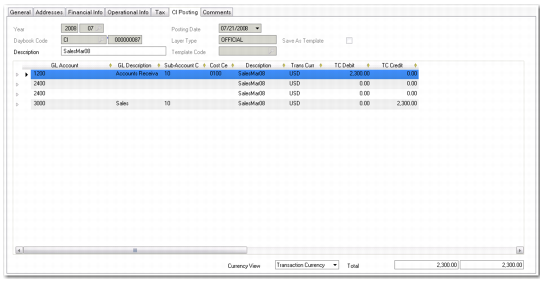
CI Posting Tab
The CI Posting tab displays the account and posting information for the invoice or credit note. Invoice postings update the following accounts:
• Invoices debit Customer Control and credit Tax and Sales.
• Credit notes debit Tax and Sales and credit Customer Control.
The Customer Control and Sales accounts default from the profiles you define for the customer in the Customer Accounting tab. The Tax account defaults from details for the tax code defined in Tax Rate Maintenance (29.4.1).
Note: You cannot select a different Customer Control account or Tax account in the CI Posting tab.
For more information on sales account GL profiles and Sales accounts, see
here.
Customer Invoice Create, CI Postings Tab
Field Descriptions
Accounting Year/Period, Posting Date, Daybook Code, Number, Layer Type
These read-only details are copied from the General tab.
Description
The invoice description is copied from the General tab, and can be modified.
Template Code, Save as Template
These fields are unavailable on customer invoices.
The CI posting grid includes the following fields:
GL Account, Sub-Account, Cost Center, Description, Curr, BC Debit, BC Credit
The system loads these posting details, including the Customer Control account and Sales account, from the General tab. When creating an invoice, you can modify these posting lines before saving the invoice.
You can expand some lines to see additional detail, such as the tax information, project codes, and SAF codes.
The system determines the default accounts to use in customer invoices postings as follows:
• For the Sales account, the system refers to the customer’s Sales account profile and uses the default account specified in that profile for the GL shared set of the current domain.
• For the AR control account, the system refers to the customer’s AR control account profile and uses the default account specified in that profile for the GL shared set of the current domain.
• For sales tax, the system uses the default account in the Sales Inv Tax field in Domain/Account Control.
Currency View
Choose to view the transaction balance in the base or transaction currency.
Total
This field displays the sum of the debit and credit amounts of all posting lines.
Comments Tab
The Comments tab lets you enter comments related to this invoice.