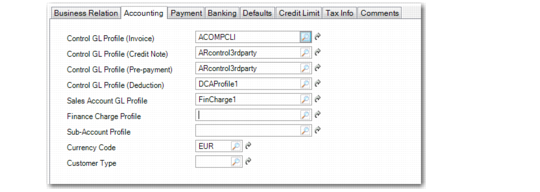
Accounting Tab
Use the Accounting tab to set up control accounts and other accounting information.
Customer Create, Accounting Tab
Field Descriptions
Control GL Profile (Invoice)
Specify the valid, active GL profile of type Customer Account used to determine the accounts receivable GL control account for invoices. This field is required.
Control GL Profile (Credit Note)
Specify the valid, active GL profile of type Customer Account used to determine the accounts receivable GL control account for credit notes. This field is required.
Control GL Profile (Prepayment)
Specify the valid, active GL profile of type Customer Account used to determine the accounts receivable GL control account for prepayments. This field is required.
All functions that create prepayments use the GL account linked to this profile, including Banking Entry, Open Item Adjustment, Customer Payment Create, Supplier Payment Create, and Supplier Payment Selection.
Control GL Profile (Deduction)
Specify the valid, active GL profile of type Customer Account used to determine the accounts receivable holding account for deductions.
Sales Account GL Profile
Specify the valid GL profile of type Sales Account used to determine the account for sales. This field is required.
Finance Charge Profile
Specify the valid, active GL profile of type Sales Account used to determine the account for finance charge postings. This field is required when the Finance Charge field in the Payment tab is selected.
When finance charges are calculated, amounts are posted to accounts in this profile.
Sub-Account Profile
Optionally specify a default sub-account profile. If the account specified by the Control GL Profile (Invoice) of the customer requires a sub-account, the value used is either:
• The sub-account found in this profile, if specified
• The default sub-account associated with the GL control account
Currency Code
Specify the currency code for this customer. Currency defaults from the current domain base currency, but can be modified.
Customer Type
Enter an optional code classifying customers by type. For example, you might classify customers as type RET for retail customers and WHSL for wholesalers. You can use customer type to select groups of customers for reporting, in particular for sales analysis reports.
You can also define GL sales accounts by customer type, channel, product line, and site in Sales Account Maintenance. This lets you separately track sales and cost of sales amounts for different types of customers.
Define type codes in Customer Type Create, described on
here.