Creating a Prepayment
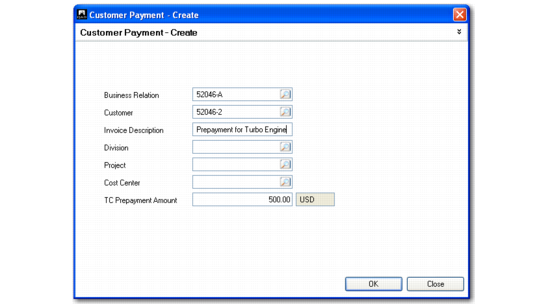
At this stage of the payment process, you can create a new prepayment instead of allocating the payment amount by clicking Prepay. Do this when you have received a payment and do not know which invoice it is related to or receive payments before invoices are sent.
Customer Payment Create, Prepayment
Field Descriptions
Business Relation/Customer
These values display from the Payment Create screen.
Invoice Description
Enter an optional description of the prepayment.
Sub-Account, Cost Center, Project
Specify analysis values if they are required by the prepayment account.
TC Prepayment Amount
Specify the amount of the prepayment in transaction currency. This defaults from the invoice amount.