Tax Calculation During Matching
The point at which you apply tax for purchased goods is determined by accounting and legal regulations. In some countries, a company is taxed when it receives goods; in others, when it receives the supplier invoice. Tax-point timing is especially critical in countries with recoverable taxes on purchases. Usually, recoverable taxes on purchases cannot be deducted against tax collected on sales until the supplier invoice is formally processed.
The setting of Accrue Tax at Receipt for the tax rate specified in Tax Rate Maintenance (29.4.1) determines when postings are created for tax amounts due on purchased goods. When this field is selected, the system generates tax postings when the PO receipt is recorded. Otherwise, tax postings are generated when the supplier invoice is processed.
Variances in tax rates between receipt and invoice are unusual. However, in countries in which tax rates change frequently, the original tax rate applied at receipt may not still be accurate when the invoice is presented for matching and payment.
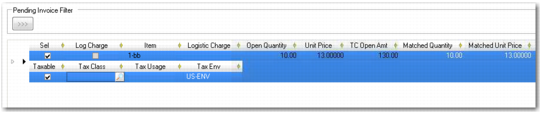
When you retrieve receivers for matching, the system displays the following tax fields for each receiver line in the matching grid:
Taxable
Tax Class
Tax Usage
Tax Environment
Tax Fields on Receiver Lines
The system applies a Tax Environment to each receiver line, which can be modified if necessary. The tax environment defaults from the purchase order tax details.
The Taxable, Tax Class, and Tax Usage fields default from the purchase order.
Each of these fields is editable, and when a tax environment, class, or usage is obviously not correct at matching stage, you can click the lookup to select a different value. The Taxable field can be selected or cleared to apply taxes to the receiver amounts as required.
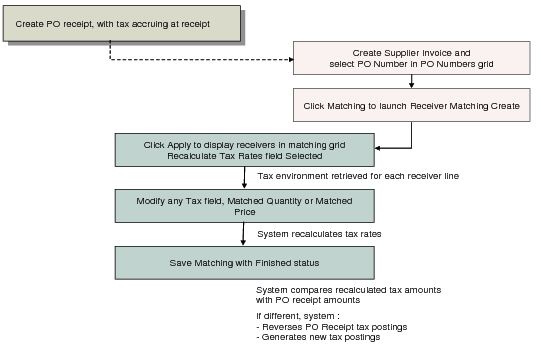
The Recalculate Tax Rates field on the Receiver Matching screen controls whether the tax rates originally applied to the purchase order are applied to the receiver totals, or whether the tax rate for each receiver line is recalculated at this stage. This field defaults from the value set in Supplier Invoice Control (28.24) and, when selected, ensures that the most current tax rate is retrieved automatically for all matching lines, even if none of the tax parameters, such as the environment, class, or usage, have changed. If you change any of these values on a matching line, the tax rate is recalculated anyway.
The recalculation takes place when you click Apply to retrieve receivers for the invoice, and the system applies the updated rate to the matching amounts. The tax point date and exchange rate to be applied to the matching are retrieved from the supplier invoice.
Note: Tax amounts are also updated by a change to the matched quantity or price. In this case, the tax amounts are adjusted to allow for the variance, without recalculating the tax rate.
Recalculating Tax Rates
Note: When Update Tax Allowed is set to Yes in Tax Rate Maintenance (24.9.1), you can also adjust the tax amounts on the receiver line manually.
Selecting the Recalculate Tax Rates field ensures that the system recalculates the tax rates for all receiver lines. This option is recommended for environments in which tax rates regularly change. However, if the field is permanently selected, the system recalculates taxes in every matching session, which may not be necessary and can impact performance.
If you clear the Recalculate Tax Rates field, you can modify tax rates for individual lines by selecting a different environment, class, or usage within the line. If tax rates for purchased goods from regular suppliers are stable but an incorrect tax environment has been selected for a purchase order, you can apply the correct environment without affecting the rates being applied to other lines.